

Merchant Portal
Reconcile Klarna payments easily with detailed Settlement Reports available in CSV, PDF, or JSON formats via the Merchant Portal, Settlements API, or Klarna-SFTP.
30 min read
Settlement Reports explain in detail all payments made by Klarna to you and help you to reconcile your accounts. Each Settlement Report can be linked to a payout by using the unique payment reference, which appears on your bank account statement. Settlement Reports are available in CSV, PDF or JSON format and can be accessed in three different ways - using Klarna’s Merchant Portal, using the Settlements API or by using the Klarna-SFTP.
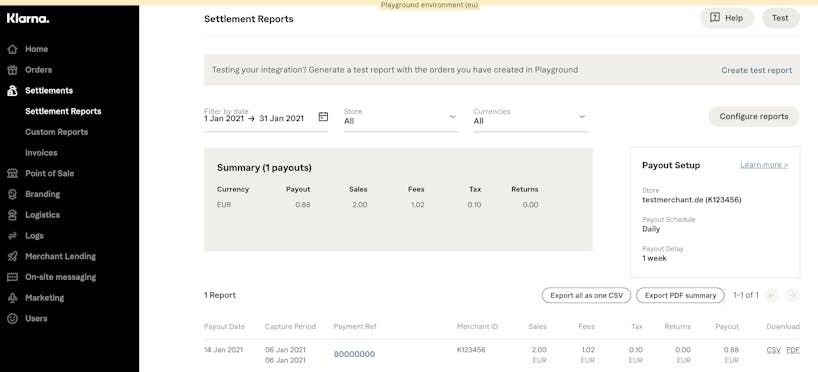
Using the Merchant Portal to access your Settlement Reports is the simplest method of managing them, as no technical setup or configuration is needed. The Merchant Portal allows for filtering by dates and currency and simple downloads of Settlement Reports for desired transactions.
For each payout, a settlement report is created and shown in the table at the bottom. You'll find the options to download the CSV and PDF report from the table or to click on the payment reference for the transactional details.
Settlements API
The Settlements API allows for managing and gathering Settlement Reports using our predefined API. It requires technical configuration but is a preferred method to manage larger volumes of Settlement Reports. Click here for detailed information about the Settlements API.
for detailed information about the Settlements API.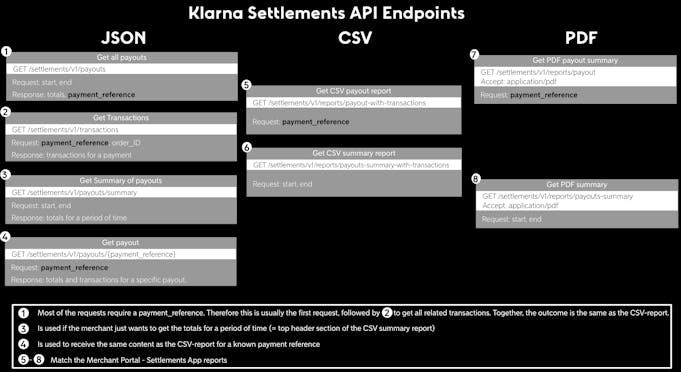
Available endpoints for the Settlements API
Fields description
Calculation of settlement amount
| Total amount | Transaction Type |
|---|---|
| + total_sale_amount | + sale |
| − total_return_amount | − return |
| − total_reversal_amount | − reversal + reversal_merchant_protection |
| − total_fee_amount | − fee |
| + total_fee_correction_amount | N/A |
| + total_commission_amount | + commission |
| - total_commission_reversal_amount | - commission |
| - total_tax_amount | Not available as a separate transaction type. However, the amount can be included as a separate column “vat_amount” with the Report Configurator |
| − total_charge_amount | − charge |
| + total_credit_amount | + credit |
| − total_repay_amount | N/A |
| − total_holdback_amount | − holdback |
| + total_release_amount | + release |
| + total_fee_refund_amount | + fee_refund |
Summary section fields
| Field | Type | Description |
|---|---|---|
| total_sale_amount | Decimal | Total of all “sale” events. These are all captured orders that have been shipped to the customers. |
| total_fee_amount | Decimal | Total of all “fee” events. These are service fees charged by Klarna for the related sale transactions. |
| total_fee_correction_amount | Decimal | Total of refunded fees in a given settlement or period. |
| total_tax_amount | Decimal | Total tax (VAT, GST) amount on Klarna fees. Reflects the total of all vat_amount values per transaction, which are described further down |
| total_return_amount | Decimal | Total of all “return” events. These are refund transaction, registered by the merchant and indicating that the goods/services have been returned by the customer. |
| total_reversal_amount | Decimal | Total of all “reversal” events. These are refund transactions, registered by Klarna in disputed orders in favour of the customer. This contains fraudulent cases seen as merchant loss eg. due to missing tracking data. With hold policy ON_ the reversal is raised when the dispute is initiated rather than when it is lost, so this total also covers disputes that are still open and may yet be resolved in your favour. Booking it straight to a loss account overstates your losses. |
| total_commission_amount | Decimal | Total of all “commission” events. These are paid by Klarna to the merchant based on the contractual agreement regarding commissions. |
| total_commission_reversal_amount | Decimal | Total of all “commission reversal” events. These represent adjustments to commissions paid by the merchant to Klarna, either as corrections to previously overpaid commission amounts or as reversals based on the contractual agreement. |
| total_credit_amount | Decimal | Total of all 'credit' transactions, including chargeback corrections resolved in your favour and other miscellaneous credits. With hold policy ON_ it also carries every dispute won at close, as CREDIT/CORRECTION_DISPUTE, so it rises with your win rate rather than with anything having gone wrong. See the detailed_type field for specifics. |
| total_charge_amount | Decimal | Total of all 'charge' transactions, including liability transfers, payment reminders, and loan-related deductions. See the detailed_type field for specifics. |
| total_holdback_amount | Decimal | The amount withheld from the payout. Common reasons include: missing or invalid bank account details, rolling reserves, or security reviews. |
| total_release_amount | Decimal | The amount reduces the rolling reserve (the opposite of a holdback). The credit that Klarna had set apart for a merchant, gets released and paid back to the merchant. |
| opening_debt_balance | Decimal | Your negative balance with Klarna from previous settlements, if your returns, fees, and other charges exceeded your sales. This amount equals the closing_debt_balance of your last settlement unless Klarna has invoiced you separately for the amount. |
| total_deposit_amount | Decimal | Increase of your debt balance with Klarna if your returns, fees, and other charges exceed your sales within this settlement period. This debt will be deducted from your next settlements as a total_repayment_amount. This field deposit amount describes the amount that is increasing your debt balance, to be seen in the closing_debt_balance. For the calculation refer to the chapter "Calculation of settlement amount". |
| total_repay_amount | Decimal | Assuming you have an opening_debt_balance with Klarna because your previous settlement was negative, this amount states the reduction of your debt balance, to be seen in a lower closing_debt_balance. The amount is simply deducted from your current settlement and you don't need to do anything further. |
| closing_debt_balance | Decimal | Your debt balance after the settlement. This amount will be the opening debt balance of your next settlement and helps you understand which amounts will be deducted from your next settlements. The amount is calculated as: opening_debt_balance - total_repay_amount + total_deposit_amount |
| total_fee_refund_amount | Decimal | Total of all fee refund transactions. Most commonly generated automatically when a return is processed (refunding the percentage fee), or when a dispute fee is corrected. The dispute fee is refunded when a previously lost dispute is later overturned, under either hold policy. |
| total_settlement_amount | Decimal | Total amount of this payout. Calculated as: total_sale_amount + total_commission_amount + total_credit_amount + total_release_amount + total_fee_correction_amount + total_fee_refund_amount − total_return_amount − total_reversal_amount − total_fee_amount − total_tax_amount − total_commission_reversal_amount − total_charge_amount − total_repay_amount − total_holdback_amount |
| payment_reference | String | Unique identifier of this payout, which is stated in the transfer note in your bank statement |
| settlement_currency | ISO 4217 | Settlement Currency. We settle you like for like in your transacting currency. Example EUR, USD, GBP |
| payout_date | ISO 8601 | Indicates when Klarna initiated the payout (Coordinated Universal Time, UTC). Please note that it usually takes one banking day until the funds are credited to your bank account. Example:2018-08-10T07:45:00Z |
| merchant_id | String | Unique Merchant Identification Number Example:"K123456" |
| merchant_settlement_type | String | Settlement type: NET Klarna service fees are deducted from the payout. GROSS Klarna service fees are invoiced separately. GROSS_FEE Invoice for Klarna service fees. |
| submerchant_id | String | unique identifier for a sub merchant |
Transaction fields
| Field | Type | Description |
|---|---|---|
| type | String | Type of this event: SALE(+) captured order that has been shipped to the customer. FEE(-) Service fee charged by Klarna for the related sale transaction. Please note that according to your contract multiple fee transactions can be applied to one sale transaction, eg. fixed fees and percentage fees. RETURN(-) refund transaction, registered by the merchant and indicating that the goods/services have been returned by the customer. REVERSAL(-) refund transaction, registered by Klarna in disputed orders in favour of the customer. This contains fraudulent cases seen as merchant loss eg. due to missing tracking data. REVERSAL_MERCHANT_PROTECTION(+) net-amount of the order value (without tax), credited by Klarna to the merchant due to Klarna’s merchant protection eg. in case of fraud. The amount is reducing the total_reversal_amount. COMMISSION(+/-) Paid by Klarna to the merchant (or by merchant to Klarna, if negative) based on the contractual agreement regarding commissions. CORRECTION(+/-) Certain corrections that are booked against specific orders according to a mutual agreement between the merchant and Klarna. HOLDBACK(-) The amount is used as a rolling reserve, which covers for future refunds or other security reasons. RELEASE(+) The amount reduces the rolling reserve (the opposite of a holdback). The credit that Klarna had set apart for a merchant, gets released and paid back to the merchant. CREDIT(+) Miscellaneous credit towards you, which is described in the field detailed_type. CHARGE(-) Miscellaneous charge towards you, which is described in the field detailed_type. FEE_REFUND(+) Refund of a previously charged fee. Most commonly generated automatically when a return is processed (refunding the percentage fee), or when a dispute fee is reversed after resolution in your favour. |
| capture_date | ISO 8601 | Date when the event was registered in Klarna’s system (Coordinated Universal Time, UTC). In case of a SALE transaction it refers to the moment when you shipped the goods to the customer and captured/activated the order. Example:2018-08-10T07:45:00Z |
| sale_date | ISO 8601 | Date of the order creation (Coordinated Universal Time, UTC). Example:2018-08-10T07:45:00Z |
| order_id | UUID | Unique identifier of the order. All related transactions in the life-span of an order are associated with this ID. eg. fees or refunds. It is therefore the recommended identifier for reconciling the report lines with your system. Example: c504a9bb-1948-46d5 |
| short_order_id | String | Customer-facing order ID. Example:9875QW2 |
| capture_id | String | Each capture on an order is assigned a unique identifier, referred to as the capture_ID, which is primarily provided for SALE and FEE transactions, but may also appear on CREDIT and FEE_REFUND transactions that relate to a specific capture. In instances of partial shipments, an order may undergo multiple captures, each of which is reflected as a separate sale transaction with its own unique capture_id. It's important to note that for certain transaction types such as RETURNS and REVERSALS, where captures do not exist, the API will return empty strings for the capture_id field. Example:8e93b66-6ab1-4d3d-b60d-1cc4e24f4a99 |
| merchant_reference1 | String | Your internal reference to the order, that has been submitted during order creation. |
| merchant_reference2 | String | Your internal reference to the order, that has been submitted during order creation. |
| amount | Decimal | Amount of the related transaction. Example:100.00 |
| posting_currency | ISO 4217 | Currency in which the order has been placed. The following currencies are currently available:DKK, EUR, GBP, NOK, SEK, USD, CHF, CAD, AUD |
| refund_id | String | Unique identifier for Return and Reversal transactions. In case of partial returns, each return transaction is associated with a unique refund_ID.Note: By default, these are not included in the reports on SFTP. They can be included by using the Report Configurator. Example:8e93b66-6ab1-4d3d-b60d-1cc4e24f4a99 |
| purchase_country | ISO 3166-alpha-2 | Purchase country, as provided by the merchant.Note: By default, these are not included in the reports on SFTP. They can be included by using the Report Configurator. Example:US, GB, DE, SE |
| tax_rate | Decimal | VAT (Value added tax in Europe) or GST (goods and services tax in Australia) rate on Klarna fees. |
| tax_amount | Decimal | VAT (Value added tax in Europe) or GST (goods and services tax in Australia) amount on Klarna fees. |
| shipping_country | ISO 3166-alpha-2 | As provided by you. |
| initial_payment_method_type | String | Payment method the consumer chose during checkout. |
| initial_number_of_installments | Decimal | Number of installments the consumer chose during checkout in case of installment payments. |
| initial_payment_method_monthly_downpayments | Decimal | Number of monthly downpayments that were chosen during the checkout in case of installment payments. |
| merchant_capture_reference | String | Your internal reference to the capture, that has been submitted during capturing an order via API. |
| merchant_refund_reference | String | Your internal reference to the refund, that has been submitted during refunding an order via API. |
| detailed_type | String | Detailed description of the transaction type. See section “Detailed type” for further information. |
| tax_rate_1-4 | String | Consumer VAT (value added tax) rates on your products/services. The rate needs to be submitted by you for every order-line when capturing or refunding an order, because an order can consist of items with different VAT rates |
| tax_amount_1-4 | Decimal | Consumer VAT (value added tax) amounts on your products/services. The amount needs to be submitted by you for every order-line when capturing or refunding an order, because an order can consist of items with different VAT rates. |
| reversal_reference | String | Unique internal identifier, known as DisputeKRN, assigned to each dispute by Klarna. This identifier includes a dispute category and a numeric code, enabling efficient tracking and management of the dispute's status. |
| acquirer_reference_number | String | The 23-digit reference number (ARN) assigned to the transaction when it clears through the card network. Match this against your acquirer or card processor settlement statement to tie a Klarna fee back to the original card purchase. Unique to CARD_ transactions.Example: 02285326057119514132123 |
| original_capture_amount | Decimal | The captured amount of the card transaction that the fee was calculated on, in the original currency of the transaction. Unique to CARD_ transactions.Example: 100.00 |
| original_capture_currency | ISO 4217 | The currency of the card captured amount, which can differ from the currency the fee is settled in. Unique to CARD_ transactions.Example: USD, GBP, EUR |
| terminal_name | String | The name of the terminal or store where the transaction took place, obtained directly from card rails (externally controlled). Unique to CARD_ transactions.Example: SHOE PARADE - STEELY ALLEY |
| terminal_id | String | The identifier of the terminal or store where the transaction took place, obtained directly from card rails (externally controlled). Unique to CARD_ transactions.Example: TML0481 |
| city | String | The city of the terminal or store, obtained directly from card rails (externally controlled). Unique to CARD_ transactions.Example: OLD TRAWFORD |
| klarna_comment | String | Optional free-text note attached by Klarna to provide additional context on a specific transaction. Used selectively for Klarna-initiated entries that need more explanation than the type and detailed_type fields alone can convey. Typical examples include: On CHARGE / LIABILITY_TRANSFER entries — which only appear on the receiving (active) MID's settlement, not on the source (inactive) MID — klarna_comment identifies the originating debt being transferred (e.g. the source MID or the originating debt-statement payment reference), enabling merchants to reconcile cross-MID debt transfers within their organisation. Empty for most transactions. Note: By default this field is not included in per-settlement CSV reports — it can be added via the Report Configurator. It is always included in the transactions CSV report and in the Settlements API JSON response. |
Detailed Type
| Transaction type | Detailed type | Description |
|---|---|---|
| CHARGE | LIABILITY_TRANSFER | Represents the movement of financial obligations (liabilities) from one entity to another, i.e. reassigns the responsibility for the debt or obligation from the original holder to a new party. For instance, liabilities can be moved between different MIDs belonging to the same organisation. |
| CHARGE | PAYMENT_REMINDER | Represents the amount of outstanding debt owed by the merchant, created when the merchant’s balance remains negative for a consecutive period. Note: this is not a money movement — it is a record of the outstanding negative balance that will be recovered from future positive settlements. |
| COMMISSION | COMMISSION | Commission paid by Klarna to the merchant (or by the merchant to Klarna, if negative) based on the contractual agreement regarding commissions. |
| COMMISSION | PURCHASE_COMMISSION_PERCENTAGE | Percentage Commission Paid by Klarna to the merchant based on the contractual agreement regarding percentage commissions |
| COMMISSION | REVENUE_SHARE | Commission Paid by Klarna to the merchant based on the contractual agreement. |
| COMMISSION | REVENUE_SHARE_REVERSAL | Commission Paid by the merchant to Klarna based on contractual agreement. |
| CORRECTION | CREDITED_CORRECTION | Manual correction entries, typically used for debt transfer reversals or other mutually agreed adjustments between the merchant and Klarna. |
| CREDIT | CORRECTION_DISPUTE | Credit that gives back a REVERSAL raised on a disputed order. It reports a dispute resolved in your favour — with hold policy NONE, one that was lost and later overturned; with ON_, one won at close. It is also used when Klarna corrects a REVERSAL that should not have been raised, so the same detailed_type covers both a dispute outcome and a Klarna-initiated correction. Match reversal_ to the dispute and read dispute_ to tell them apart. |
| FEE | PURCHASE_FEE_FIXED | Fixed fee charged per captured order, as defined in your contractual agreement with Klarna. Always appears alongside a SALE/PURCHASE entry sharing the same order_id and capture_id. In cases of partial shipments, each capture incurs its own fixed fee. |
| FEE | PURCHASE_FEE_PERCENTAGE | Percentage-based fee charged on a captured order, calculated as a percentage of the capture amount as defined in your contractual agreement with Klarna. Always appears alongside a SALE/PURCHASE entry sharing the same order_id and capture_id. |
| FEE | CARD_PURCHASE_FEE_FIXED | Fixed fee charge applied to Klarna-branded card transactions, as defined in your contractual agreement with Klarna. |
| FEE | CARD_PURCHASE_FEE_VARIABLE | A percentage-based charge applied to Klarna-branded card transactions, as defined in your contractual agreement with Klarna. |
| FEE | EXTEND_DUE_DATE_FEE | Fee for extending the payment due date for a consumer invoice (excl. VAT). |
| FEE | DISPUTE_FEE | Dispute fee charged when a chargeback/dispute is raised against a captured order. The fee amount is fixed per dispute. For card chargebacks, it is charged at close regardless of the outcome. With hold policy ON_ it also carries the appeal fee, charged at close only when the appeal is lost, so a dispute lost on appeal produces two DISPUTE_FEE rows. |
| FEE_REFUND | DISPUTE_FEE_REFUND | Correction of a dispute fee that should not have been charged, including a correction of an appeal fee. It accompanies a CREDIT/CORRECTION_DISPUTE when a previously lost dispute is overturned, under either hold policy. |
| FEE_REFUND | PURCHASE_FEE_FIXED | A refund issued for a previously charged purchase fee. This action is performed manually as part of a fee correction process in the event of an error or other issue. |
| FEE_REFUND | PURCHASE_FEE_PERCENTAGE_REFUND | Refund of the percentage fee component when you process a return (refund). Automatically generated based on your configured fee refund rate. Always appears alongside a RETURN/PURCHASE_RETURN entry for the same order. Match by order_ and refund_ |
| HOLDBACK/RELEASE | INSUFFICIENT_BANK_ACCOUNT_DETAILS | A holdback for the sum amount that would have been released if correct bank details were present. These can be updated in Merchant portal under settings > Bank account details. Once updated the withheld amount(s) will be paid out together either in a new settlement the following business day if you are settled weekly, or in your next settlement if you are settled daily. |
| HOLDBACK/RELEASE | ROLLING_RESERVE | Security measure that works well for both you as a merchant and Klarna since we do not hold funds or delay payment of funds, but rather hold only a portion of it as collateral, which will automatically be released after the time agreed upon. |
| HOLDBACK/RELEASE | UNDER_REVIEW | Security measure that will allow Klarna to place a hold on payouts either in part of full while we review the financial holding of a merchant and the underlying transactions |
| RETURN | PURCHASE_RETURN | Refund, registered by the merchant and indicating that the goods/services have been returned by the customer. |
| RETURN | PAYMENT_DEFAULT | Refund registered by Klarna and indicating the customer fails to pay. This is to distinguish this refund from others. |
| REVERSAL | COMMISSION_RETURN | Return of commission |
| REVERSAL | REVERSAL | Refund, registered by Klarna on disputed orders in favour of the customer. This contains fraudulent cases seen as merchant loss eg. due to missing tracking data. With hold policy ON_, this is raised when the dispute is initiated rather than when it is lost, and is given back by a CREDIT/CORRECTION_DISPUTE if you win. |
| SALE | PURCHASE | Captured order |
Transaction lifecycle scenarios
This section explains what entries you can expect in your settlement report for each common business event. For each scenario, we show the transaction lines that appear, how to match them together, and which summary totals are affected.
Scenario A: Standard purchase
What happens: You capture (ship) an order. Klarna settles the order amount minus fees.
Report lines:
| type | detailed_type | amount | identifier | summary total affected |
|---|---|---|---|---|
| SALE | PURCHASE | + order amount | capture_id | total_sale_amount |
| FEE | PURCHASE_FEE_FIXED | − fixed fee | capture_id | total_fee_amount |
| FEE | PURCHASE_FEE_PERCENTAGE | − percentage fee | capture_id | total_fee_amount |
How to match: All three lines share the same
order_ and capture_. The FEE lines are always tied to the SALE they relate to.Date fields:
capture_ is the date you captured (shipped) the order. sale_ is the date the order was originally created.Fee types vary
Depending on your contract, you may see only a fixed fee, only a percentage fee, or both.
Mini CSV example:
TEXT
1
2
3
4
5
type;capture_date;order_id;short_order_id;capture_id;amount;detailed_type
"SALE";"2026-01-14T14:00:55.000Z";"00000000-0000-0000-0000-000000000001";"SO-0001-1";"11111111-1111-1111-1111-000000000001";"403.65";"PURCHASE"
"FEE";"2026-01-14T14:00:55.000Z";"00000000-0000-0000-0000-000000000001";"SO-0001-1";"11111111-1111-1111-1111-000000000001";"0.35";"PURCHASE_FEE_FIXED"
"FEE";"2026-01-14T14:00:55.000Z";"00000000-0000-0000-0000-000000000001";"SO-0001-1";"11111111-1111-1111-1111-000000000001";"12.07";"PURCHASE_FEE_PERCENTAGE"
Scenario B: Partial shipment (multiple captures)
What happens: You ship an order in multiple parts. Each shipment is a separate capture, and each generates its own SALE + FEE lines.
Report lines (per capture):
| type | detailed_type | amount | identifier | summary total affected |
|---|---|---|---|---|
| SALE | PURCHASE | + capture amount | capture_id (unique per shipment) | total_sale_amount |
| FEE | PURCHASE_FEE_FIXED | − fixed fee | capture_id (same as its SALE) | total_fee_amount |
| FEE | PURCHASE_FEE_PERCENTAGE | − percentage fee | capture_id (same as its SALE) | total_fee_amount |
How to match: All captures share the same
order_, but each has a unique capture_. Match FEE lines to their SALE line by capture_. The short_ will have a suffix (e.g. -1, -2) indicating the capture sequence.Mini CSV example (2 captures on the same order):
TEXT
1
2
3
4
5
6
7
8
type;order_id;short_order_id;capture_id;amount;detailed_type
"SALE";"00000000-0000-0000-0000-000000000001";"SO-0001-1";"11111111-1111-1111-1111-000000000001";"200.00";"PURCHASE"
"FEE";"00000000-0000-0000-0000-000000000001";"SO-0001-1";"11111111-1111-1111-1111-000000000001";"0.35";"PURCHASE_FEE_FIXED"
"FEE";"00000000-0000-0000-0000-000000000001";"SO-0001-1";"11111111-1111-1111-1111-000000000001";"6.00";"PURCHASE_FEE_PERCENTAGE"
"SALE";"00000000-0000-0000-0000-000000000001";"SO-0001-2";"11111111-1111-1111-1111-000000000002";"150.00";"PURCHASE"
"FEE";"00000000-0000-0000-0000-000000000001";"SO-0001-2";"11111111-1111-1111-1111-000000000002";"0.35";"PURCHASE_FEE_FIXED"
"FEE";"00000000-0000-0000-0000-000000000001";"SO-0001-2";"11111111-1111-1111-1111-000000000002";"4.50";"PURCHASE_FEE_PERCENTAGE"
Scenario C: Return (refund)
What happens: You issue a refund for an order that was previously captured. Klarna deducts the return amount from your settlement. If you have a configured fee refund rate, Klarna automatically refunds the percentage-based fee (but not the fixed fee).
Report lines:
| type | detailed_type | amount | identifier | summary total affected |
|---|---|---|---|---|
| RETURN | PURCHASE_RETURN | − refund amount | refund_id | total_return_amount |
| FEE_REFUND | PURCHASE_FEE_PERCENTAGE_REFUND | + fee refund | (same order_id) | total_fee_refund_amount |
How to match: The RETURN and FEE_REFUND lines share the same
order_. The RETURN uses refund_ as its unique identifier. In case of partial returns, each return has its own refund_.Date fields:
capture_ on the RETURN line is the date the refund was registered. sale_ is the original order creation date.Fixed-fee refund behavior
Fixed fees (PURCHASE_FEE_FIXED) are not automatically refunded when a return is processed. Only the percentage fee is auto-refunded based on your configured fee refund rate.
Mini CSV example:
TEXT
1
2
3
4
type;capture_date;order_id;refund_id;amount;detailed_type
"RETURN";"2026-01-21T12:26:48.000Z";"00000000-0000-0000-0000-000000000001";"22222222-2222-2222-2222-000000000001";"108.95";"PURCHASE_RETURN"
"FEE_REFUND";"2026-01-21T12:26:48.000Z";"00000000-0000-0000-0000-000000000001";"";"3.26";"PURCHASE_FEE_PERCENTAGE_REFUND"
Scenario D: Payment default
What happens: Klarna registers a refund because the customer has failed to pay. This is distinct from a merchant-initiated return.
Report lines:
| type | detailed_type | amount | identifier | summary total affected |
|---|---|---|---|---|
| RETURN | PAYMENT_DEFAULT | − refund amount | refund_id | total_return_amount |
How to match: Use
order_ to link back to the original SALE. The refund_ uniquely identifies this payment default entry.Mini CSV example:
TEXT
1
2
3
type;capture_date;order_id;refund_id;amount;detailed_type
"RETURN";"2026-01-10T19:38:08.000Z";"00000000-0000-0000-0000-000000000001";"22222222-2222-2222-2222-000000000001";"46.44";"PAYMENT_DEFAULT"
Scenario E: Dispute lost by merchant
What happens: A customer dispute (chargeback) is resolved against you. Klarna reverses the order amount and charges a dispute fee.
Warning
This scenario describes disputes with hold policy
NONE, where the REVERSAL posts only once the dispute is lost. With ON_ the reversal is raised when the dispute is initiated instead, and a win adds a CREDIT/CORRECTION_DISPUTE at close. See Disputes in the settlement report for both shapes and worked examples.Report lines:
| type | detailed_type | amount | identifier | summary total affected |
|---|---|---|---|---|
| REVERSAL | REVERSAL | − order amount | refund_id, reversal_reference | total_reversal_amount |
| FEE | DISPUTE_FEE | − dispute fee | capture_id, reversal_reference | total_fee_amount |
How to match: Both lines share the same
order_ and reversal_ (the dispute KRN). The REVERSAL has a refund_; the DISPUTE_FEE has a capture_ linking to the original capture.Date fields:
capture_ on the REVERSAL is when the dispute was resolved. sale_ is the original order date.Mini CSV example:
TEXT
1
2
3
4
type;capture_date;order_id;amount;detailed_type;reversal_reference
"REVERSAL";"2026-01-09T10:08:58.000Z";"00000000-0000-0000-0000-000000000001";"69.90";"REVERSAL";"krn:network:eu1:live:payment:dispute:000000000000001"
"FEE";"2025-11-22T10:42:14.000Z";"00000000-0000-0000-0000-000000000001";"15.00";"DISPUTE_FEE";"krn:network:eu1:live:payment:dispute:000000000000001"
Recommended for integration
The REVERSAL and DISPUTE_FEE may appear in different settlements if they are processed at different times. Use the
reversal_ to match them across settlements.Scenario F: Dispute won by merchant
What happens: A dispute that was previously resolved against you is overturned in your favour. You receive back the reversed order amount and the dispute fee.
Report lines:
| type | detailed_type | amount | identifier | summary total affected |
|---|---|---|---|---|
| CREDIT | CORRECTION_DISPUTE | + order amount | capture_id, reversal_reference | total_credit_amount |
| FEE_REFUND | DISPUTE_FEE_REFUND | + fee refund | capture_id, reversal_reference | total_fee_refund_amount |
How to match: Both lines share the same
order_ and reversal_. The reversal_ links back to the original dispute from Scenario E.Typical sequence across settlements:
- 1.Settlement X: REVERSAL + DISPUTE_FEE (dispute lost — Scenario E)
- 2.Settlement Y: CREDIT / CORRECTION_DISPUTE + FEE_REFUND / DISPUTE_FEE_REFUND (dispute resolved in your favour — this scenario)
Mini CSV example:
TEXT
1
2
3
4
type;capture_date;order_id;amount;detailed_type;reversal_reference
"CREDIT";"2026-01-16T10:41:07.000Z";"00000000-0000-0000-0000-000000000001";"69.90";"CORRECTION_DISPUTE";"krn:network:eu1:live:payment:dispute:000000000000001"
"FEE_REFUND";"2025-11-22T10:42:14.000Z";"00000000-0000-0000-0000-000000000001";"15.00";"DISPUTE_FEE_REFUND";"krn:network:eu1:live:payment:dispute:000000000000001"
Scenario G: Fraud protection (merchant protection)
What happens: A fraud-related dispute results in a reversal, but Klarna's merchant protection policy covers you. Two entries appear: a gross debit (full order value including consumer VAT) and a net credit (order value excluding consumer VAT). The net effect is that you are only charged the consumer VAT portion.
Report lines:
| type | detailed_type | amount | identifier | summary total affected |
|---|---|---|---|---|
| REVERSAL | FRAUD_POLICY_CHARGE | − gross order amount (incl. consumer VAT) | refund_id | total_reversal_amount |
| REVERSAL_MERCHANT_PROTECTION | FRAUD_POLICY_CREDIT_NET | + net order amount (excl. consumer VAT) | refund_id | reduces total_reversal_amount |
How to match: Both lines share the same
order_. They always appear together in the same settlement.Merchant protection offset
The REVERSAL_MERCHANT_PROTECTION amount offsets most of the REVERSAL amount. The difference is the consumer VAT portion, which is not covered by merchant protection.
Mini CSV example:
TEXT
1
2
3
4
type;order_id;amount;detailed_type
"REVERSAL";"00000000-0000-0000-0000-000000000001";"119.00";"FRAUD_POLICY_CHARGE"
"REVERSAL_MERCHANT_PROTECTION";"00000000-0000-0000-0000-000000000001";"100.00";"FRAUD_POLICY_CREDIT_NET"
Scenario H: Holdback and release
What happens: Klarna withholds a portion of your payout as a reserve. The held amount is later released back to you when the hold condition is resolved.
Common reasons for holdbacks:
- INSUFFICIENT_BANK_ACCOUNT_DETAILS: Your bank account details are missing or invalid. Update them in Merchant Portal under Settings > Bank account details. The withheld amount will be paid out once details are corrected.
- ROLLING_RESERVE: A contractual security measure where a percentage of each settlement is held for an agreed period, then automatically released.
- UNDER_REVIEW: Klarna is reviewing your account or transactions.
Report lines (holdback, in one settlement):
| type | detailed_type | amount | identifier | summary total affected |
|---|---|---|---|---|
| HOLDBACK | (reason) | − held amount | (no order_id) | total_holdback_amount |
Report lines (release, in a later settlement):
| type | detailed_type | amount | identifier | summary total affected |
|---|---|---|---|---|
| RELEASE | (same reason) | + released amount | (no order_id) | total_release_amount |
How to match: HOLDBACK and RELEASE entries are not tied to specific orders — they have no
order_, capture_, or refund_. Match them by detailed_ (the reason) and amount.Mini CSV example (holdback in settlement 1):
TEXT
1
2
3
type;amount;detailed_type
"HOLDBACK";"1122.37";"INSUFFICIENT_BANK_ACCOUNT_DETAILS"
Mini CSV example (release in a later settlement):
TEXT
1
2
3
type;amount;detailed_type
"RELEASE";"1122.37";"INSUFFICIENT_BANK_ACCOUNT_DETAILS"
Scenario I: Negative balance and debt statement
What happens: When your returns, fees, and other charges consistently exceed your sales, your balance with Klarna becomes negative. Klarna records this as a CHARGE / PAYMENT_REMINDER. This is not a money movement — it is a formal record of the outstanding negative balance.
The debt is automatically recovered from your future positive settlements via
total_ (see "How debt balance works" above).Report lines:
| type | detailed_type | amount | identifier | summary total affected |
|---|---|---|---|---|
| CHARGE | PAYMENT_REMINDER | − outstanding amount | (no order_id) | total_charge_amount |
Special settlement type: Debt statements use
merchant_ in the summary row.Mini CSV example:
TEXT
1
2
3
4
5
6
total_sale_amount;total_fee_amount;...;merchant_settlement_type
"0.00";"0.00";...;"DEBT_STATEMENT"

type;amount;detailed_type
"CHARGE";"455.29";"PAYMENT_REMINDER"
Liability transfer
If the debt is later transferred to another MID within your organisation, a CHARGE / LIABILITY_TRANSFER entry will appear on the receiving MID's settlement. The source (inactive) MID does not receive a new entry — the debt is resolved internally.
Scenario J: GROSS_FEE settlement (fee-only invoice)
What happens: If your settlement type is GROSS (fees invoiced separately), you receive a separate fee-only settlement with
merchant_. This contains only FEE lines — no SALE, RETURN, or other transaction types.Report lines:
| type | detailed_type | amount | identifier | summary total affected |
|---|---|---|---|---|
| FEE | PURCHASE_FEE_FIXED | − fixed fee | capture_id | total_fee_amount |
| FEE | PURCHASE_FEE_PERCENTAGE | − percentage fee | capture_id | total_fee_amount |
| FEE | DISPUTE_FEE | − dispute fee | capture_id | total_fee_amount |
How to match: Each FEE line includes the
order_ and capture_ of the original SALE it relates to. The SALE itself will appear in a separate GROSS settlement (without fees).Mini CSV example:
TEXT
1
2
3
4
5
6
7
total_sale_amount;total_fee_amount;...;merchant_settlement_type
"0.00";"388.41";...;"GROSS_FEE"

type;order_id;capture_id;amount;detailed_type
"FEE";"00000000-0000-0000-0000-000000000001";"11111111-1111-1111-1111-000000000001";"0.15";"PURCHASE_FEE_FIXED"
"FEE";"00000000-0000-0000-0000-000000000001";"11111111-1111-1111-1111-000000000001";"0.69";"PURCHASE_FEE_PERCENTAGE"
Scenario K: Commission
What happens: Klarna pays you a commission based on your contractual agreement. Commission entries appear alongside regular SALE and FEE lines.
Report lines:
| type | detailed_type | amount | identifier | summary total affected |
|---|---|---|---|---|
| COMMISSION | PURCHASE_COMMISSION_PERCENTAGE | + commission amount | capture_id | total_commission_amount |
How to match: The COMMISSION line shares the same
order_ and capture_ as the SALE it relates to.Negative commissions
Commission amounts can also be negative (merchant pays Klarna), depending on your contractual arrangement. Negative commissions appear as COMMISSION with a negative amount and affect
total_.Mini CSV example:
TEXT
1
2
3
4
5
type;order_id;capture_id;amount;detailed_type
"SALE";"00000000-0000-0000-0000-000000000001";"11111111-1111-1111-1111-000000000001";"265.50";"PURCHASE"
"FEE";"00000000-0000-0000-0000-000000000001";"11111111-1111-1111-1111-000000000001";"8.67";"PURCHASE_FEE_PERCENTAGE"
"COMMISSION";"00000000-0000-0000-0000-000000000001";"11111111-1111-1111-1111-000000000001";"7.96";"PURCHASE_COMMISSION_PERCENTAGE"
Scenario L: Card purchase fees
What happens: A
CARD_ and a CARD_ are applied to Klarna-branded card transactions, as may be defined in your contractual agreement. If you have not received communication regarding updated settlement reporting to include these fees, this does not apply to you.Card purchase fees
CARD_PURCHASE_FEES do not appear alongside SALE/PURCHASE line-items, as those are settled directly via your Payment Processor.
Report lines:
| type | detailed_type | amount | identifier | summary total affected |
|---|---|---|---|---|
| FEE | CARD_PURCHASE_FEE_FIXED | − fixed fee | capture_id | total_fee_amount |
| FEE | CARD_PURCHASE_FEE_VARIABLE | − percentage fee | capture_id | total_fee_amount |
How to reconcile: For CARD_PURCHASE_FEE, we recommend using the following fields to support your reconciliation:
sale_, capture_, acquirer_, original_, original_, terminal_, terminal_, city. These card-specific fields are not included in reports by default, you can enable them via the Report Configurator in Merchant Portal.Mini CSV example:
TEXT
1
2
3
4
5
6
7
8
total_sale_amount;total_fee_amount;total_return_amount;total_reversal_amount;total_commission_amount;total_holdback_amount;total_repay_amount;total_release_amount;total_fee_correction_amount;total_settlement_amount;total_tax_amount;payment_reference;settlement_currency;payout_date;merchant_id;merchant_settlement_type
"0.00";"-1.95";"0.00";"0.00";"0.00";"0.00";"0.00";"0.00";"0.00";"0.00";"0.00";"100162627";"EUR";"2026-05-14T00:00:00.000Z";"K371509";"NET"
type;order_id;capture_id;amount;detailed_type;sale_date;capture_date;acquirer_reference_number;original_capture_amount;original_capture_currency;terminal_id;terminal_name;city
"FEE";"";"11111111-1111-1111-1111-000000000001";"-0.15";"CARD_PURCHASE_FEE_FIXED";"2026-05-12";"2026-05-14";"74085326057119512124723";"50.00";"EUR";"DER-1725";"WICKS.COM";"Amsterdam"
"FEE";"";"11111111-1111-1111-1111-000000000001";"-0.69";"CARD_PURCHASE_FEE_VARIABLE";"2026-05-12";"2026-05-14";"74085326057119512124723";"50.00";"EUR";"DER-1725";"WICKS.COM";"Amsterdam"
"FEE";"";"11111111-1111-1111-1111-000000000002";"-0.15";"CARD_PURCHASE_FEE_FIXED";"2026-05-13";"2026-05-14";"74085326057119512124888";"80.00";"GBP";"DER-1726";"WICKS.COM";"London"
"FEE";"";"11111111-1111-1111-1111-000000000002";"-0.96";"CARD_PURCHASE_FEE_VARIABLE";"2026-05-13";"2026-05-14";"74085326057119512124888";"80.00";"GBP";"DER-1726";"WICKS.COM";"London"
Quick reference: Which identifier and date to use per type
| Transaction type | Detailed type | Primary identifier | Date field to use |
|---|---|---|---|
| SALE | PURCHASE | capture_id | capture_date (when shipped) |
| FEE | PURCHASE_FEE_FIXED | capture_id | capture_date |
| FEE | PURCHASE_FEE_PERCENTAGE | capture_id | capture_date |
| FEE | DISPUTE_FEE | capture_id | capture_date |
| FEE | SERVICING_FEE | capture_id | capture_date |
| FEE | CARD_PURCHASE_FEE_FIXED | capture_date + acquirer_reference_number | capture_date |
| FEE | CARD_PURCHASE_FEE_VARIABLE | capture_date + acquirer_reference_number | capture_date |
| RETURN | PURCHASE_RETURN | refund_id | capture_date (when refund registered) |
| RETURN | PAYMENT_DEFAULT | refund_id | capture_date (when default registered) |
| REVERSAL | REVERSAL | refund_id + reversal_reference | capture_date |
| REVERSAL | FRAUD_POLICY_CHARGE | refund_id | capture_date |
| REVERSAL_MERCHANT_PROTECTION | FRAUD_POLICY_CREDIT_NET | refund_id | capture_date |
| CREDIT | CORRECTION_DISPUTE | capture_id + reversal_reference | capture_date |
| FEE_REFUND | DISPUTE_FEE_REFUND | capture_id + reversal_reference | capture_date |
| FEE_REFUND | PURCHASE_FEE_PERCENTAGE_REFUND | order_id | capture_date |
| COMMISSION | PURCHASE_COMMISSION_PERCENTAGE | capture_id | capture_date |
| HOLDBACK | (any) | none | none |
| RELEASE | (any) | none | none |
| CHARGE | PAYMENT_REMINDER | none | none |
| CHARGE | LIABILITY_TRANSFER | none | none |
| CORRECTION | CREDITED_CORRECTION | order_id | capture_date |
CSV settlement report examples
The following CSV examples illustrate different settlement scenarios. Each file demonstrates the report structure for a specific combination of transaction types. Use these alongside the Transaction lifecycle scenarios section to understand how different events appear in your reports.
Anonymized sample IDs
All sample IDs in these files are anonymized. To preserve the relationships between rows, the same original
order_ always maps to the same anonymized UUID within a file (e.g. 00000000-0000-0000-0000-000000000001). The same applies to capture_ (11111111-.) and refund_ (22222222-.). Merchant-supplied values such as short_ and merchant_ have been completely replaced with generic placeholders (SO-0001, MR1-0001, MR2-0001).Which file should I download?
| File | Scenario covered | Key transaction types shown |
|---|---|---|
| sample_purchase_with_vat.csv | Standard settlement with VAT on fees | SALE, RETURN, FEE (with tax_rate / tax_amount) |
| sample_release.csv | Release of previously held funds | SALE, FEE, RELEASE / INSUFFICIENT_BANK_ACCOUNT_DETAILS |
| sample_payment_default.csv | Payment default and dispute correction | SALE, RETURN / PAYMENT_DEFAULT, CREDIT / CORRECTION_DISPUTE |
| sample_holdback.csv | Holdback due to missing bank details | SALE, FEE, HOLDBACK / INSUFFICIENT_BANK_ACCOUNT_DETAILS |
| sample_holdback_with_returns.csv | Holdback due to missing bank details (also includes a return) | SALE, RETURN, FEE, HOLDBACK / INSUFFICIENT_BANK_ACCOUNT_DETAILS |
| sample_settlement_gross_fee.csv | GROSS_FEE settlement (fee-only invoice) | FEE / PURCHASE_FEE_FIXED, FEE / PURCHASE_FEE_PERCENTAGE, FEE / DISPUTE_FEE |
| sample_dispute_fee_refund.csv | Dispute resolved in merchant's favour | SALE, FEE, FEE_REFUND / DISPUTE_FEE_REFUND, CREDIT / CORRECTION_DISPUTE |
| sample_dispute_fee_refund_extended_vat.csv | Dispute resolved in merchant's favour (extended fields, with VAT) | Same as above, with tax fields |
| sample_dispute_fee_refund_extended_no_vat.csv | Dispute resolved in merchant's favour (extended fields, no VAT) | Same as above, without tax fields |
| sample_dispute_fee_extended_no_vat.csv | Dispute lost by merchant (no VAT) | SALE, FEE, REVERSAL / REVERSAL, FEE / DISPUTE_FEE |
| sample_dispute_fee_extended_vat.csv | Dispute lost by merchant (with VAT) | SALE, RETURN, REVERSAL / REVERSAL, FEE / DISPUTE_FEE (with tax fields) |
| sample_commission.csv | Settlement with commissions | SALE, FEE, RETURN, REVERSAL, COMMISSION / PURCHASE_COMMISSION_PERCENTAGE |
| sample_charge_debt_statement.csv | Debt statement (negative balance notification) | CHARGE / PAYMENT_REMINDER (merchant_settlement_type = DEBT_STATEMENT) |
| sample_card_purchase_fee.csv | Klarna card purchase fees (Scenario L) | FEE / CARD_PURCHASE_FEE_FIXED, FEE / CARD_PURCHASE_FEE_VARIABLE (with card-specific fields) |
Download sample files
Jump to section...