

Consumer FX
Let your customers pay in their local currency — no matter what currency your store uses.
7 min read
Overview
Consumer FX lets your store accept Klarna customers from around the world, even if you only sell in a single currency. Klarna automatically converts the order amount into the currency your customer pays in, so they can check out in their local currency with their familiar payment methods from Klarna.
You always receive payouts in the currency you create transactions in. Klarna handles the rest, currency conversion, exchange rate disclosure, and regulatory compliance, all within the Klarna purchase flow.
Key benefits
- Reach more customers: Customers from any supported Klarna market can check out at your store, even if you operate in a single currency.
- No integration burden: Klarna handles all currency conversion, exchange rate disclosure, and legal compliance within the purchase flow.
- Simple settlement: You receive payouts in your transaction currency with no need for additional bank accounts.
Example:
A customer based in Germany purchases from a US store. They pay Klarna in euros (EUR). The US store presents its goods in US dollars (USD) receives its payout in US dollars.
Consumer FX is available across all currently supported Klarna markets. See where Klarna is available at klarna.com/international.
Key concepts
| Term | Definition |
| Transaction Currency | The currency in which the order is created with Klarna. This is the currency shown to the customer in your checkout. |
| Billing Currency | The currency in which the customer pays Klarna, determined by the country of the customer. This is the currency shown to the customer in the Klarna purchase flow. |
| Settlement Currency | The currency in which Klarna pays out to your shop. This is the same as your transaction currency. |
How it works
For each transaction, Klarna identifies the customer's billing currency based on the billing country associated with their Klarna account. If the billing currency differs from your transaction currency, Klarna converts the amount automatically within the Klarna purchase flow.
Exchange rates
The foreign exchange rate is locked at the time of each transaction event with Klarna, capture, refund or dispute. Because the rate is set independently at each stage, the applied rate may differ across the authorization, capture, and refund stages of a transaction.
Customer experience
Klarna manages the full customer-facing currency conversion experience within its own purchase flow and post-purchase communications.
Your website can continue to display prices in your transaction currency, no changes are required.
Website
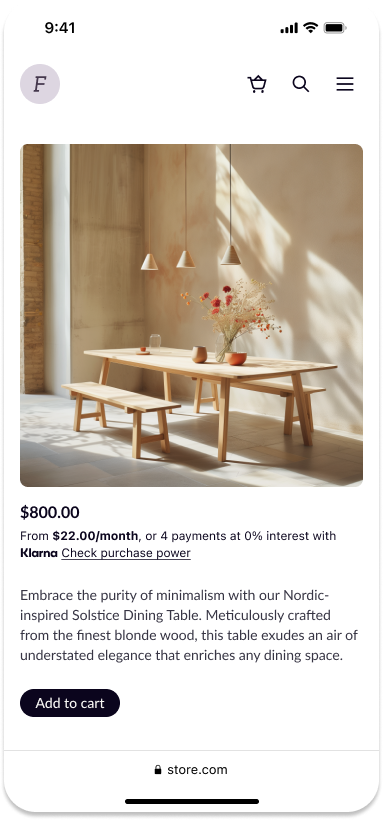 | 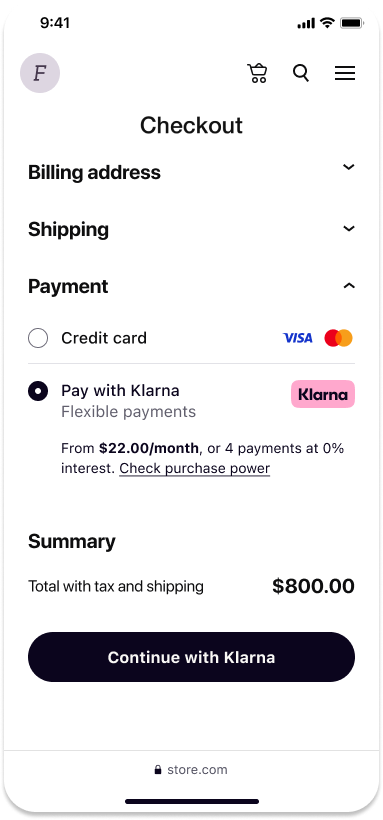 |
| Store's product page | Store's checkout |
Purchase flow
Once the customer enters the Klarna Purchase flow, they see amounts in their billing currency at every step.
The converted amount is shown using Klarna's current exchange rate. This rate is indicative of the final charge and customers are informed that the rate is subject to change at capture.
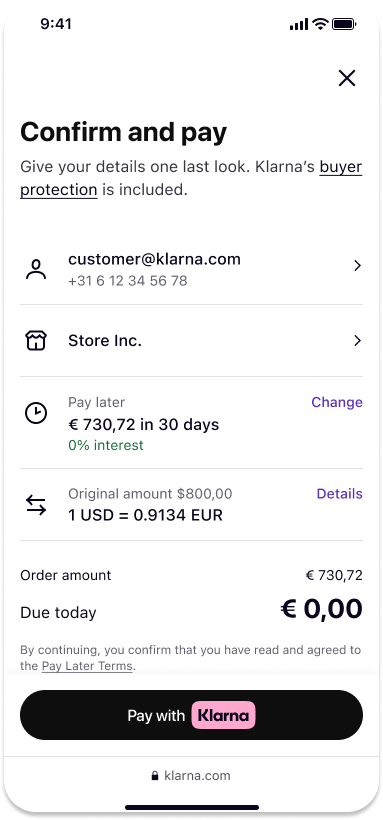 | 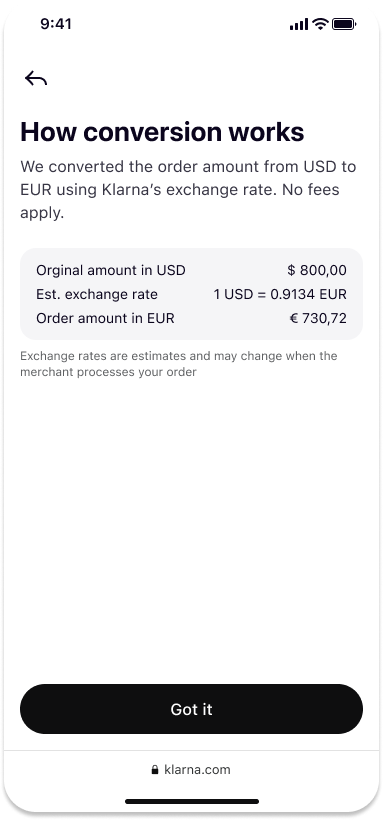 |
| Review Page | Additional details on currency conversion |
Purchase confirmation
After the order is placed, the indicative exchange rate and converted amount appear in the Klarna app.
Capture
At the time of capture, the exchange rate is locked and applied to calculate the final amount charged to the customer in their billing currency. Klarna communicates the final rate and amount by email and in the Klarna app.
Refund
At the time of refund, Klarna converts the refund amount to the customer's billing currency using the exchange rate at the time of the refund. Because this rate may differ from the rate applied at capture, the refunded amount in the customer's billing currency may not exactly match the original charge. There may be an open amount left to pay after a full refund due to market fluctuations.
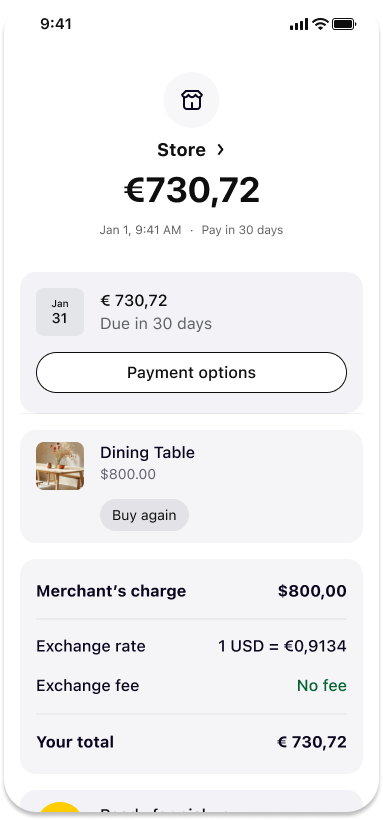
More information in the Klarna app
Getting Started
Prerequisites
- An active Klarna merchant account, you can sign up here.
- Consumer FX enabled on your account, contact your Klarna account representative or Acquiring Partner to get started.
Availability
| Integration type | Description |
|---|---|
| Klarna Payments API | Consumer FX works with existing Klarna Payments integrations. |
| Shopify app from Klarna | All Klarna sessions are created in your store's base currency. This is standard behavior for third-party payment providers in Shopify. If you use Shopify Markets, prices in checkout may appear in a converted currency for display purposes only. The Klarna session is always created in your base currency, and Shopify's display rate may differ from Klarna's rate. |
| Acquiring Partner integrations | Contact your Acquiring Partner for details on Consumer FX availability and eligibility. |
Frequently asked questions
What countries does Consumer FX support?
Consumer FX is available across all currently supported Klarna customer countries.
How is the customer's billing currency determined?
The billing currency is based on the billing country in the customer's Klarna account. Klarna always charges the customer in their local currency.
Does Klarna handle post-purchase communications in the customer's currency and language?
Yes. Klarna's app, push notifications, and email communications are fully localized in the customer's language and billing currency.
Which payment options are available for customers in other countries?
No matter where your customers are shopping from, the Klarna purchase flow presents them with the payment options they know and trust from their home country, keeping checkout seamless and conversion-friendly.
Do I need to add any exchange rate disclaimers to my website?
No. Klarna handles all FX disclosure, customer consent, and regulatory compliance within the payment flow. You can optionally mention that Klarna communicates the final exchange rate at capture if you display converted prices on your site.
What if my store shows a specific payment method name, like "Pay in 4"?
Avoid hard-coding specific payment method names. The options presented to customers may differ by market, for example, a German customer on a US store may see "Pay in 3" rather than "Pay in 4." Use generic messaging such as "Pay with Klarna" as described in Payment Descriptors.
I'm integrated via Klarna Payments API and getting a 400 - [Bad value: purchase_currency] error. What's the cause?
When Consumer FX is enabled, Klarna validates the
purchase_ in your session request against the currencies supported by your configured bank accounts. To resolve this, make sure a bank account is configured for the currency you're creating sessions in. You can do this in Merchant Portal > Settings > Bank Accounts if you’re an administrator.The pricing in my agreement is in a specific currency — how will the fixed fee be charged?
We will charge the fixed fee of your transaction in your Settlement Currency. If the rates in your agreement are in a specific currency that is not your Settlement Currency, we will convert this from the contracted currency to the Settlement Currency.
Resources
- Klarna Demo Store
- You can test the Consumer FX experience in the Klarna Demo Store by selecting a customer country with a different currency from the store's currency and signing in with the corresponding sample customer data.
Jump to section...