

App Return URL
The Mobile SDK offers integration of all Klarna products and it comes with just few requirements for maintaining stability in your mobile application experience as outlined below.
6 min read
Klarna Mobile SDK is the official recommendation when using any Klarna product (Klarna Payments, On-site Messaging etc.) in mobile applications. This is mainly due to the limitations and security concerns surrounding usage of the Embedded WebViews in payment flows, hence Klarna prohibits any usage of Embedded WebViews in any mobile application for its payment flow.
Mobile integration patterns
To learn more about mobile integration patterns on mobile, check out our introduction page here.
To support seamless redirects to and back from third party apps for authentication and Klarna app for App Handover purchase experience, Klarna Mobile SDK requires all integrators to set up an app return URL. This URL ensures that when Klarna redirects customers to Klarna app, mobile banking application or authorization providers in certain markets the user can be redirected back to the application where the flow was started with the Mobile SDK.
This URL needs to be set as an app scheme/deep link that navigates to your application without any change in its state, ensuring that the customer can continue the flow from where they were before the redirects.
Versioning policy
The Klarna Mobile SDKs follow semantic versioning MAJOR.MINOR.PATCH:
- MAJOR: a major version increment indicates incompatible and breaking changes.
- MINOR: a minor version increment indicates added functionality that is backwards compatible.
- PATCH: a patch version increment indicates backwards-compatible bug fixes.
We recommend staying up to date with the latest SDK versions to take advantage of new features, improvements, and bug fixes.
Support Policy
Klarna does not support bug fixes to earlier MINOR or PATCH SDK versions. If you find bugs in an older MINOR or PATCH version, we recommend updating to the latest available SDK. Older minor versions of the SDK continue to be available for use, but won’t receive any additional updates.
Make sure to stay informed about Mobile SDK version changes (iOS, Android) and add the new version to your project. As part of our security policy, each version of the Mobile SDK is considered deprecated one year after the version was released.
Deprecation Policy
- Only SDK versions released within the last 12 months are considered officially approved by Klarna.
- Early Deprecation: SDK versions may be deprecated earlier than 12 months if critical vulnerabilities are identified that impact the confidentiality, integrity, or availability of the service. In such cases, Klarna will provide clear and timely communication.
- Obsolete Integrations: Partners are responsible for any issues, including security breaches, resulting from the use of outdated or unsupported SDK versions.
- Right to Deactivate: Klarna reserves the right to disable integrations using deprecated SDK or OS versions, especially when they pose an identified security risk.
By keeping your integration up to date, you ensure continued compatibility, access to the latest features, and the highest level of security for your users.
UX Guidelines for Klarna Mobile SDK
Mobile integrations for Klarna products follow the general Klarna guidelines for implementation and UX that exists for web, you can learn more about those in the following pages;
- Purchase experience UX guidelines This guide outlines best practices for implementing Klarna Payments in native mobile apps using Klarna’s iOS and Android SDKs. It complement Klarna's official purchase experience UX recommendations with mobile-specific implementation insights to help you deliver a seamless, trustworthy, and high-converting Klarna checkout experience.
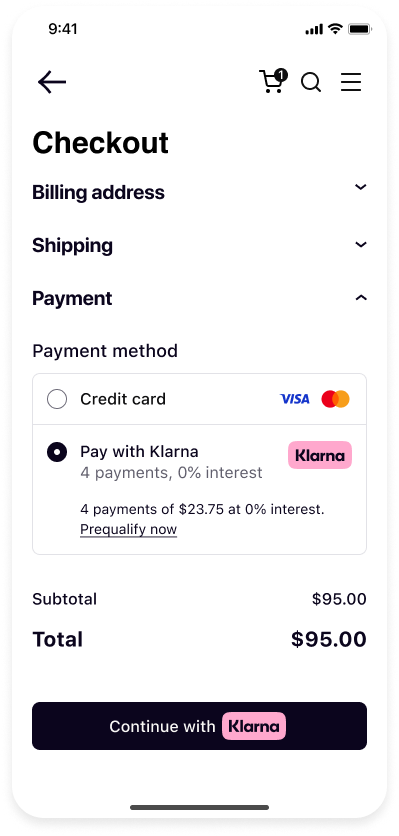 | 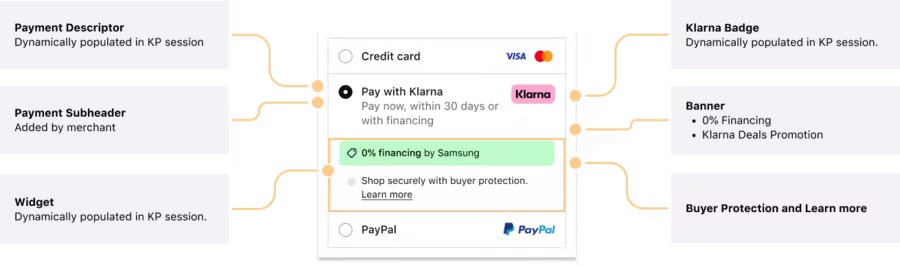 |
| Presenting Klarna in the checkout | Klarna payment widget |
1. Klarna Payment Options: Presentation
Offer Klarna clearly as a single payment method.
- Klarna recommends presenting Klarna as a unified option (e.g., “Pay with Klarna”) in your payment method list, rather than splitting it into separate methods like "Pay Later", "Pay Now", or "Financing".
- This approach creates a cleaner, simpler checkout UI and improves conversion by reducing decision fatigue.
Introduce Klarna early to build trust.
- Mention Klarna availability on product and cart pages to raise awareness.
2. KlarnaPaymentView Integration
Use KlarnaPaymentView to render Klarna's native UI.
- Only render one KlarnaPaymentView per checkout.
Do not overlay, mask, or alter the view.
- Leave at least 8pt/dp padding around KlarnaPaymentView.
- Do not cover legal text or logos with popups or other UI elements.
- KlarnaPaymentView handles height, branding, and eligibility logic internally.
3. Layout and Responsiveness
Handle dynamic height properly (especially on iOS).
- iOS: Use
klarnaResized(.to update height constraints... ) - Android: Use
wrap_or embed KlarnaPaymentView in a ScrollView.content
Avoid hardcoded or fixed-height layouts.
- Klarna content height varies; let the view expand naturally.
Use mobile-friendly spacing.
- Follow platform guidelines (iOS: 44pt touch areas, Android: 48dp).
- Avoid UI crowding; Klarna views should remain clear and legible.
4. Branding and Trust
Use Klarna’s official branding assets.
- Use only logos, icons, and payment badges from Klarna’s official brand kit: docs.klarna.com.
- Do not alter the logo’s aspect ratio, apply shadows, or change colors.
Show Klarna’s value proposition clearly.
- If presenting Klarna in a list of payment methods, accompany with text like:
- "Pay now, or later with Klarna. Flexible options available."
- In the KlarnaPaymentView, Klarna displays the appropriate option dynamically.
Do not obscure Klarna legal or informational text.
- Always allow KlarnaPaymentView to display legal terms.
- Ensure links are accessible and not hidden behind other views.
5. Error Handling and Recovery
Implement SDK error callbacks.
- Show clear user-facing messages like:
- "Something went wrong. Please try another payment method."
Enable retries and fallback paths.
- Allow the user to retry Klarna.
- If denied, offer another payment method.
6. Accessibility and Touch UX
Ensure full accessibility support.
- KlarnaPaymentView is accessible by default.
- Surrounding elements (buttons, headings) should have proper accessibility labels.
Design for touch.
- Avoid placing other tappable elements too close to KlarnaPaymentView borders.
7. Mobile Testing UX
Test across screen sizes.
- Check for layout issues on small devices.
- Ensure Klarna views remain visible and scroll properly.
Simulate real-world conditions.
- Use network throttling to test Klarna loading on slower connections.
- Test app-switch flows (e.g. with BankID or Klarna app installed).
Jump to section...