
Payment Authorization for Server-side integration
Integrate Klarna's Payment Authorize API for server-side, customer-initiated scenarios. This guide shows how to collect payment context, call the API, and handle all authorization outcomes including step-up flows.
159 min read
Overview
Learn how to authorize a Payment Transaction with Klarna using a server-side-only integration when the customer is present during checkout. As an Acquiring Partner, you'll collect payment context from a Partner, call the authorizePayment endpoint, handle all authorization outcomes, manage step-up flows, and finalize the Payment Authorization.
endpoint, handle all authorization outcomes, manage step-up flows, and finalize the Payment Authorization.Prerequisites
Before starting, complete the following steps:
- Complete the Payment Presentation integration.
Then ensure you have:
- A valid Partner Account onboarded with Klarna
- Backend capability to receive and process Klarna webhooks
- Partner-facing APIs capable of forwarding redirect URLs and Klarna data without modification
Integration overview
Once the customer selects Klarna at checkout and clicks the Pay button:
- 1.The Partner initiates Payment Authorization through the Acquiring Partner
- 2.The Acquiring Partner forwards the payment context to Klarna by calling the authorizePayment endpoint
- 3.Klarna evaluates the request and returns one of the following results:
- 3.1.
APPROVED - 3.2.
DECLINED - 3.3.
STEP_UP_ REQUIRED
- 4.The Acquiring Partner handles the result and returns the outcome to the Partner
- 5.If step-up is required, the customer completes the Klarna Purchase Journey
- 6.The Acquiring Partner finalizes the authorization and returns the final result
sequenceDiagram
autonumber
participant C as Customer
participant P as Partner
participant AP as Acquiring Partner
participant K as Klarna
Note over C,K: Payment Presentation integration (previous step)
C->>P: Start checkout
P->>AP: Initiate payment processing
Note over P,AP: amount, currency, purchase_details, return_url, app_return_url
Note over P,AP: klarna_network_session_token and klarna_network_data
AP->>K: Call Payment Authorize API
Note over AP,K: Forward payment context to Klarna
Note over AP,K: step_up_config configured with HANDOVER
K->>AP: Authorization result
alt APPROVED/DECLINED
AP->>P: Return success/failure indicator
else STEP_UP_REQUIRED
AP->>P: Return payment_request_url
P->>C: Redirect customer to Klarna's Purchase Journey
C->>K: Customer approves the purchase
K-->>AP: Webhook Payment Request completed
Note over AP,K: Receive klarna_network_session_token
AP->>K: Finalize authorization
Note over AP,K: Call Payment Authorize API with klarna_network_session_token
K->>AP: Authorization result
AP->>P: Return success/failure indicator
end
Integration details
Update the Partner-facing API to collect the following data points from the Partner for customer-initiated payment scenarios:
| Parameter | Required (Acquiring Partner) | Required (Partner) | Description |
|---|---|---|---|
amount | Yes | Yes | Total amount of the authorization, including tax and any available discounts. |
currency | Yes | Yes | Currency in ISO 4217 format. |
supplementary_ | Yes | Recommended | Additional details about the transaction to help reduce fraud risk and enhance transparency. Include this data to improve underwriting, fraud detection, and customer communication. Klarna processes and uses this data for fraud assessment and customer experience optimization. |
supplementary_ | Yes | Recommended | Customer-facing payment reference displayed to customers on the Klarna app and other communications. Also included in settlement reports for reconciliation purposes. If you are an Acquiring Partner, this is the reference your Partner generated for their customer's payment. |
supplementary_ | Yes | Recommended | Detailed line item information of the purchase. This data is used for fraud detection and customer communication. |
supplementary_ | Yes | Recommended | Information about the customer based on their previous interactions with the Partner. These data points may be used by Klarna to simplify sign-up and during fraud assessment, as well as for underwriting purposes to provide an enhanced experience to returning customers. |
supplementary_ | Yes | Recommended | Shipping information for the purchase. This data is used for fraud detection and customer communication. If the purchase contains multiple shipments with different recipients, provide one shipping object per shipment. |
klarna_ | Yes | Conditional | Encodes Klarna Network Session Token context (prequalification, sign-in state, or approval). Required for finalization after customer authorization; optional on initial request. |
klarna_ | Yes | Recommended | Additional data to enable custom features or data exchange supported by your Integrating Partner. Klarna accepts this passthrough field in a structured JSON format and forwards it to relevant systems for interoperability. Data shared in this field may complement structured datapoints provided in supplementary_purchase_data. Treat this value as an opaque string; do not validate or infer its structure. |
return_ | Yes | Recommended | Payment flow redirection URL. The customer will always be redirected to this URL on successful authorization. For web SDK with REDIRECT mode, the customer will also be redirected to this URL on failed authorization. Recommended for web flows. |
app_ | Yes | Recommended | Mobile application return URL (app scheme with no action deeplink). The customer will be redirected to this URL after third-party redirects or redirects to the Klarna Application. It is expected to open the integrating mobile application in its last state (no state changes or deeplink navigations). Recommended for mobile app flows. |
Requirements
- Use exact parameter names
klarna_andnetwork_ session_ token klarna_in the Partner-facing API to ensure Partners can easily identify and use them.network_ data - Forward all parameters unmodified to Klarna.
- Parameter validation must not be more restrictive than Klarna's authorizePayment.
- Support all printable UTF-8 characters.
- Supplementary purchase data handling:
- Map your existing Partner-facing fields (line items, customer billing address, shipping, purchase reference) into
supplementary_when calling Klarnapurchase_ data - Don't add new Partner-facing fields "just for Klarna" if you already have equivalent fields in your existing schema. Avoid forcing Partners to submit the same data twice using parallel structures
| Do | Don't |
|---|---|
Map existing line items into supplementary_. | Introduce a parallel line-item structure such as klarna_. |
Map existing customer details into supplementary_. | Duplicate customer fields you already collect from Partners. |
Map existing shipping data into supplementary_. | Add a separate shipping object "just for Klarna". |
Map your existing purchase reference into supplementary_. | Force Partners to submit the same purchase reference twice. |
Supplementary purchase data scenarios
Acquiring Partners may receive supplementary purchase data (including line items, L2/L3 data for Card Network optimization, and transaction context) in one or both of the following ways:
- Embedded in
klarna_: Forward as received without parsing or mappingnetwork_ data - Provided as individual API fields: Map to the
supplementary_object when calling authorizePaymentpurchase_ data
flowchart LR
Partner[Partner]:::tertiaryEntity
LineItems[Line items,\nL2/L3 data,\netc]:::secondaryEntity
KlarnaNetLeft[Klarna Network Data]:::secondaryEntity
AP[Acquiring Partner's API]:::primaryEntity
Supplementary[Supplementary\nPurchase Data]:::secondaryEntity
KlarnaNetRight[Klarna Network Data]:::secondaryEntity
Auth[Payment Authorization]:::primaryEntity
%% Main flows
Partner --> LineItems --> AP --> Supplementary --> Auth
Partner --> KlarnaNetLeft --> AP --> KlarnaNetRight --> Auth
The authorizePayment endpoint is used to authorize a Payment Transaction with Klarna, for both customer-initiated and Partner-initiated scenarios.
endpoint is used to authorize a Payment Transaction with Klarna, for both customer-initiated and Partner-initiated scenarios.- Call the authorizePayment endpoint and forward the complete payment context, including:
- Amount and currency
- Supplementary purchase data
- Klarna parameters
- Customer return URLs
- Configure
step_withup_ config HANDOVERto allow Klarna to trigger customer interaction when required.
In the request to the authorizePayment endpoint, specify the following parameters:
endpoint, specify the following parameters:SHELL
1
2
3
4
5
6
7
8
9
10
curl https://api-global.test.klarna.com/v2/accounts/{partner_account_id}/payment/authorize \
  -H 'Authorization: Basic <API key>' \
  -H 'Content-Type: application/json' \
  -H 'Klarna-Customer-Token: krn:partner:us1:test:identity:customer-token:ACZawkw7-2[...]' \
  -H 'Klarna-Network-Session-Token: krn:network:us1:test:session-token:eyJhbGciOiJIU[...]' \
  -d '{
        "currency": "USD",
        "supplementary_purchase_data": {
          "purchase_reference": "order-7f3a9b2e",
"line_items": [Customer token source
The
customer_ can be obtained from the Payment Tokenization flow.Optional custom expiry
Optionally set
step_ to override the default 3-hour Payment Request lifetime. See Custom Payment Request expiry.When performing customer-initiated authorization through the authorizePayment endpoint, Klarna returns a
endpoint, Klarna returns a payment_ object. The result field inside this object indicates the outcome and determines your next action.The
result has the following possible values:| Result | Description | Next steps |
|---|---|---|
STEP_ | Additional customer interaction is needed to complete the authorization. A payment_ is created. | Handle this result when Klarna requires additional customer interaction to complete authorization:
|
APPROVED | The authorization succeeded and a payment_ was created. | The Payment Authorization is complete. Handle this result when Klarna authorizes the payment without requiring customer interaction.
|
DECLINED | The authorization was not approved and no transaction was created. | Handle this result when Klarna does not approve the authorization.
|
Here's the high-level diagram of the Payment Authorization results and resources it produces:
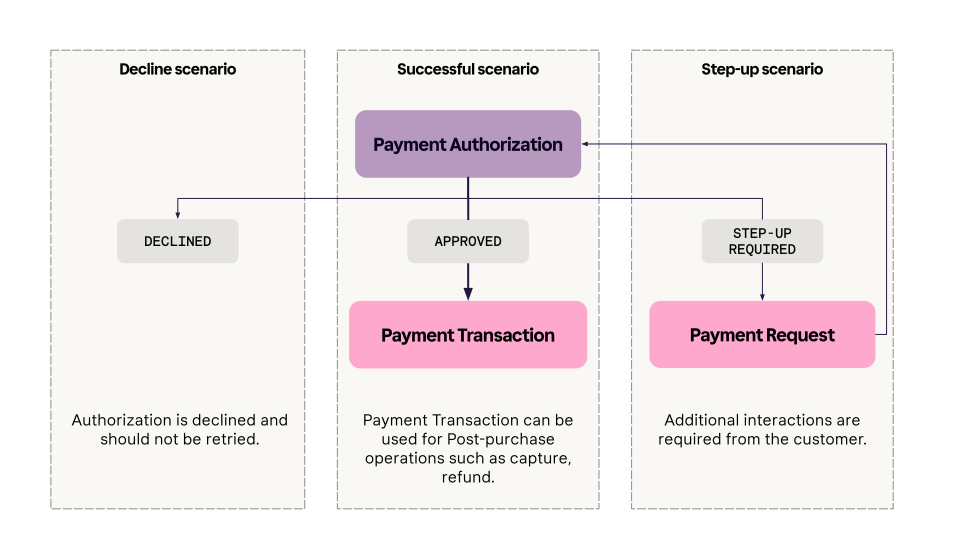
The response schema is as follows:
JSON
1
2
3
4
5
6
7
8
9
10
{
"payment_transaction_response": {
"result": "STEP_UP_REQUIRED"
},
"payment_request": {
"payment_request_id": "krn:payment:us1:request:552603c0-fe8b-4ab1-[...]",
"payment_request_reference": "acquiring-partner-request-reference-1234",
"amount": 11800,
"currency": "USD",
"state": "SUBMITTED",Return URLs for step-up scenario
Acquiring Partners must include return URLs in the to enable the step-up scenario.
step_ when calling authorizePayment to enable the step-up scenario.These URLs, set inside the
customer_ object, tell Klarna where to redirect the customer after they complete or stop the Klarna Purchase Journey.return_url
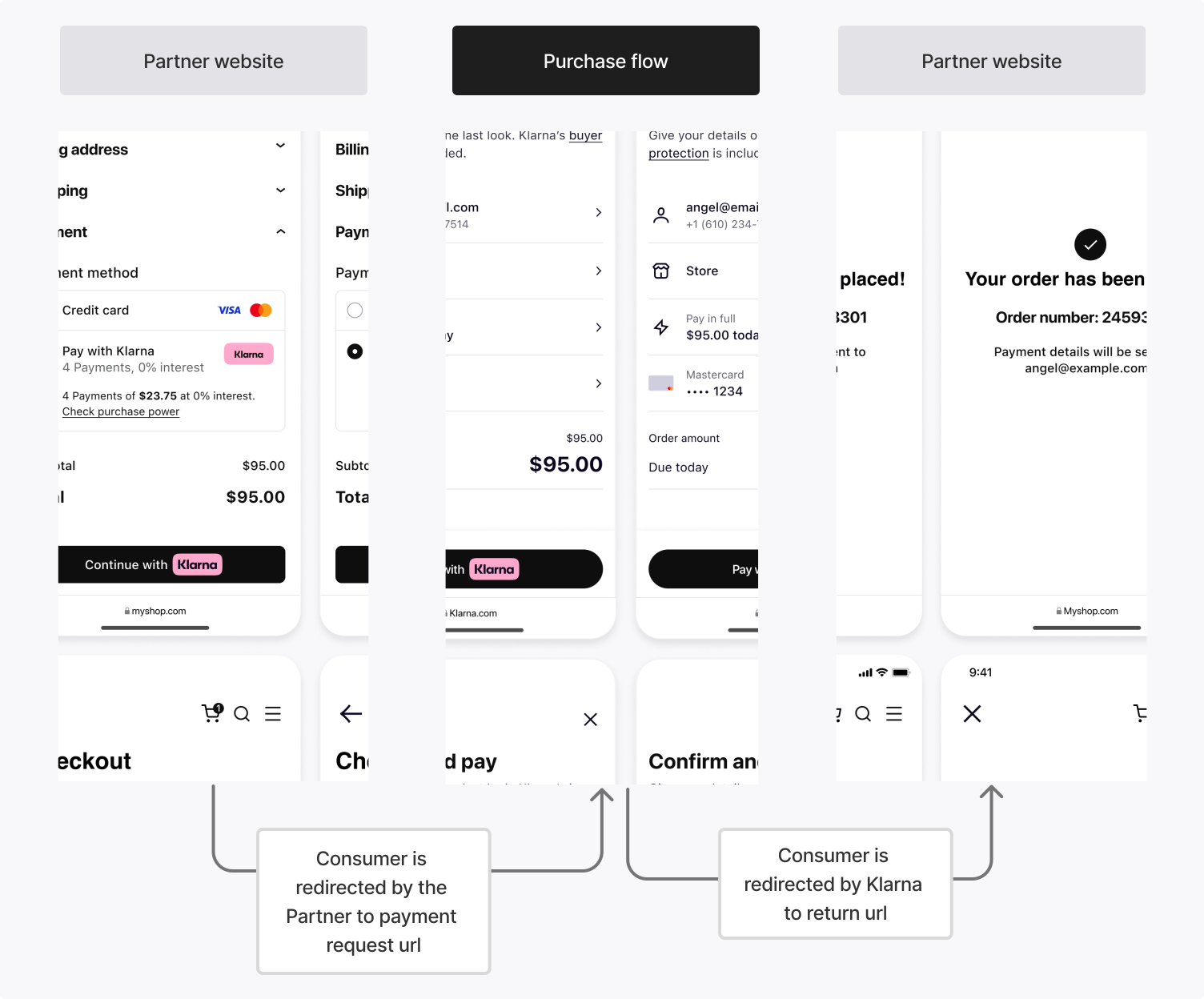
If the Klarna Purchase Journey is launched in a web environment, Klarna redirects the customer to the
return_ after they finish, whether they complete or stop the flow. This can be a URL managed by the Acquiring Partner (which handles redirection logic) or one collected directly from the Partner.app_return_url
On mobile, the customer may be redirected to a third-party app (such as a bank app) or the Klarna app during the Klarna Purchase Journey. The
app_ brings the customer back to the Partner's mobile app when this happens.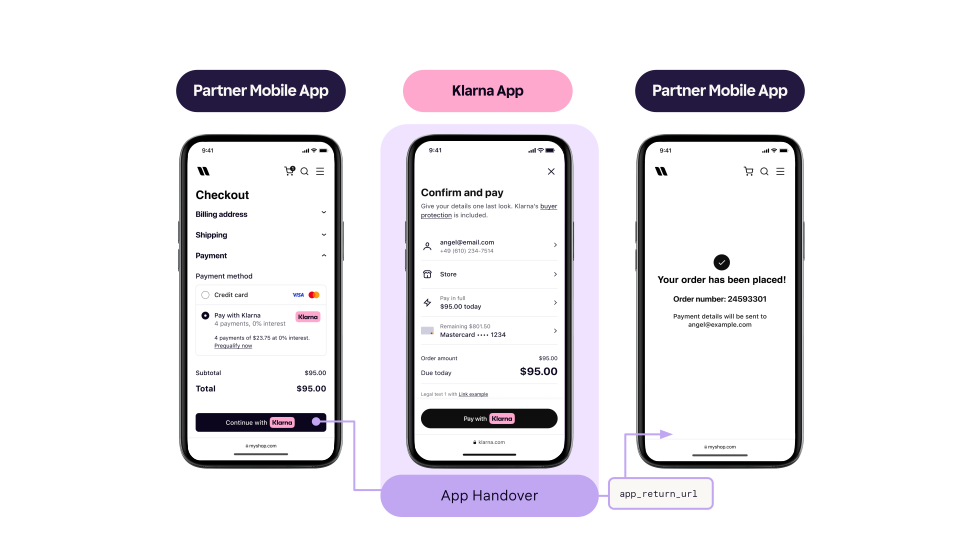
Partners must register a URL scheme (for example,
partnerapp:/) that resumes the payment flow. Klarna invokes this URL after the customer completes a native app-based step, such as biometric authentication or Klarna app login. Partners are expected to resume the mobile app in its last state without applying state changes or deep link navigations.Interaction scenarios
The
return_ and app_ are not mutually exclusive. Depending on the device and environment, either or both may be triggered:| Scenario | Description |
|---|---|
| Pure web flow | The customer starts the Klarna Purchase Journey in a desktop browser. After completing the flow, Klarna redirects them to return_. |
| App-to-app flow | The Partner's native app opens the Klarna Purchase Journey using a universal link. If the Klarna app is installed, the customer goes directly into it. After completion, Klarna redirects them to app_. |
| WebView flow with app handover | The Partner's native app starts the Klarna Purchase Journey in a System WebView. If the customer must authenticate via an external banking app, app_ returns them to the Partner's app mid-flow. They then resume in the WebView and, on completion, are redirected to return_. |
Avoid duplicate return URL collection
If the Acquiring Partner already collects a suitable
return_ or app_ from the Partner, do not request a second one. This would increase the minimum integration requirements for Klarna to work.Return authorization outcomes to the Partner
Map the Klarna authorization result to the Partner-facing API response according to the authorization outcome. The response may include a
payment_ and/or a klarna_ parameter.Requirements
payment_MUST be returned directly to the Partner in an existing field and MUST NOT be wrapped or hidden behind Acquiring Partner-managed redirects.request_ url - Use exact parameter name
klarna_in the Partner-facing API to ensure Partners can easily identify and use the parameter. Treat this value as an opaque string; do not validate or infer its structure.network_ response_ data
Below are examples of how Acquiring Partners can return the
klarna_ parameter in their Partner-facing APIs depending on the authorization outcome.JSON
1
2
3
4
5
6
7
8
9
10
{
  "payment_id": "pr_27234RBQD9NAKD032BN",
  "amount": 17800,
  "currency": "USD",
  "status": "open",
  "url": "https://pay.test.klarna.com/na/requests/6bbf6775-[...]/start",
  ...
  "additional_data": {
    "klarna_network_response_data": "{\"content_type\":\"vnd.klarna.network-data.v2+json\",\"content\":{\"operation\":\"payment_request\",\"response\":{\"result\":\"STEP_UP_REQUIRED\",\"payment_request\":{\"payment_request_id\":\"krn:payment:us1:request:552603c0-fe8b-4ab1-[...]\",\"payment_request_url\":\"https://pay.test.klarna.com/na/requests/6bbf6775-[...]/start\"}}}}"
}What happens next by result
If the result is
APPROVED, the Partner can redirect the customer to the confirmation page.If the result is
STEP_, the Partner handles the step-up scenario and launch the Klarna Purchase Journey (see Step 4).Avoid intermediate redirects
Acquiring Partners should expose Klarna's
payment_ directly to Partners rather than routing through an Acquiring Partner-owned URL.Using an intermediate redirect under the Acquiring Partner's domain causes the following issues:
| Issue | Impact |
|---|---|
| Reduced app handover success | Cross-domain redirects reduce the likelihood of a successful handover to the Klarna app, negatively impacting Klarna's purchase conversion rate. |
| Incompatibility with Klarna web SDK integration | Not compatible with Partners using the Klarna web SDK for pop-up flows on websites or app-to-app handoff in native mobile apps. |
| Network issues | Frontend redirects expose customers to network issues. |
When step-up is triggered, authorizePayment returns a
returns a STEP_ result along with a Payment Request containing the payment_ and klarna_ which the Partner needs in order to launch the Klarna Purchase Journey, either through a redirect or a pop-up experience.The Klarna Purchase Journey allows the customer to authenticate with Klarna (via login, one-time passwords, etc.), choose a payment method, and accept the payment.
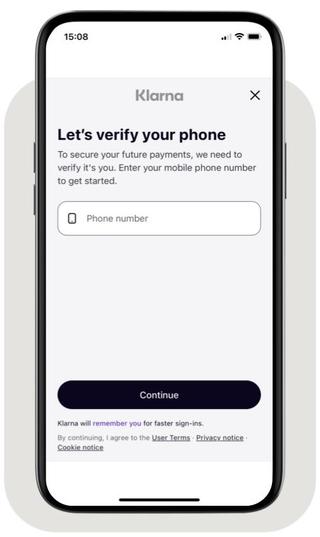
Phone collection in the Klarna Purchase Journey
Upon completion:
- Klarna redirects the customer to the
return_inurl customer_, except when a pop-up experience is used and the customer stops the flow.interaction_ config - Klarna issues a
klarna_to the Acquiring Partner to finalize the payment.network_ session_ token
This step only applies when the authorizePayment endpoint returns
endpoint returns STEP_.To retrieve the required token(s), Klarna provides multiple integration methods. Subscribing to Klarna webhook events is required and may be combined with additional methods to improve resilience.
Using webhooks ensures reliable completion handling, particularly when the customer closes the browser before returning, network interruptions occur during redirects, or post-processing is required before notifying the customer.
The
klarna_ represents the Klarna session context and must be included in the Klarna-Network-Session-Token header when calling the Payment Authorize API.Partners can obtain this token through:
- Step-up completion: Issued after a customer completes the Klarna Purchase Journey, used to finalize the Payment Authorization.
- Customer token exchange or prequalification flows: Obtained through other Klarna mechanisms, enabling fresh authorization requests (for example, Partner-initiated payments using a Customer Token).
Integration requirement
The
klarna_ is valid for only 1 hour, so be sure to use it promptly.Method: Subscribe to Klarna webhook events (required)
Subscribe to the
payment. webhook event using the Klarna webhook guidelines. Klarna sends this event when the Payment Request reaches the COMPLETED state.This event indicates that the customer has finished the step-up interaction and that the Acquiring Partner can proceed with finalizing the authorization.
Sample payload
JSON
1
2
3
4
5
6
7
8
9
10
{
  "metadata": {
    "event_type": "payment.request.state-change.completed",
    "event_id": "d9f9b1a0-5b1a-4b0e-9b0a-9e9b1a0d5b1a",
    "event_version": "v2",
    "occurred_at": "2024-01-01T12:00:00Z",
    "correlation_id": "2d1557e8-17c3-466c-924a-bbc3e91c2a02",
    "subject_account_id": "krn:partner:global:account:test:HGBY07TR",
    "recipient_account_id": "krn:partner:global:account:test:LWT2XJSE",
"product_instance_id": "krn:partner:product:payment:ad71bc48-8a07-4919-[...]",Acknowledge the event before finalizing the authorization
Handle
payment. in two stages. In the webhook handler, verify the event, persist the payload (including the klarna_) durably against metadata., and return a 2xx response immediately. Run everything that follows asynchronously, after the acknowledgment is sent.Don't do any of the following before the acknowledgment:
- Call authorizePayment to finalize the Payment Authorization.
- Create the Payment Transaction or any record derived from it.
- Return the authorization outcome to the Partner or notify the customer.
When an event arrives with a
metadata. you have already recorded, confirm that it is recorded and return a 2xx response without repeating the work. The Klarna webhook guidelines define the accepted acknowledgment responses and the retry schedule Klarna applies when one doesn't arrive.Method: Read the Payment Request (optional/fallback)
As an alternative method, retrieve the Klarna token(s) by calling the readPaymentRequest .
.Once the Payment Request reaches the
COMPLETED state, the token(s) are available in the state_ object of the Payment Request.Sample payload
JSON
1
2
3
4
5
6
7
8
9
10
{
  "payment_request_id": "krn:payment:us1:request:552603c0-fe8b-4ab1-[...]",
  "state": "COMPLETED",
  "previous_state": "IN_PROGRESS",
  "state_context": {
    "klarna_network_session_token": "krn:network:us1:test:session-token:eyJhbGciOiJIU..."
  },
  "expires_at": "2025-02-26T17:25:34.534721775Z",
  "created_at": "2025-02-24T17:25:34.534721775Z",
"updated_at": "2025-02-24T17:25:34.534721775Z",After receiving the
klarna_ from webhook or polling, finalize the authorization by calling the Payment Authorize API again with the new token.Finalization request
Call authorizePayment using:
using:- The newly obtained
klarna_in thenetwork_ session_ token Klarna-Network-Session-Tokenrequest header - The same payment context (
amount,currency,supplementary_,purchase_ data klarna_) used in the initial authorizationnetwork_ data - The same
payment_to link the requests Example finalization request:transaction_ reference
SHELL
1
2
3
4
5
6
7
8
9
10
curl https://api-global.test.klarna.com/v2/accounts/{partner_account_id}/payment/authorize \
  -H 'Authorization: Basic <API key>' \
  -H 'Content-Type: application/json' \
  -H 'Klarna-Network-Session-Token: krn:network:us1:test:session-token:eyJhbGciOiJIU...' \
  -d '{
        "currency": "USD",
        "supplementary_purchase_data": { ... },
        "klarna_network_data": "{\"content_type\":\"vnd.klarna.network-data.v2+json\",\"content\":{\"operation\":\"payment_request\",\"request\":{\"supplementary_purchase_data\":{...}}}",
        "request_payment_transaction": {
"amount": 11800,Integration requirement
If the
klarna_ has expired (1-hour validity) or the payment context doesn't match the initial authorization, the finalization call returns DECLINED.Expected finalization response
When finalization succeeds, Klarna returns
APPROVED with the Payment Transaction:JSON
1
2
3
4
5
6
7
8
9
10
{
  "payment_transaction_response": {
    "result": "APPROVED",
    "payment_transaction": {
      "payment_transaction_id": "krn:payment:us1:transaction:791bbb7b-813a-[...]",
      "amount": 11800,
      "currency": "USD",
      "payment_pricing": {...},
      "payment_funding": {
"type": "GUARANTEED",Map the Klarna authorization result to the Partner-facing API response and return the
klarna_.Requirements
- Treat this value as an opaque string; do not validate or infer its structure.
- Use exact parameter name
klarna_in the Partner-facing API to ensure Partners can easily identify and use the parameternetwork_ response_ data - All returned data MUST be forwarded without modification. Below is an example of how Acquiring Partners can return the Klarna Response Data parameter in their Partner-facing APIs.
JSON
1
2
3
4
5
6
7
8
9
10
{
  "payment_id": "pr_27234RBQD9NAKD032BN",
  "amount": 17800,
  "currency": "USD",
  "status": "completed"
  ...
  "additional_data": {
    "klarna_network_response_data": "{\"content_type\":\"vnd.klarna.network-data.v2+json\",\"content\":{\"operation\":\"payment_request\",\"response\":{\"result\":\"APPROVED\",\"payment_transaction\":{\"payment_transaction_id\":\"krn:payment:us1:transaction:791bbb7b-813a-[...]\"}}}}"
  }
}Next steps
After implementing Payment Authorization, explore these related topics:
- Manage Payment Transactions - Capture, refund, and cancel authorized payments
Jump to section...