
Partner self-service in your Partner portal — with Klarna's Payment Programs Presentation API
Host the Payment Program enablement experience inside your own Partner portal and source the screen data from Klarna's dedicated presentation endpoint. Klarna returns Payment Programs already grouped into categories, with localized headers, lifecycle state, and migration hints ready to render. Use this method when you want full UX hosting inside your portal but prefer Klarna-curated presentation data over composing it yourself.
16 min read
Coming soon
Method 2b is a documented future capability. The dedicated presentation endpoint
listPaymentProgramsPresentation is currently unavailable in both playground and production. The spec is Klarna-internal until the endpoint is released; request it from your Klarna Business Developer, who can also advise on early-access timing. The page describes the integration pattern so you can plan against it ahead of GA. Until the endpoint is live, use Method 2a as the actively recommended AP-portal approach.Overview
With this method, your Partners never leave your portal and you don't compose the Payment Programs screen from scratch. You call Klarna's dedicated presentation endpoint, which returns Payment Programs already grouped into categories, with localized headers and messages, availability lifecycle state ( when the Partner confirms.
AVAILABLE, DEPRECATED, DECOMMISSIONED), and migration hints (replaces_). You render that response in your UI and call createPaymentProgramEnablement when the Partner confirms.This is the right path when your Partners' workflow is centralized in your portal and you want Klarna to do the heavy lifting on categorization, localization, and lifecycle-aware UX, so your team ships a Payment Programs screen faster than they would with Method 2a, which composes the same screen from raw Payment Program Plan data.
Portal becomes read-only
Klarna Partner portal becomes read-only for your Partners. When you choose this method, Partners who log into the Klarna Partner portal (for example, to manage other settings) see a read-only view of their current Payment Program enablements with a notice telling them to go to your portal for any changes.
sequenceDiagram
participant P as Partner
participant AP as Acquiring Partner portal
participant K as Klarna API
P->>AP: Opens the Payment Program Enablements screen
AP->>K: listPaymentProgramsPresentation (locale, optional filters)
K-->>AP: Categories + Payment Programs<br/>(localized, lifecycle, enablement_state inline)
AP->>K: listPaymentProgramEnablements
K-->>AP: Current enablements
AP-->>P: Renders the Partner's enabled Payment Programs
P->>AP: Opens the create screen
AP-->>P: Renders curated categories + programs with your sell rates
P->>AP: Selects program(s) and confirms
AP->>K: createPaymentProgramEnablement
K-->>AP: Enablement created (instant)
AP->>K: listPaymentProgramsPresentation (refresh)
K-->>AP: Updated enablement_state inline
AP-->>P: Updated state
Prerequisites
Before implementing this method, make sure you have completed the common prerequisites.
In addition, you need:
- The Partner's
partner_for every API call.account_ id - A target
localefor each Partner so Klarna returns localized presentation content. Klarna falls back toen-USwhen the requested locale isn't available. See Handling localization and fallbacks.
Keyed on Partner Account ID
Unlike Method 2a, Method 2b is keyed on
partner_. You don't need the Partner's MCC or to resolve a Payment Program Plan from the Partner's Payment Profile. That's the main reason to choose Method 2b if you'd rather not track Payment Program Plans yourself.Implementation steps
These steps follow the Partner's journey through your portal: from seeing what they already have enabled, to adding new Payment Programs, to managing them over time. The full request and response detail for creating an enablement (sample payloads, idempotency, enablement criteria) lives in Create Payment Program Enablement; the steps below describe how to source the screen data from Klarna's presentation endpoint and wire it into your Partner-facing portal. Method 2b only changes how you read the data. The write path is identical to Method 2a.
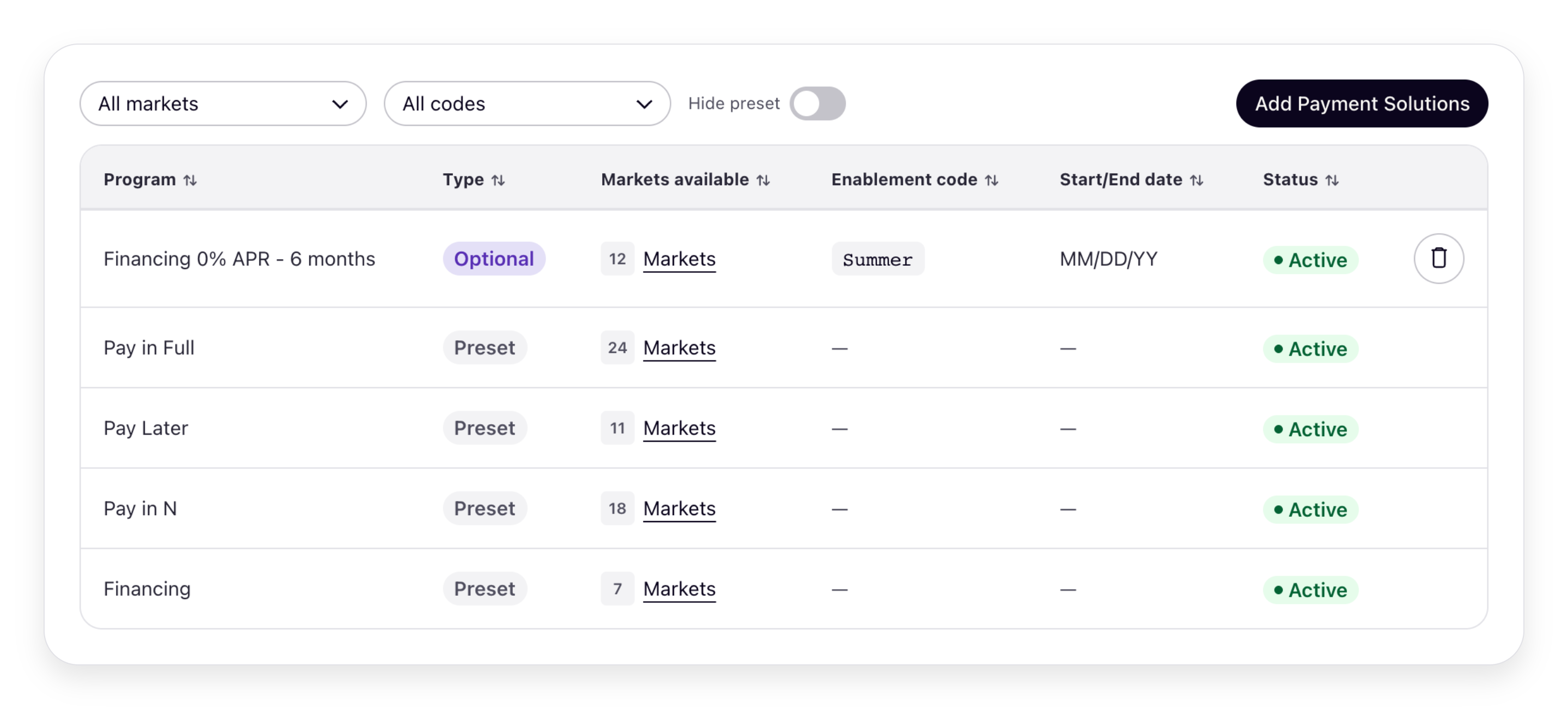
This is the Partner's landing screen. It shows the Payment Programs the Partner already has enabled and the ones they can still add. Source it from the presentation endpoint plus the canonical enablement list:
- Fetch the presentation data: call
listPaymentProgramsPresentationwith the Partner'spartner_. Passaccount_ id localeto receive localized headers, subheaders, and messages; optionally filter bypayment_(to scope a screen to one category) or byprogram_ category_ id payment_(to render the view for a specific Payment Account). The response contains aaccount_ id payment_array and aprogram_ categories payment_array.programs - List the Partner's enablements: call listPaymentProgramEnablements for the
partner_to get the canonical enablement records, both active and ended. The presentation response already carries the active ones inline (account_ id active_), so use this call when you also need the ended history.enablements - Render categories: each category in
payment_carries aprogram_ categories nameand apresentationobject (display_, a localizedorder header, an optionalsubheader, and an optional category-levelmessage/message_, for example, flagging a category as recommended, or warning that a whole category is being phased out). Render a section per category with itstype presentation.(andheader subheaderif present), and place the matching programs inside, sorted by their ownpresentation.. The presentation endpoint is opinionated by design: respecting the ordering and headers Klarna returns keeps the screen current as Klarna adds, retires, or recategorizes programs.display_ order - Render the Partner's enabled programs: each entry in
payment_carriesprograms enablement_(state ENABLEDorNOT_), localizedENABLED presentation(header, optional message + message type),availability_(lifecycle state and optionaldetails decommissioned_/at replaces_), and any inlinepayment_ program_ ids active_. Useenablements enablement_, cross-checked against the enablement list, to show which programs the Partner already has on.state - Render the available Payment Programs: within the same categories, render the programs the Partner can still add, each with an affordance that leads into the create flow (Step 2).
| Do | Don't |
|---|---|
Respect Klarna's display_ at both the category and the program level — the ordering is curated for clarity and conversion. | Override display_ with your own ordering — you'll diverge from Klarna's recommendation and lose the automatic updates that come with the curated view. |
Render the localized header and subheader from the response so each category reads the way Klarna intends. | Drop the header or subheader — that's where Klarna communicates context the program name alone doesn't capture. |
Surface a category-level message above its programs, using the banner style that matches its message_ (e.g. WARNING → warning banner) and falling back to INFO for values you don't recognize. | Hide the category message or render an unrecognized message_ as an error — the enum is open and new values may be added in the future. |
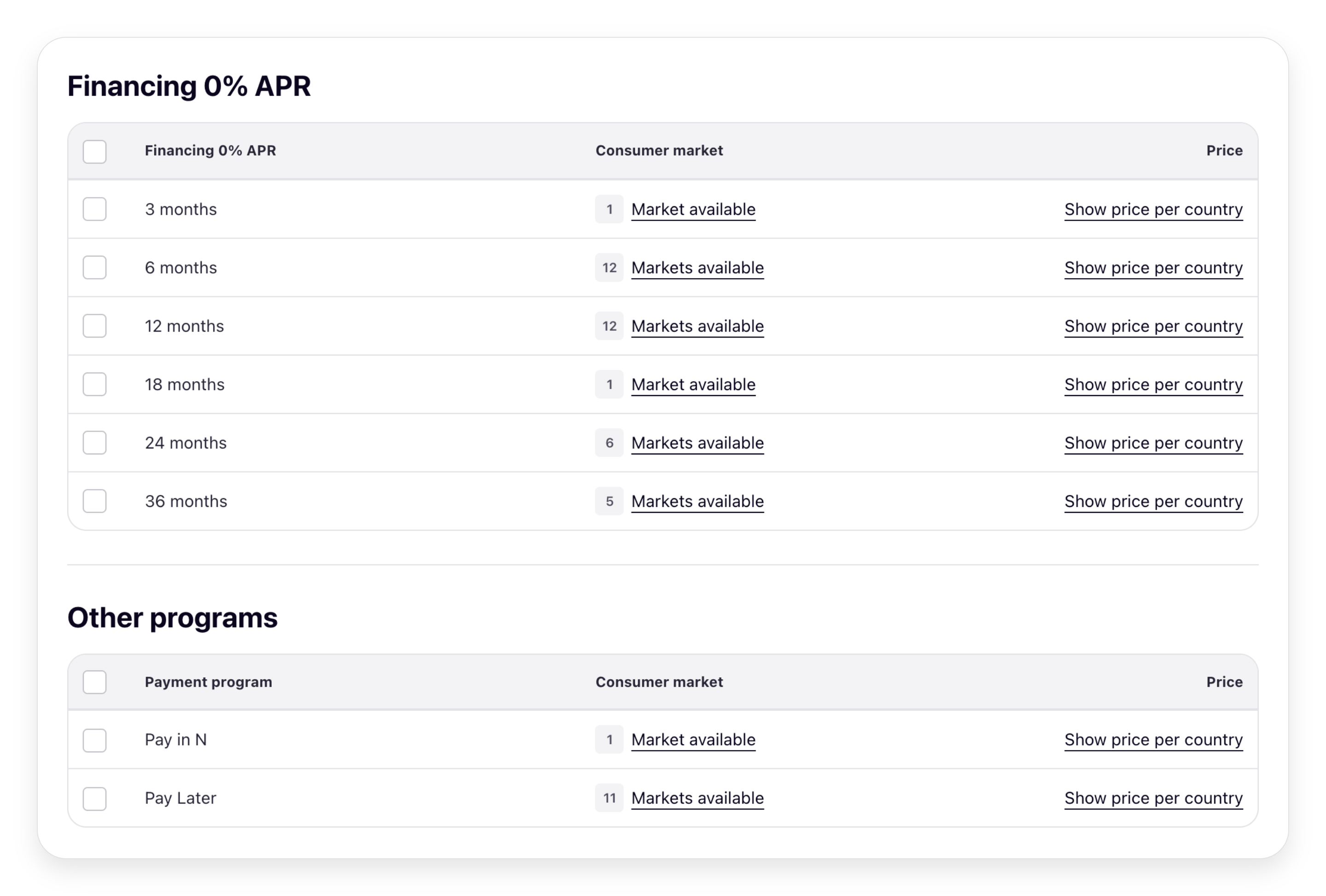
This step runs only when the Partner clicks to add Payment Programs. Open the create screen and render the Payment Programs within Klarna's curated categories, priced with your own rates:
- Reuse the categorized presentation data from Step 1: render the programs in their categories, carrying over Klarna's grouping and
display_.order - Overlay your own sell rates: Method 2b doesn't return pricing, so look up the rate that applies to this Partner for each program from your own pricing system and render it inline. This is the conversion-critical view: Partners need to see the actual rate that will apply to them before they decide.
Best practices for the create screen:
- Show your sell rate inline next to each Payment Program. Klarna does not return pricing in this response.
- Keep Klarna's category grouping and
display_so the priced view stays consistent with the curated presentation.order
Render every Payment Program in the create flow. Don't hide a program just because its
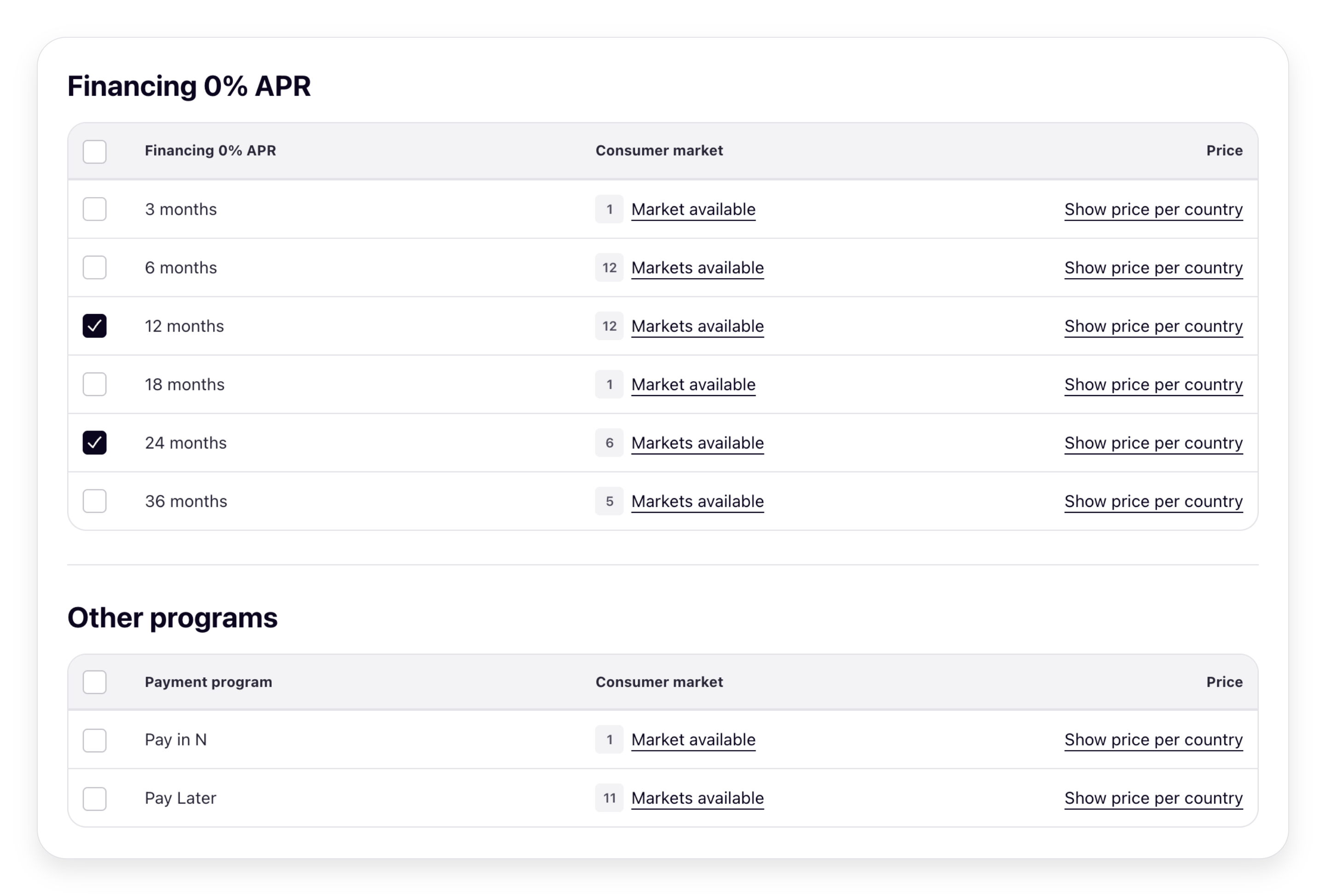
enablement_ is ENABLED. An enablement carries enablement_ (country, MCC, Payment Account, optional code), so a program that's already enabled for one set of criteria can still be enabled for another. Only treat a program as already active, and suppress its "Enable" action, when an existing enablement matches the exact same criteria (same payment_, country, and payment_). The presentation response surfaces this, so you can render Klarna's "already active" message instead of an enable affordance.- Call create enablement: when the Partner selects a program and confirms, call createPaymentProgramEnablement with the
payment_and anyprogram_ id enablement_(customer countries, MCCs, Payment Account IDs, optionalcriteria payment_). The full request and response shape, idempotency requirements, and field-by-field guidance live in Create Payment Program Enablement.program_ enablement_ code
Coming soon
Enablement updates aren't supported today. To change
enablement_ for an existing enablement, end it and create a new one.After a successful create or end, re-call . See Staying in sync: reconciliation.
listPaymentProgramsPresentation with the same parameters and re-render the screen. The refreshed response reflects the new enablement_ and any updated active_, so the screen converges in one call. For a canonical, history-aware list of every enablement (including any created outside your portal), use listPaymentProgramEnablements. See Staying in sync: reconciliation.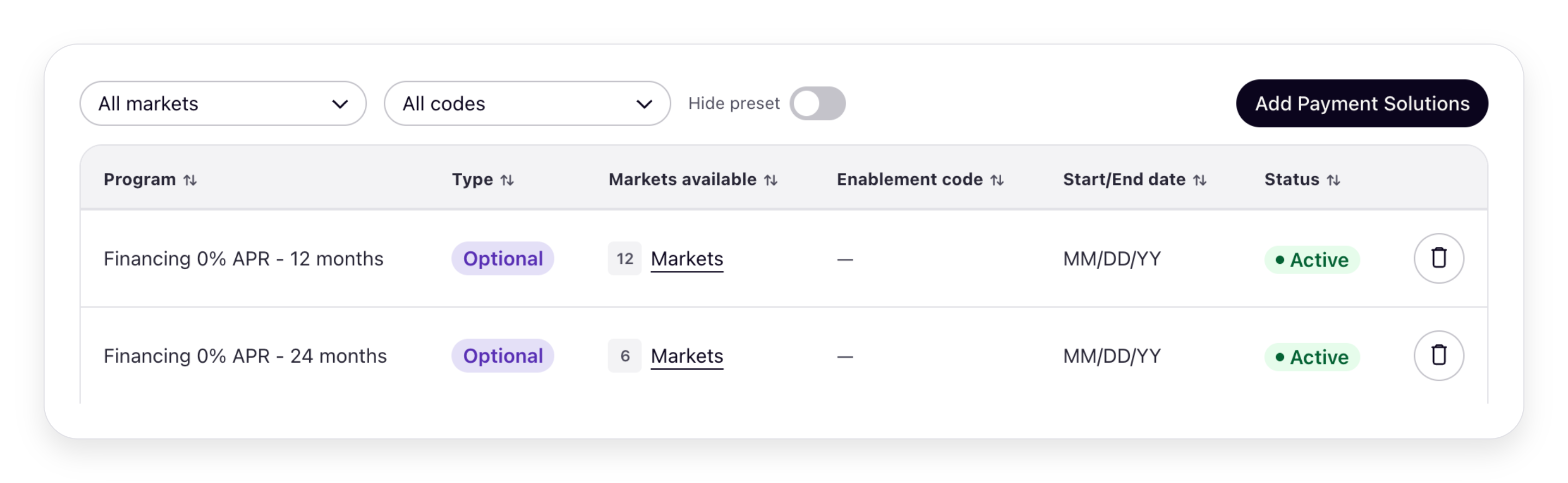
For each with the relevant
ENABLED program, show an "End" affordance. The program's active_ array lists each enablement currently in effect, with its payment_. On confirmation, call endPaymentProgramEnablement with the relevant payment_.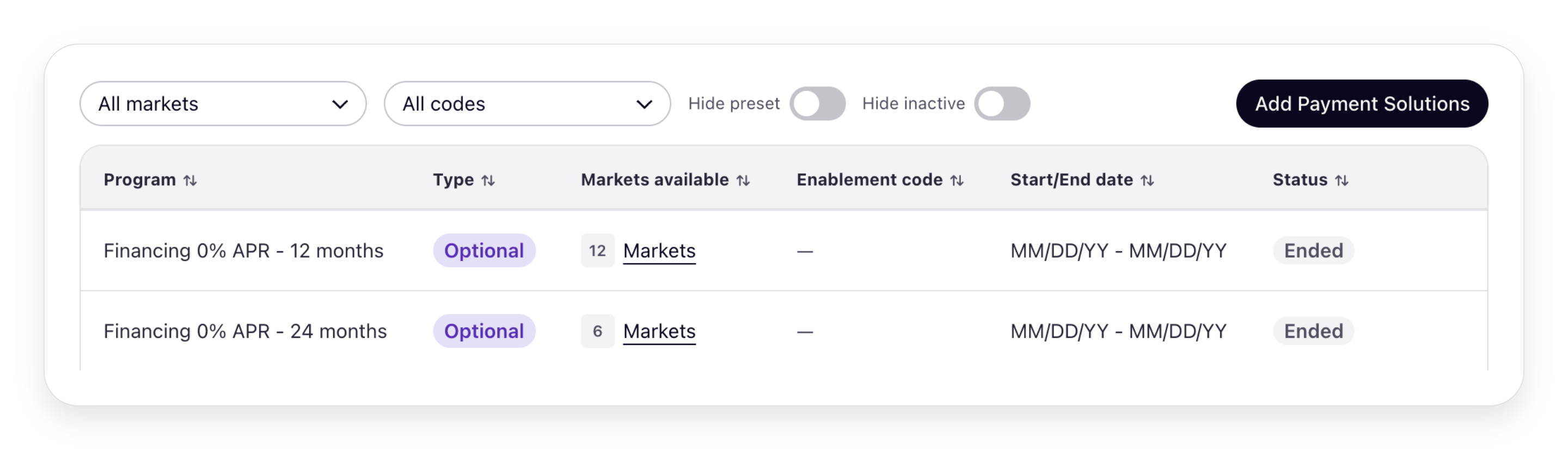
UI-to-API field mapping
The visuals below show the global configuration of the two screens, the Payment Program Enablements screen and the create screen, annotated with numbered callouts. Each callout maps to a field in the responses that render the screens: the Payment Programs Presentation API and listPaymentProgramEnablements. For the advanced layout, see Advanced enablement alternative.
. For the advanced layout, see Advanced enablement alternative.Payment Program Enablements screen
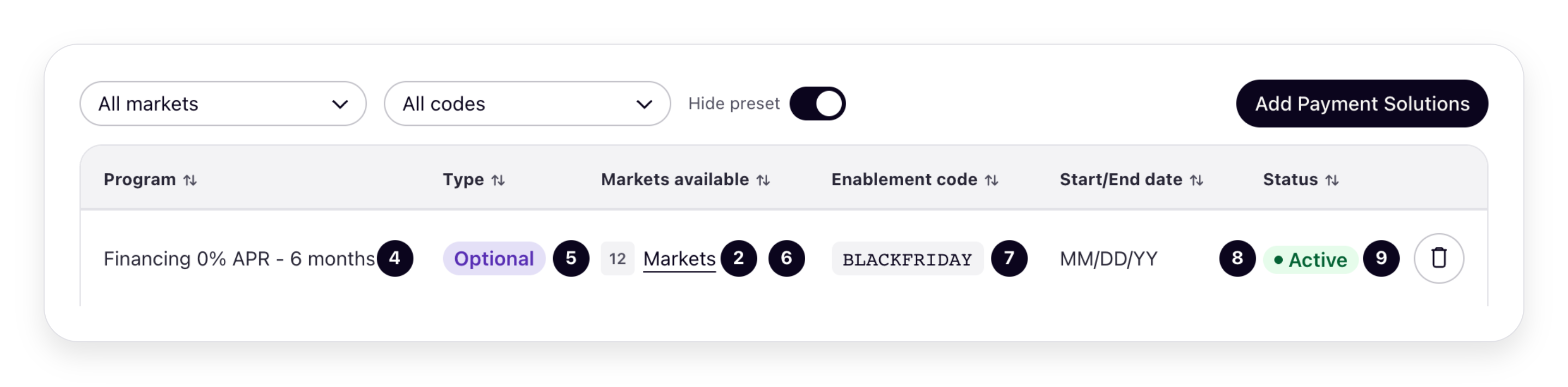
Create screen
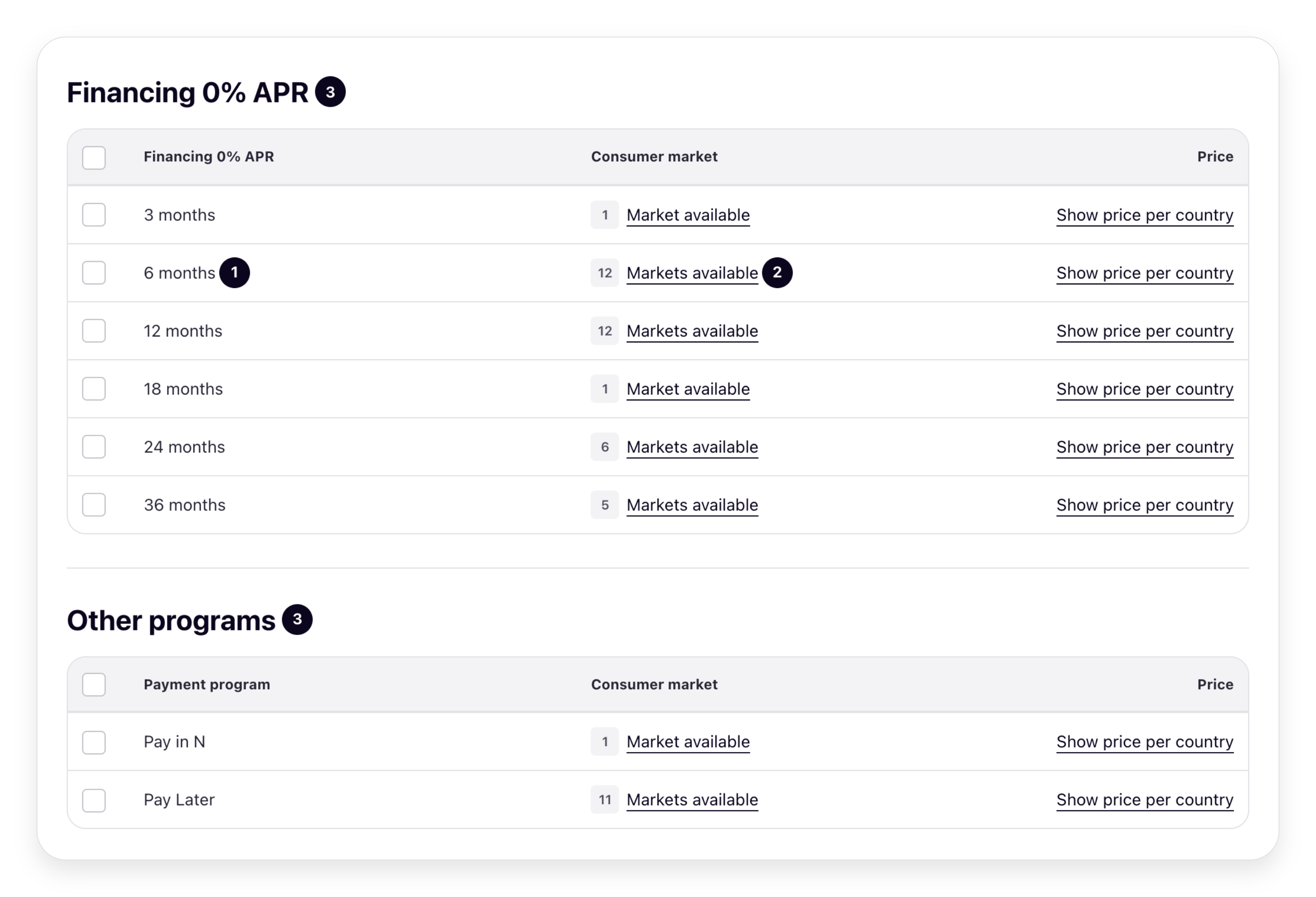
Fields
| # | Field |
|---|---|
| 1 | payment_ (Presentation API) |
| 2 | payment_ (Presentation API) |
| 3 | payment_ (Presentation API) |
| 4 | payment_ (Presentation API) |
| 5 | payment_ (Presentation API) |
| 6 | enablement_ (listPaymentProgramEnablements) |
| 7 | enablement_ (listPaymentProgramEnablements) |
Advanced enablement alternative
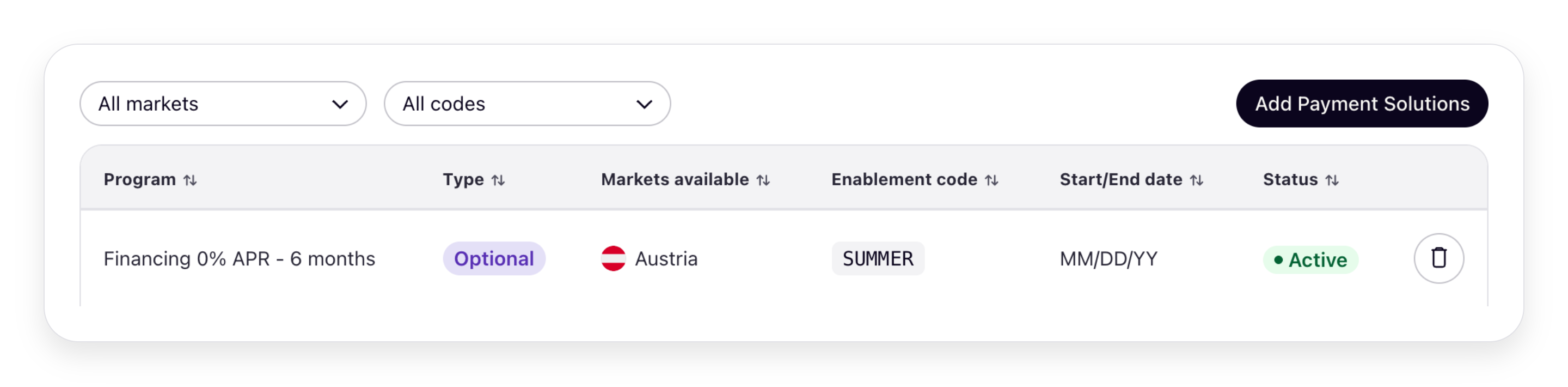
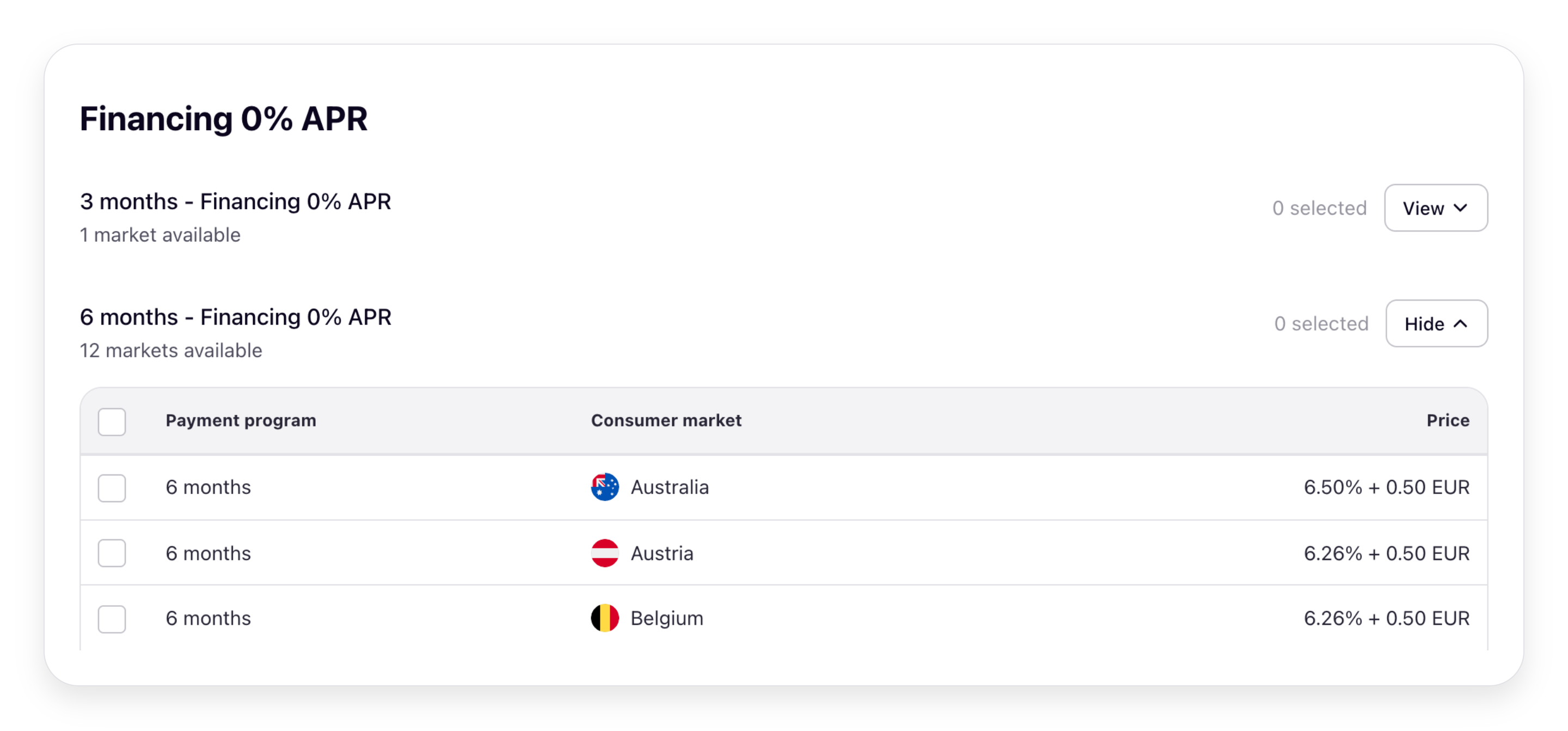
Your portal runs one configuration. The mapping above shows the global layout: one row per Payment Program covering all countries, and no countries passed when you create the enablement. In the advanced (market-specific) layout, the same screens render per market, and you pass the selected market(s) in the enablement criteria. See Global vs. advanced enablement in the overview for what each one means and when to use it.
Payment Program Enablements screen
Create screen
Staying in sync: reconciliation
Klarna is the system of record for Payment Program enablement. Your portal is the Partner-facing surface that writes through the Klarna API, not a second source of truth. Because Partner-driven enablement flows through your portal, you'll generally have an up-to-date local view, but you still need to reconcile periodically to pick up changes that happen outside your portal: for example, Klarna-driven lifecycle transitions on a Payment Program (an
AVAILABLE program moving to DEPRECATED, a new replacement program appearing) or any out-of-band create/end on Klarna's side.The presentation endpoint helps here too: each call returns the current and diff against your local state.
enablement_ and inline active_ per program, so a screen refresh acts as a side-effect reconciliation for the data shown to the Partner. For full historical reconciliation across all enablements for a Partner Account (including ones not in the current presentation view), call listPaymentProgramEnablements and diff against your local state.Coming soon
A webhook that notifies you when a Payment Program Enablement is created, ended, or approved is on the roadmap. Until it's available, periodically call listPaymentProgramEnablements per Partner Account and diff against your local state.
per Partner Account and diff against your local state.Handling localization and fallbacks
Klarna localizes every text field in the presentation response (category headers and subheaders, program headers, and any
message content) based on the locale query parameter you pass. When the requested locale isn't supported, Klarna falls back to en-US. The default value if you omit the parameter is also en-US.| Do | Don't |
|---|---|
Pass the Partner's preferred locale on every presentation call so the response matches the rest of your portal's localization. | Cache the localized response across locales — re-call the endpoint when the Partner switches the portal language. |
Localize the UI labels you add around the Klarna-supplied content (your sell-rate label, your enable/end buttons, your sub-headers) using your own localization stack — Klarna localizes its content, you localize yours. | Translate Klarna's header, subheader, or message content yourself — those strings are owned by Klarna and may change. Wrap them in your UI, but don't rewrite them. |
Treat the en-US fallback as a feature: it guarantees you always have renderable text, even for less common locales. | Treat an unsupported locale as an error or render blanks — Klarna already falls back to en-US, so always render the returned text. |
Handling deprecated and decommissioned programs
Klarna communicates lifecycle changes through
availability_ on every program. Use these fields to give Partners a clear, proactive view of what's changing in their Payment Program setup:availability_:details. state AVAILABLE,DEPRECATED, orDECOMMISSIONED.availability_: present when the state isdetails. decommissioned_ at DEPRECATEDorDECOMMISSIONED; tells you when the program was or will be retired.availability_: present on andetails. replaces_ payment_ program_ ids AVAILABLEprogram when enabling it would automatically end one or more existing enablements; tells you which programs the new one supersedes.
| State | What it means | What to render |
|---|---|---|
AVAILABLE | The program is offered and can be enabled normally. | Standard enable/end affordance. If replaces_ is present, surface a confirmation step that explains which existing programs will be ended. |
DEPRECATED | The program is being phased out. Existing enablements still work until decommission, but new enablements are typically not accepted. | Highlight the program with the Klarna-supplied message (often message_), display decommissioned_, and prompt the Partner to migrate to the program(s) listed in any AVAILABLE program's replaces_ that points back to this one. |
DECOMMISSIONED | The program is fully retired and any enablement is inert (enablement_ will be NOT_). | Render in a clearly retired style; do not offer an enable affordance. |
| Do | Don't |
|---|---|
Surface migration prompts to Partners before the decommission date — give them time to act. | Leave Partners unaware that a program they've enabled is moving toward decommission — silent retirement is a bad experience. |
Use replaces_ to drive a "switch to" affordance on the new program (or a "migrate from" prompt on the deprecated one). | Construct your own deprecation copy when Klarna provides a message — the curated message is what's been agreed across Acquiring Partners. |
Trust enablement_ for decommissioned programs — Klarna sets it to NOT_ automatically. | Offer an enable affordance for a decommissioned program — its enablement is inert. |
Testing
Test the Partner's journey end to end, not just the individual API calls. Walk a test Partner through the same path your screens guide them along. Run these once the presentation endpoint is available in your test environment.
- 1.The Partner sees a correctly curated screen (Step 1): open the Payment Program Enablements screen for a test Partner and confirm the categories, headers, and program ordering render the way Klarna curates them, with each program showing the right enabled / not-enabled state.
- 2.The screen reads in the Partner's language: switch the Partner's locale and confirm headers, subheaders, and messages change accordingly. Set an unsupported locale and confirm the screen still reads correctly via the
en-USfallback rather than showing blanks. - 3.The Partner adds a Payment Program (Steps 2–4): open the create screen, confirm available programs show with your sell rates inline, select one, and confirm. Check that the screen refreshes and the program flips to enabled.
- 4.The Payment Program activates at checkout: run a checkout for the test Partner and confirm the newly enabled Payment Program is offered (enablement is cached, so allow up to 15 minutes).
- 5.The Partner ends a Payment Program (Step 5): end an optional program the Partner enabled and confirm it flips back to not-enabled on the refreshed screen, and is no longer offered at checkout.
- 6.The screen reflects the canonical state: enable a program for the same Partner directly via the API, then reopen your screen and confirm the presentation response reflects that enablement too — proving you render Klarna's source of truth, not just local state.
Troubleshooting
| Symptom | Likely cause | Action |
|---|---|---|
400 Bad Request on presentation call | Invalid payment_, payment_, or malformed locale | Drop the optional filters and retry; verify the locale string matches the BCP 47 format Klarna accepts. |
Response contains an empty payment_ array | The Partner Account has no Payment Programs eligible for presentation, or the filters are too narrow | Remove the filters and retry; if still empty, verify the Partner Account has an active Payment Program Plan. |
| Headers and messages are in English when the Partner expects another language | Requested locale is unsupported or omitted | Confirm the locale parameter is set correctly; Klarna falls back to en-US for unsupported locales. |
enablement_ doesn't update after a successful create | Local cache or stale state on your side | Re-call the presentation endpoint immediately after the create to refresh the view; if the issue persists, reconcile against listPaymentProgramEnablements. |
400 Bad Request on create | Required field missing, type mismatch, or payment_ not eligible for the Partner | Validate against the latest presentation response (enablement_ indicates eligibility); retry with the same Klarna-Idempotency-Key. |
| Enablement created but not visible at checkout | Klarna caches not yet refreshed | Wait 15 minutes and retry. |
Enablement state in your portal disagrees with listPaymentProgramEnablements | Out-of-band change made by Klarna | Re-sync from listPaymentProgramEnablements. |
Next steps
- For a Klarna-hosted enablement experience instead, see Method 1: Partner self-service in Klarna's Partner portal.
- For full UX control inside your own portal (composing the screen from raw Payment Program Plan data), see Method 2a: Compose the screen yourself.
- For the underlying resource model, see Payment Program Enablement.
- For the operational how-to, see Create Payment Program Enablement.
Jump to section...