
Interoperability for plugins
Integrate Klarna plugins by passing the interoperability token at checkout to support Express and session-based flows with consistent customer recognition.
15 min read
Interoperability between Acquiring Partner plugins and Klarna plugins relies on a shared interoperability token used to coordinate functionality across supported platforms. When an Acquiring Partner utilizes the Klarna Web SDK, in most cases the
interoperability_ can pass seamlessly.In cases where the Klarna web SDK is not utilized by the Acquiring Partner, and uses the Presentation API instead, there is additional work required. We will outline the necessary steps to support interoperability between Klarna and Acquiring Partner plugins below. This implementation is also recommended as a fallback even if utilizing the Klarna web SDK.
The methods for passing, storing, and retrieving this token vary by platform. Wherever possible, existing platform functionality is used. In cases where native support isn’t available, interoperability is enabled through additional API calls or custom hooks.
Two main interoperability scenarios are defined:
- Express Checkout flow: Used when a rapid transition between plugins is required. The interoperability token is exchanged during the checkout notification process.
- Session-based flow: Used for general integrations. The Klarna plugin stores the token in the session, and the Acquiring Partner plugin retrieves and applies it when needed.
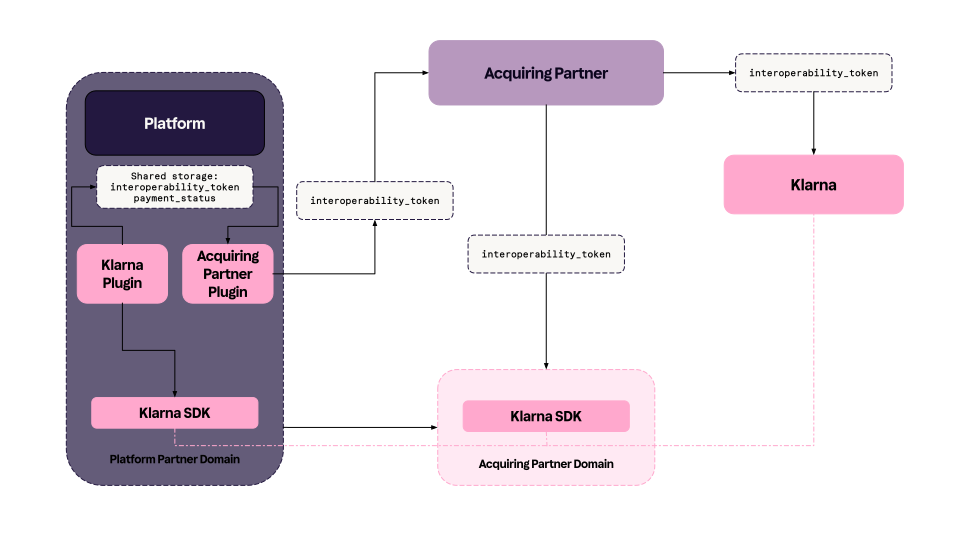
Use cases
There are two main use cases for interoperability on platforms that cover for multiple experiences from the customer’s perspective. Interoperability user journeys are detailed here, but will be commented on shortly below to set the context for plugin interoperability.
Klarna Express Checkout
sequenceDiagram
autonumber
participant A as Customer
participant B as Partner
participant C as Klarna Plugin
participant D as Klarna
participant F as Acquiring Partner Plugin
B->>C: Enable Express Checkout
B->>F: Enable Klarna payments in AP plugin
C->>D: Load the Klarna web SDK
C->>D: Initiate the web SDK
C->>A: Display Klarna Express button
A->>C: Click on Klarna Express button
C->>D: Initiate payment request
C->>A: Start Klarna purchase journey
A->>D: Complete Klarna purchase journey
D->>C: Payment request completed event
Note over D,C: interoperability_token
C->>C: Store interoperability data<br>in session storage
C->>F: Send hook to complete payment
Note over C,F: Share interoperability data points
F->>D: Authorize payment
Note over F,D: Share interoperability data points
D->>F: Approve payment
F->>A: Redirect customer to order confirmation page
One-step checkout
In an Express Checkout flow, the customer expects a fast and seamless transition from the Klarna payment experience to the store’s confirmation page.
When a Partner enables Klarna Express Checkout through the Klarna plugin, and Klarna is also activated as a payment method through the Acquiring Partner plugin, the two plugins must maintain seamless interoperability.
- The Klarna plugin handles the Web SDK, Klarna button, and initialization.
- The Acquiring Partner plugin finalizes the purchase flow by creating the platform-specific order using data retrieved via the interoperability token, and then redirects the customer to the confirmation page.
If a two-step Express Checkout flow is used instead, the Acquiring Partner plugin must redirect the customer to the checkout page, showing only Klarna (since the payment is already initiated from the customer’s perspective). The plugin must then authorize the payment once the customer completes the order.
Failure to handle this correctly causes a broken purchase flow, forcing the customer to repeat checkout and payment authorization.
Multi-step checkout
In setups where the store has complex shipping, discount, or loyalty program logic, the customer first lands on the checkout page.
After completing the Klarna Express Checkout purchase flow, the Acquiring Partner plugin must redirect the customer to the checkout page with Klarna shown as the only payment option (authorization already completed). In this flow, the Klarna hook for Klarna Express Checkout includes the parameter
intent: preparation.Error handling and fallback flow
If an error occurs, for example, when the Klarna plugin hook does not include
payment_ , the Acquiring Partner plugin must always redirect the customer back to the cart or checkout page.During this fallback, the plugin must retrieve the interoperability token to ensure Klarna is presented as expected.
This prevents scenarios where the Klarna dialog closes unexpectedly after the Express Checkout process begins, leaving the customer uncertain about their order status.
Redirecting to the checkout page as a fallback also helps reduce abandoned purchases.
By consistently retrieving the interoperability token whenever the customer enters the checkout page, the integration can prevent multiple authorizations for the same purchase.
Optional approach (not currently implemented)
An alternative fallback solution involves the Klarna plugin monitoring completion of the Express Checkout order via Klarna webhooks, specifically:
payment.If no completion event is received within 5 seconds, the Klarna plugin could redirect the customer to the cart page.
Alternatively, the Acquiring Partner plugin could expose a hook triggered when the Klarna Express Checkout transaction completes, which the Klarna plugin would listen to. If no event occurs within 5 seconds, the Klarna plugin would again redirect to the cart page.
This approach introduces timing risks, particularly on slower platforms such as Adobe or WooCommerce, which may lead to conflicting redirects initiated by both plugins.
Once redirected, the Acquiring Partner plugin retrieves the interoperability token from session storage, avoiding additional payment authorizations.
For both fallback options, the Klarna plugin must notify the Acquiring Partner plugin whenever the customer is redirected to the cart page.
Other flows (Prequalification through On-site Messaging, Sign in with Klarna)
sequenceDiagram
autonumber
participant A as Customer
participant B as Partner
participant C as Klarna Plugin
participant D as Klarna
participant F as Acquiring Partner Plugin
%% --- Setup ---
B->>C: Enable On-site Messaging
B->>F: Enable Klarna payments
%% --- Prequalification ---
A->>B: Go to product page
C->>D: Load Klarna SDK
C->>D: Get OSM placement
D->>C: Return messaging / prequalification content
C->>A: Show messaging / prequalification
A->>D: Click "Check purchase power"
D->>A: Start prequalification
A->>D: Complete prequalification
D->>C: Send approval event
C->>A: Update messaging with approval
D->>C: On token update event with latest interoperability_token
C->>C: Stores interoperability_token in platform storage
%% --- Checkout ---
A->>B: Navigate to checkout
F->>C: Retrieve interoperability token from session storage
F->>D: Get payment instructions
F->>D: Create payment request
F->>A: Display Klarna as preselected option
A->>D: Proceed payment with Klarna<br>as preselected and prequalified method
%% --- Authorization & Confirmation ---
F->>D: Authorize payment
Note over F,D: Share interoperability data points
D-->>F: Approve payment
F->>A: Redirect to confirmation page
During Prequalification (On-site messaging) or Sign in with Klarna, customers expect their saved or preselected payment options to appear automatically when they continue with Klarna at checkout.
To enable this behavior, the Klarna plugin—which manages both On-site messaging and Sign in with Klarna—must pass an interoperability token to the Acquiring Partner plugin.
The Acquiring Partner then retrieves the token from platform-specific storage and uses it to present Klarna to the customer through the Klarna Web SDK or the presentation API, ensuring a consistent experience.
Implementation options
Both server-side and client-side implementations are available for interoperability token handling:
- Server-side implementation: Mandatory. Ensures secure, consistent token exchange and storage.
- Client-side implementation: Optional. Recommended for enhanced performance or user experience.
When the Acquiring Partner plugin integrates the Klarna Web SDK, the interoperability token can be retrieved automatically, provided the SDK is loaded on the same domain.
If the Acquiring Partner loads the Klarna Web SDK inside an iframe or redirects to a different domain, additional handling must be implemented to retrieve and pass the token correctly.
Definitions
This Wiki page presents some new concepts that will be used to enable interoperability on platforms. The main concepts will be explained shortly below for a generic understanding of them before getting into details for each platform.
- Hook: In order to facilitate a seamless transition for Express Checkout in cases where it is integrated via the Klarna plugin, but the payment request is created by the Acquiring Partner, notifications will be implemented. These vary somewhat between the different platforms, in order to accommodate for the differences in them, and to utilize existing mechanisms where possible.
- Observer: In order to listen to the notification from the Klarna plugin, the Acquiring Partner plugin will need to use a platform mechanism to get updates from the hook that the Klarna plugin emits that includes their unique Acquiring Partner Key and the interoperability token.
- Storing the token: Klarna will always store the interoperability token in the appropriate and below detailed way in the platform storage.
- Retrieving the token: The Acquiring Partner plugin is always expected to retrieve the Klarna interoperability token at the point of customer entry to checkout, in order to present Klarna in the expected way. If there is no interoperability token in the session storage, the customer has not interacted with any Klarna products before checkout.
- Acquiring Partner Key: Each Acquiring Partner will have a unique key. In some cases, an Acquiring Partner may have several to distinguish multiple different plugins on the same platform. This is used by the Klarna plugin in order to ensure the communication is directed at the correct Partner, in particular in cases where a merchant might have enabled Klarna via several Acquiring Partners. Using this key, Klarna can signal which Acquiring Partner the notification is directed toward, to ensure the transaction is finalized by the same Acquiring Partner the merchant has added credentials for in the Klarna plugin settings. The Acquiring Partner key is not retrievable programmatically, but is instead shared by the Klarna Delivery Manager. Currently this can be found here.
What data will the Klarna plugin pass or store for the Acquiring Partner?
The Klarna plugin will pass the following transactional data to the Acquiring Partner:
| Data point | Purpose |
|---|---|
interoperability_ | The interoperability_token is a krn that ensures a seamless consumer journey across different integrations. It contains all necessary information, including expiration details, which are set by Klarna, however a Partner can issue a new token within a session. Expired or invalid tokens are ignored for API resilience, and Acquiring Partners should not run any validation on the token. |
interoperability_ | The interoperability_data is a serialized JSON object that adheres to Klarna’s Interoperability Data Schema, allowing Partners and Acquiring Partners to send additional data points to improve conversion rates and enhance the customer experience. When available, this data should be forwarded in all API interactions related to accepting payments, tokenizing a consumer, initiating a checkout flow, and post-purchase operations such as captures and refunds. |
interoperability_ | To signify if a customer completed the Klarna express checkout flow. |
Building a compliant payment selector
The Acquiring Partner plugin is expected to present Klarna as detailed in Building the payment form documentation.
In cases where the platform owns the payment method selector, such as in the case of Woo Payments, the integration will differ somewhat due to a third party being involved.
Platform specific guidance
Below, each of the main concepts for interoperability will be detailed for each top platform.
Adobe Commerce
Hook (Klarna plugin)
When a customer has completed a purchase through the Klarna express checkout, the Klarna plugin both saves the interoperability token to the checkout session, but also dispatches an event for the Acquiring Partner to observe. The event from the Klarna plugin is as follows:
PHP
1
2
3
4
5
6
$this->eventManager->dispatch(
'klarna_interoperability_ready_event', [
'interoperability_token' =>$interoperabilityToken,
'interoperability_acquirer_key'=> $interoperabilityAcquirerKey
]);
Observer (Acquiring Partner plugin)
The Acquiring Partner plugin is expected to add an observer in order to listen to these events and act when their acquirer key is present in these. The below is a proposal on how to add an observer for listening to the interoperability ready event:
PHP
1
2
3
4
5
6
7
8
9
10
<!-- ModuleName/etc/frontend/events.xml -→
<!-- Setup an observer that listens to the “klarna_interoperability_handover” event -→    <event name="klarna_interoperability_ready_event">
       <observer name="observer_name" instance="Project\ModuleName\Observer\ExampleObserver" />
   </event>

// ModuleName/Observer/ExampleObserver.php
   public function execute(\Magento\Framework\Event\Observer $observer): void
   {

$interoperabilityTokenAcquirerKey = $observer->getData('interoperability_acquirer_key');The Acquiring Partner plugin is here expected to create the payment request and redirect the customer to the confirmation page.
Storing the token (Klarna plugin)
The interoperability token is stored by Klarna in the following way in the Adobe Commerce checkout session:
PHP
1
2
$this->checkoutSession->setKlarnaOfficialInteroperabilityToken($interoperabilityToken);
It is only stored on the cart and checkout pages.
Retrieving the token (Acquiring Partner plugin)
The Acquiring Partner is expected to always retrieve the Klarna interoperability token, if present, and use it to present Klarna in the expected way. This should be done when the customer is entering the checkout, in order to present the Klarna payment option in the expected way. Retrieving the token could be done in the following way:
PHP
1
2
3
4
5
6
7
8
9
10
public function getInteroperabilityToken() {
  return $this->checkoutSession->getKlarnaOfficialInteroperabilityToken();
}

public function getInteroperabilityData() {
  return $this->checkoutSession->getKlarnaOfficialInteroperabilityData();
}

public function getInteroperabilityPaymentState() {
return $this->checkoutSession->getKlarnaOfficialInteroperabilityPaymentState();Prestashop
Hook (Klarna plugin)
When a customer has completed a purchase through the Klarna express checkout, the Klarna plugin both saves the interoperability token to the checkout session, but also dispatches an event for the Acquiring Partner to observe. The Klarna module emits the interoperability token through both frontend and backend channels:
JavaScript Event (Frontend)
JAVASCRIPT
1
2
3
4
5
prestashop.emit('updateKlarnaInteroperabilityToken', {
klarna_interoperability_token: token,
Klarna_order_state: order_state,
});
PHP hook (backend)
PHP
1
2
3
4
Hook::exec('updateKlarnaInteroperabilityToken', [
    'klarna_interoperability_token' => $token,
]);
As previously stated, backend is mandatory to implement, while frontend is optional.
Observer (Acquiring Partner)
To access the Klarna interoperability token, the Acquiring Partner module needs to listen for a custom event emitted by the Klarna module, called “updateKlarnaInteroperabilityToken”. This interoperability mechanism is currently available on the frontend (JavaScript, PrestaShop event emitter) and backend (PHP, PrestaShop hooks). In the backend, modules could listen to the updateKlarnaInteroperabilityToken hook to receive the Klarna token when it's available.
1. Registering the Hook
The hook should be registered in your module’s install() method:
PHP
1
2
3
4
5
6
public function install()
{
    return parent::install()
        && $this->registerHook('updateKlarnaInteroperabilityToken');
}
2. Implementing the Hook Listener
Listen for the hook using a method named hookUpdateKlarnaInteroperabilityToken in your module’s main class:
PHP
1
2
3
4
5
6
7
8
public function hookUpdateKlarnaInteroperabilityToken($params)
{
    if (isset($params['klarna_interoperability_token'])) {
        $klarnaInteroperabilityToken = $params['klarna_interoperability_token'];
        // Use the token as needed
    }
}
Storing the token (Klarna)
In this example you can see how the interoperability_token is stored by the Klarna plugin in the session storage.
Retrieving the token (Acquiring Partner)
The field in the session storage is named klarna_interoperability_token and will be accessible as follows:
JAVASCRIPT
1
2
3
4
sessionStorage.getItem('klarna_interoperability_token')
sessionStorage.getItem('klarna_interoperability_data')
sessionStorage.getItem('klarna_interoperability_payment_state')
Salesforce Commerce Cloud
Hook (Klarna)
The SFCC plugin listens for the updated interoperability token from the Klarna Web SDK. When received, it sends a POST request to the Acquiring Partner observer with the following payload:
payload: {
	interoperabilityToken: <token_value>
paymentState: <payment_state>
}
Observer (Acquiring Partner)
The AP must expose an endpoint that listens for a POST request from the SFCC server containing the token. The token will be sent in the request in the following JSON format:
payload: {
	interoperabilityToken: <token_value>
paymentState: <payment_state>
}
The AP should process this token and prepare their plugin to use it when the shopper reaches the checkout.
Storing the token (Klarna)
Once the token is received on the SFCC client, it is forwarded to the server and stored in the session as follows:
session.privacy.klarna_interoperability_token = <interoperability_token>
This makes it available for later retrieval by the AP.
Retrieving the token (AP)
The Acquiring Partner is expected to retrieve the Klarna interoperability token and use it to present Klarna at checkout. Retrieving the token on SFCC can be done in the following way:
var interoperability_data = session.privacy.klarna_interoperability_data
var interoperability_token = session.privacy.klarna_interoperability_token
var payment_state = session.privacy.klarna_interoperability_payment_state
Woo
Hook (Klarna plugin)
When a customer has completed a purchase through the Klarna express checkout, the Klarna plugin both saves the interoperability token to the session, but also dispatches an action for the Acquiring Partner to act on. The action from the Klarna plugin is as follows:
PHP
1
2
do_action( 'kec_process_order', $wc_order, $interoperability_token, $interoperability_data, $interoperability_payment_state, $other_klarna_data );
Observer (Acquiring Partner plugin)
The Acquiring Partner plugin should add an observer to ensure they are notified on actions. This could look the following way:
PHP
1
2
add_action('kec_process_order', 'psp_kec_process_order', 10, 3);function psp_kec_process_order( $wc_order, $interoperability_token, $interoperability_data, $interoperability_payment_state, $other_klarna_data ) { // PSP Logic here... // ... // ... wp_safe_redirect( $psp_redirect_url );}
Storing the token (Klarna)
The interoperability token will be stored like this in the session for the WooCommerce customer:
PHP
1
2
WC()->session->set( 'klarna_interoperability_token', $token );
There is also an option to set this in the frontend, if this would be preferable. Then it can be read with the code:
JAVASCRIPT
1
2
const token = window.klarna_interoperability_token; or const token = klarna_interoperability_token;
Retrieving the token (Acquiring Partner plugin)
The interoperability token can be retrieved by reading it using the WooCommerce session with the same key as we set it with, using the following code:
PHP
1
2
$token = WC()->session->get( 'klarnainteroperability_token' );
Shopify
For Shopify, interoperability as it stands for other plugins, can not be enabled. We would however like to ensure the Klarna On-site messaging app can be used also by PSP merchants.
Currently we have logic in place that automatically connects the account based on the url - meaning a PSP merchant can already use the Klarna OSM app. There are, however, cases where a merchant has several accounts with Klarna, and we therefore can not connect automatically as we do not know which one to connect to. In such cases merchants are currently asked to enter their Klarna merchant ID. As PSP merchants do not have such, there is currently no way for them to do this. We would like to, in the future, expose an identifier to them (perhaps the client identifier), that they could then use as a fallback option in cases where the automatic connection does not work. No work for this will be needed on your side, other than an agreement on what such an identifier would be.
Related articles
Jump to section...