

Set up your webhooks
Integrate Klarna Webhooks to receive real-time business event notifications, ensuring secure, responsive, and well-maintained backend operations.
8 min read
Klarna webhooks enable Partner applications to receive real-time business event notifications from the integrated Klarna product suite, allowing the backend systems to respond promptly.
Webhooks are customizable, and all Klarna APIs include a standard set of webhook events to subscribe to. For a list of supported event types, refer to the events categories section.
Consult the API reference for a complete description of the request body parameters.
for a complete description of the request body parameters.Getting started with Klarna webhooks
To maintain seamless integration with Klarna's payment services and ensure systems are equipped to handle Klarna notifications effectively, follow these steps:
1. Establish a secure endpoint
- Expose an HTTPS endpoint on the Partner's server designed to receive webhook notifications.
- Ensure only HTTPS endpoints are used and that a valid SSL certificate is in place.
- Expose the endpoint on port 443 or 8443 only. Requests sent to other ports won't be delivered, as webhook traffic is routed through a proxy with restricted port support.
2. Endpoint Configuration
- Configure a single endpoint for multiple event types or set up separate endpoints for each event type based on Partner preferences. To ensure accurate event delivery and maintain compatibility with the latest updates, Partners must always request events from the most recent version of the API. This is done by specifying the appropriate
event_in the request, which ensures alignment with Klarna's current event structure and data standards.version
3. Receive Notifications
- Ensure the endpoint is reachable over HTTPS on port 443 or 8443.
- Verify HMAC Signature to ensure data security and integrity.
- Store the webhook event data durably, keyed on
metadata., before acknowledging the delivery. Sample webhook requestevent_ id
JSON
1
2
3
4
5
6
7
8
9
10
{
"metadata": {
"event_type": "event_type",
"event_id": "unique event UUID",
"event_version": "v2",
"occurred_at": "2025-02-28T12:00:00Z",
"subject_account_id": "Partner account ID",
"recipient_account_id": "Partner Account ID",
"product_instance_id": "product-specific ID",
"webhook_id": "webhook-specific ID",4. Acknowledge the webhook
Klarna webhooks are asynchronous notifications, so the delivery is acknowledged first and the work it triggers happens afterwards. Handle each notification in this order:
- 1.Verify the HMAC signature, and reject anything that fails verification.
- 2.Persist the event durably, keyed on
metadata., so the record survives a restart of the Partner's service.event_ id - 3.Respond with an HTTP status code of 200, 201, 202, or 204 as soon as the event is persisted.
204 No Contentis a good fit, since no response body is expected. - 4.Run Payment Authorization and any other business logic asynchronously, after the response is sent.
Because
metadata. is stable across retries, a delivery carrying an already-recorded event_ is a duplicate. Acknowledge it with a 2xx status code and discard it. Don't process it again or respond with 409 Conflict, because Klarna treats every non-2xx response as a failed delivery.Failure to respond, or a response with any other status code, triggers Klarna's retry mechanism. Keeping authorization and downstream processing off the acknowledgment path means slow work can't turn a delivered notification into a retry.
Synchronous callbacks work differently
This contract covers asynchronous Klarna webhooks. It doesn't apply to synchronous callbacks where Klarna expects a response payload in the same exchange. Those callbacks carry no
metadata envelope or event identifier, so compute the response and return it in the same round trip.5. Retry mechanism
Klarna retries notifications at increasing intervals upon failure (timeout or HTTP 4XX/5XX response codes). Klarna orchestrates these retries with progressively longer delays, which can extend up to 12 hours or until a successful response is received.
The retry schedule is structured as follows:
- First retry: 10 seconds after the initial failure.
- Second retry: 2 minutes later.
- Third retry: 15 minutes later.
- If the issue persists, retries are scheduled at 3 hours, 6 hours, and finally 12 hours for the last attempt.
This structured approach ensures multiple opportunities for notifications to succeed, enhancing the reliability of the communication between systems.
Handling failed notifications
If no successful response is received after the final retry attempt at 12 hours, the notification is considered permanently failed.
Manual processing of failed notifications
When the Partner resolves an issue on their side and needs additional assistance to receive the previously failed notification, contact Klarna support.
When webhook settings are modified during ongoing retries, these changes only apply to new notifications. When a triggered Klarna webhook fails to receive a response code of 200, 201, 202, or 204, it continues to retry using the old configuration until it either successfully communicates or reaches the 12-hour retry limit.
sequenceDiagram
participant A as KLARNA
participant B as DIRECT PARTNER
autonumber
A ->> B: Send webhook
Note over A, B: POST request will be sent to the URL of configured endpoint.<br/>POST https://{your-webhook-domain}/receive-hook
B ->> A: Acknowledge webhook
par Acknowledged (2XX)
Note over A, B: Responses code 200, 201, 202 or 204 are expected to acknowledge webhook.
and Failed (Timeout,4XX,5XX)
par Retries
Note over A, B: The retry mechanism will try to deliver the notification for up to 12 hours or until a successful response.
A ->> B: Retry webhook
Note over A, B: Retries will contain same body and will be send to the same endpoint as the initial attempt.
end
end
Recommended for integration
To avoid disruptions and ensure a smooth transition, it is recommended to initiate and run a new webhook in parallel before discontinuing an older webhook. This strategy ensures that the new settings are fully operational and effective, maintaining seamless notification delivery during the transition period.
Create and manage signing keys
To securely receive webhook notifications, Partners must generate and attach signing keys to webhooks. There are two options to create signing keys:
- Using the createSigningKey endpoint.
- In the Klarna Partner Portal.
This procedure ensures the authenticity of incoming notifications can be verified. Klarna signs each notification using the designated signing key before dispatch. Both the signature and its identifier are included in the notification, enabling Partners to confirm its validity. When configuring a new webhook, specify the signing key to be used.
Integration requirement
After generating signing keys, make sure to securely store them immediately. These keys cannot be retrieved again for webhook validation purposes.
Verify HMAC signature to ensure data security and integrity
- 1.Compute the signature:
- Use the raw JSON sent in the HTTP request body.
- Use the
Klarna-Signing-Key-Idfrom the header to identify the appropriate signing key. - Apply HMAC-SHA256 to the raw HTTP request body with the corresponding signing key, then encode the digest as lowercase hexadecimal (64 characters). Do not use Base64.
- 1.Parse
Klarna-Signature:
- Extract the "
Klarna-Signature" from the HTTP headers of the received request.
- 1.Compare signatures:
- Match the computed signature against the
Klarna-Signaturefrom the HTTP headers.
- 1.Validate the request:
- Confirm the request's authenticity if the signatures align. If not, reject the request with an HTTP
400 Bad Requestresponse to indicate potential tampering.
Currently a maximum of 50 signing keys per account are supported. When new keys are required, use the deleteSigningKey to disable the old keys.
to disable the old keys.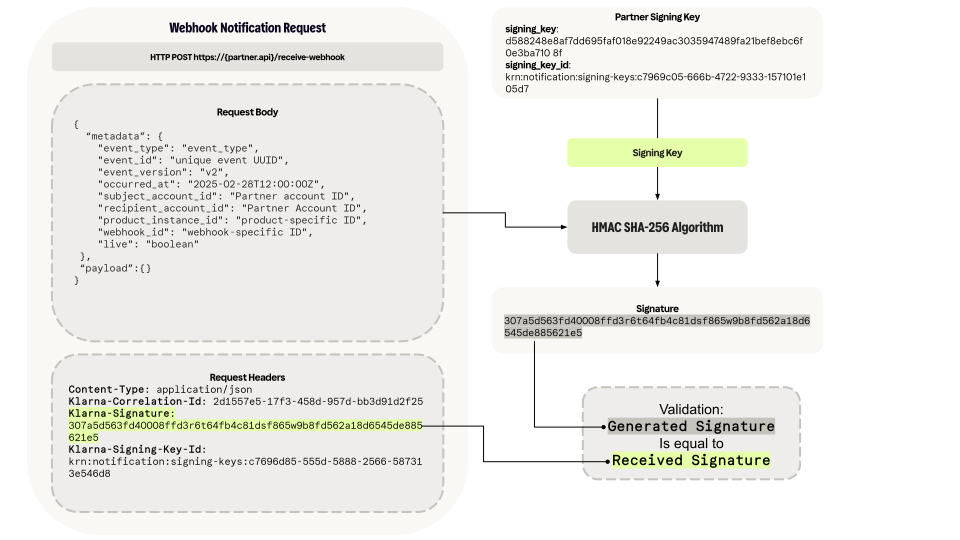
To handle changes such as the rotation of signing keys, it is recommended to support multiple signing keys during the transition. The steps for key rotation involve:
- 1.Creating a new signing key.
- 2.Updating the recipient server to accept the new signing key.
- 3.Updating the webhook.
- 4.Validate the new signing key has been correctly implemented before
- 5.Remove the old signing key.
Consult the API reference for a complete description of the request body parameters.
for a complete description of the request body parameters.Create and manage webhooks
Create webhooks to receive notifications about configured events. These notifications are sent to the provided endpoint and signed with the corresponding signing key.
Wildcards can be used to set up the desired event types.
Webhook wildcards
By using a wildcard such as "*", all events that match the specified pattern will be included.
Example: with "payment.request.*", all events associated with payments are delivered, such as:
payment.request. state-change. submitted payment.request. state-change. in-progress payment.request. state-change. expired payment.request. state-change. completed payment.request. state-change. canceled payment.request. state-change. declined
Simulate and test webhooks
To test the webhook integration, Partners can simulate a webhook by manually triggering an event subscribed to. Provide the
webhook_, event_, and event_ for the webhook previously configured to endpoints on the Partner account.This feature is available in the test environment and is critical for ensuring the integration functions as expected before going live. By manually triggering webhooks, Partners can simulate any state change for a Payment Request instantly, bypassing the need to complete the Klarna Purchase Journey or wait for the request to expire.
In the test environment, when a simulated webhook is triggered, the endpoint generates a test event using dummy data that adheres to the schema of the specified event type. This approach ensures the system's response to various webhook events can be thoroughly tested and adjusted without affecting live data.
Sample webhook request
JSON
1
2
3
4
5
6
7
8
9
10
{
"metadata": {
"event_id": "b0e715e0-2ebd-462f-80f6-1366b4f9a4af",
"event_type": "payment.transaction.state-change.authorized",
"event_version": "v2",
"occurred_at": "2025-02-28T12:52:57.577790899Z",
"product_instance_id": "krn:partner:product:test:5cadd30a-c536-4230-8667-d3971fb7e7dd",
"webhook_id": "krn:partner:global:notification:webhook:bc266feb-ba9a-40d8-af77-ebe24166ae2d",
"live": false
},API & SDK references
Jump to section...