

Payment Tokenization for Server-side integration
Save a customer's Klarna payment method from the backend using the canonical Payment Request, Klarna Purchase Journey, token issuance flow. Step-by-step server-side implementation for Partners, with sample requests and responses for tokenization only and tokenization combined with an initial payment.
432 min read
Overview
Use this guide to save a customer's Klarna payment method from the backend without embedding the Klarna Web SDK in the checkout. Partners create a Payment Request that asks Klarna to issue a
customer_, redirect the customer to the Klarna Purchase Journey to collect consent, then either store the issued token (tokenization only) or finalize an initial Payment Transaction (tokenization combined with authorization).This page is the tokenization counterpart of Authorize a customer-initiated payment (server-side). It uses the same
createPaymentRequest, redirect, webhook, authorizePayment pattern, with one extra parameter (request_) that tells Klarna to issue a token alongside (or instead of) a Payment Transaction.For conceptual background on tokenization, scopes, and the customer-not-present authorization path, see the Payment Tokenization overview and the Customer Token resource.
What this guide covers
- A backend that creates a Payment Request with
request_and stores the resultingcustomer_ token payment_.request_ id - A redirect step from the checkout to the Klarna Purchase Journey.
- A webhook handler that processes
payment.and extracts either therequest. state-change. completed customer_(tokenization only) or thetoken klarna_(tokenization combined with authorization).network_ session_ token - For combined flows, a backend step that finalizes the Payment Transaction with authorizePayment
 .
. - Secure storage of the issued
customer_, ready to be reused on subsequent authorizations.token
Web SDK checkout alternative
When Klarna is embedded in the checkout via the Klarna Web SDK, follow Tokenization for hosted checkout pages and embedded elements instead. The SDK orchestrates the same underlying API calls, but launches the Klarna Purchase Journey in a popup or modal rather than via a full-page redirect.
Prerequisites
Before starting tokenization, ensure the following are in place:
- A valid Klarna Partner account with API credentials.
- Backend capability to receive and process Klarna webhooks. See Webhooks registration.
- A subscription to the
payment.webhook event.request. state-change. completed - A
return_on the Partner's domain where Klarna can redirect the customer after the Klarna Purchase Journey.url - A checkout, account-setup, or subscription-signup flow where the customer is present and able to provide consent for saving the payment method.
- A clear customer-facing consent mechanism that explains the token's intended use (subscription billing, on-demand re-authorization, wallet linking).
End-to-end flow
The flow is the canonical Partner Payment Request flow, with two branches that diverge after the customer completes the Klarna Purchase Journey:
- The Partner's backend calls createPaymentRequest with
request_(and, for the combined flow, ancustomer_ token amount) pluscustomer_.interaction_ config. method = HANDOVER - Klarna responds with a
payment_and arequest_ id payment_.request_ url - Redirect the customer's browser to the
payment_.request_ url - The customer authenticates with Klarna and approves the tokenization (and the initial payment, when one was requested) in the Klarna Purchase Journey.
- Klarna sends a
payment.webhook.request. state-change. completed - Branch on the scenario:
- Tokenization only: The webhook payload (and the Payment Request's
state_) carry the issuedcontext. klarna_ customer. customer_ token customer_. Tokenization is complete and no further API call is needed. Acknowledge the event as described in Step 3, then store the token and confirm the outcome as described in Step 5.token - Tokenization combined with authorization: The webhook payload carries a
klarna_. Call authorizePaymentnetwork_ session_ token with the Klarna Network Session Token in the Klarna-Network-Session-Tokenheader to create the initial Payment Transaction. The response includes bothcustomer_(the issued token) andtoken_ response payment_(the payment outcome).transaction_ response
sequenceDiagram
autonumber
participant C as Customer
participant P as Partner
participant K as Klarna
C->>P: Initiate tokenization (subscription signup, save card, free trial)
P->>K: createPaymentRequest (request_customer_token, customer_interaction_config=HANDOVER)
K->>P: payment_request_id, payment_request_url, state=SUBMITTED
P->>C: Redirect to payment_request_url
C->>K: Authenticate and approve tokenization in the Purchase Journey
K->>C: Redirect to return_url
K-->>P: Webhook payment.request.state-change.completed (state=COMPLETED)
alt Tokenization only
Note over K,P: Payload carries customer_token in klarna_customer
P->>P: Store customer_token securely
P->>C: Confirm tokenization success
else Tokenization combined with authorization
Note over K,P: Payload carries klarna_network_session_token
P->>K: authorizePayment with Klarna-Network-Session-Token header
alt APPROVED
K->>P: customer_token_response + payment_transaction_response (APPROVED)
P->>P: Store customer_token and payment_transaction_id
P->>C: Show success page
else DECLINED
K->>P: customer_token_response + payment_transaction_response (DECLINED)
Note over P: Token may still be issued, inspect customer_token_response
P->>C: Show alternative payment page
end
end
From the Partner's backend, call createPaymentRequest with the tokenization context and a
with the tokenization context and a customer_ describing how Klarna should hand the customer over to the Klarna Purchase Journey. For server-rendered checkouts, set method = HANDOVER and provide a return_ (and optionally an app_ for native apps).The request structure depends on whether the payment method is being saved alone, or saved together with an initial payment.
Use this shape to save a payment method without an immediate charge (for example, a free trial, wallet linking, or "save card for later"). Include
request_ and omit request_ and amount.Include at minimum:
| Parameter | Required | Description |
|---|---|---|
currency | Yes | Currency in ISO 4217 format. The token's currency context for future transactions. |
request_ | Yes | Token scope. Use payment:customer_ for subscription / scheduled billing, payment:customer_ for on-demand / one-click. See token scopes. |
request_ | Recommended | The Partner's own reference for the token, used for reconciliation and to link the token to a customer record. |
customer_ | Yes | Set to HANDOVER for the redirect-based server-side flow. The customer must always provide consent for tokenization, so HANDOVER is mandatory here. |
customer_ | Yes | URL on the Partner's domain where Klarna redirects the customer after the Klarna Purchase Journey. |
customer_ | Recommended (mobile) | Application URL scheme that returns the customer to the Partner's native app after a mid-flow handover to a third-party app (such as a bank app or the Klarna app). Not a substitute for return_. |
payment_ | Recommended | The Partner's own reference for the Payment Request, used for reconciliation. |
supplementary_ | Recommended | Additional context describing the tokenization use case. Significantly improves underwriting and powers customer communication. See supplementary purchase data. |
supplementary_ | Conditional | Required when the token will be used for subscription authorizations (scope payment:customer_). Include subscription reference, billing plans, and free-trial status. |
supplementary_ | Conditional | Required when the token will be used for on-demand authorizations (scope payment:customer_). Describes the service the token will be used for. |
supplementary_ | Recommended | Customer context (name, email, address). Used by Klarna to simplify sign-up and for fraud assessment. |
acquiring_ | Conditional | Routes the Payment Request to a specific Payment Account or Payment Acquiring Account. Required when the Partner's Klarna setup includes more than one account. See Payment Request resource. |
Sample request
SHELL
1
2
3
4
5
6
7
8
9
10
curl https://api-global.test.klarna.com/v2/payment/requests \
  -H 'Authorization: Basic <API key>' \
  -H 'Content-Type: application/json' \
  -d '{
        "currency": "USD",
        "payment_request_reference": "partner-tokenization-reference-1234",
        "request_customer_token": {
          "scopes": ["payment:customer_not_present"],
          "customer_token_reference": "subscription-user-12345"
},Sample response
A successful call returns the created Payment Request in
SUBMITTED state with the payment_ to redirect the customer to in Step 2:JSON
1
2
3
4
5
6
7
8
9
10
{
"payment_request_id": "krn:payment:us1:request:bcb5ca7d-9ad4-4cf1-9e34-7311f0d3ab02",
"payment_request_reference": "partner-tokenization-reference-1234",
"currency": "USD",
"state": "SUBMITTED",
"state_context": {
"customer_interaction": {
"method": "HANDOVER",
"payment_request_id": "krn:payment:us1:request:bcb5ca7d-9ad4-4cf1-9e34-7311f0d3ab02",
"payment_request_url": "https://pay.test.klarna.com/na/requests/2cb914b0-[...]/start"Custom Payment Request expiry
Optionally set
customer_ to override the default 3-hour Payment Request lifetime. See Custom Payment Request expiry.Integration requirement
Token scope selection is critical
The token scope must match the intended re-authorization pattern:
payment:customer_is for on-demand re-authorizations where the customer is present.present payment:customer_is for unattended scheduled authorizations.not_ present
Klarna issues exactly one scope per token, and it cannot be changed later. See the token scopes guidance for help choosing.
Redirect the customer to the
payment_ returned in Step 1. The Klarna Purchase Journey lets the customer authenticate with Klarna (login, one-time passcode, biometrics), confirm tokenization consent, and (for combined flows) approve the initial payment.On completion, Klarna redirects the customer back to the
return_ (or app_ on mobile) provided in customer_. For tokenization-only flows, the issued customer_ is delivered via the webhook (Step 3). For combined flows, Klarna also issues a klarna_ used to finalize the Payment Transaction in Step 4.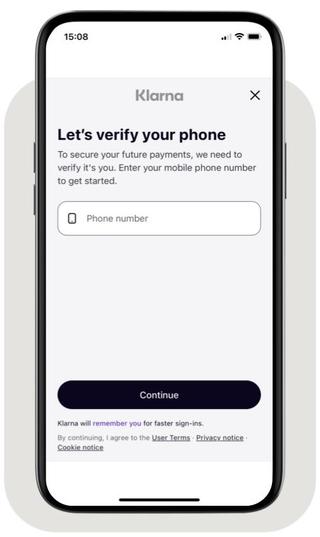
Phone collection in the Klarna Purchase Journey
Return URLs
The
return_ and app_ set inside customer_ tell Klarna where to send the customer after they complete or stop the Klarna Purchase Journey.return_
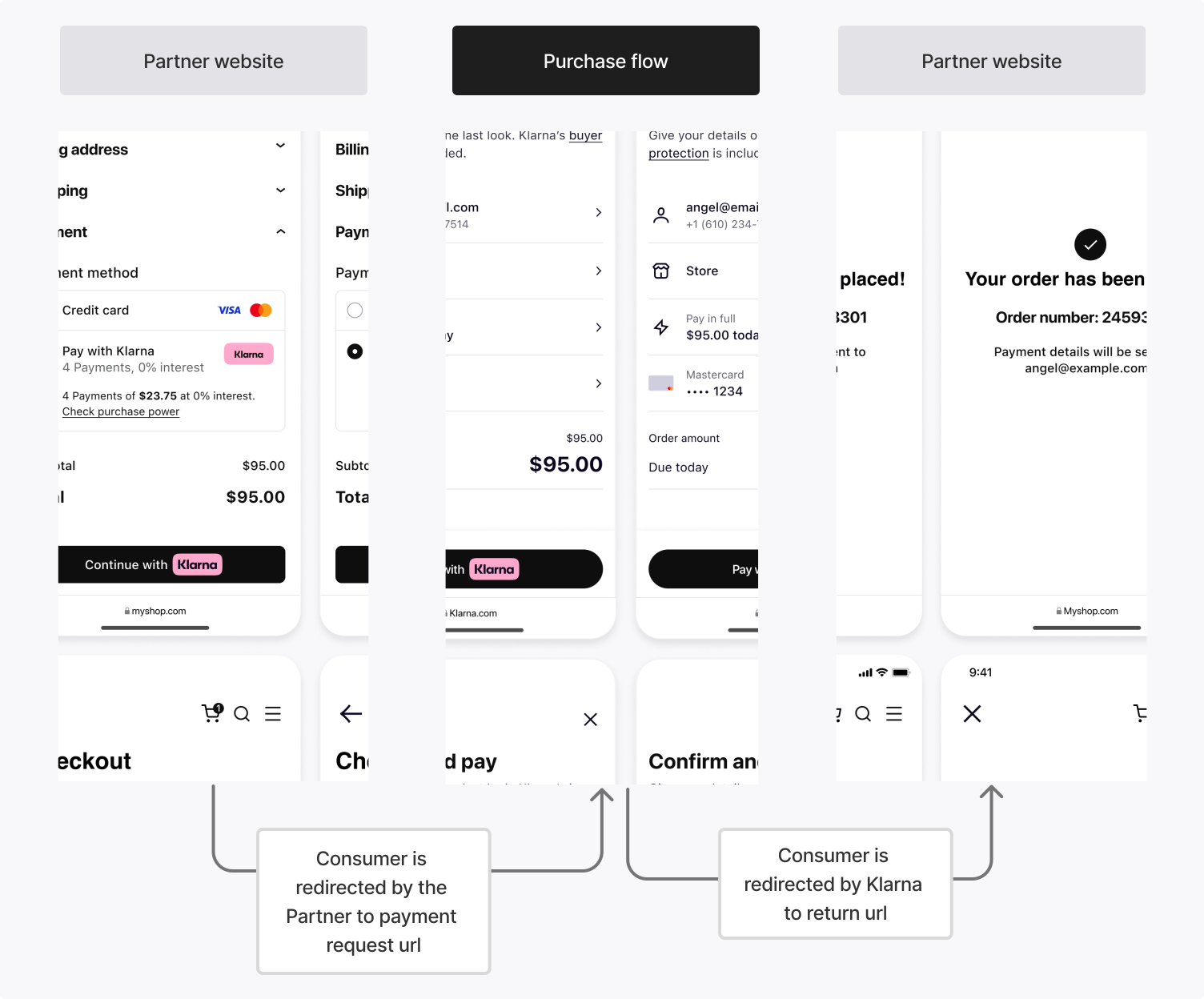
When the Klarna Purchase Journey is launched in a web environment, Klarna redirects the customer to the
return_ after they finish, whether they complete or stop the flow.app_
On mobile, the customer may be redirected to a third-party app (such as a bank app) or the Klarna app during the Klarna Purchase Journey. The
app_ brings the customer back to the Partner's mobile app when this happens.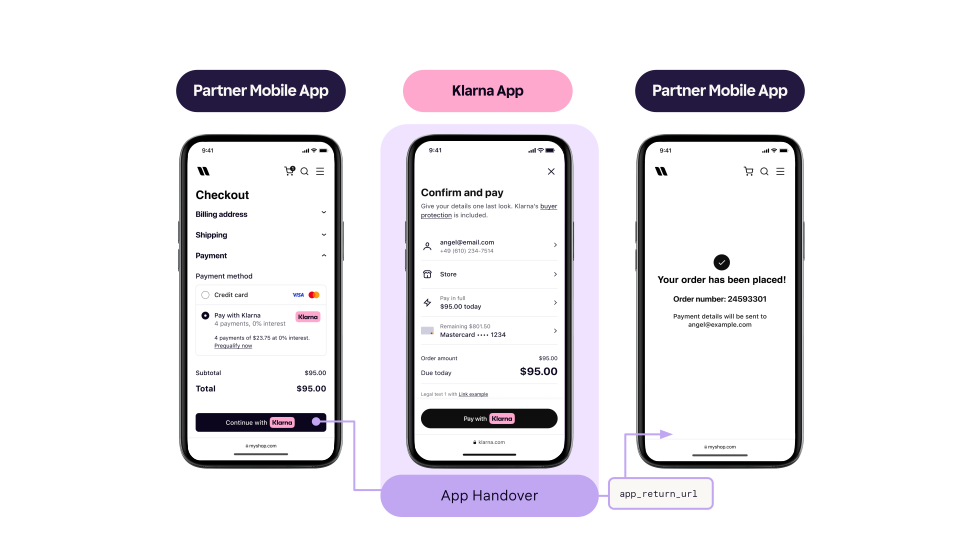
Register a URL scheme (for example,
partnerapp:/) that resumes the tokenization flow. Klarna invokes this URL after the customer completes a native app-based step, such as biometric authentication or Klarna app login. Resume the mobile app in its last state without applying state changes or deep link navigations.Interaction scenarios
The
return_ and app_ are not mutually exclusive. Depending on the device and environment, either or both may be triggered:| Scenario | Description |
|---|---|
| Pure web flow | The customer starts the Klarna Purchase Journey in a desktop browser. After completing the flow, Klarna redirects them to return_. |
| App-to-app flow | The Partner's native app opens the Klarna Purchase Journey using a universal link. When the Klarna app is installed, the customer goes directly into it. After completion, Klarna redirects them to app_. |
| WebView flow with app handover | The Partner's native app starts the Klarna Purchase Journey in a System WebView. When the customer must authenticate via an external banking app, app_ returns them to the Partner's app mid-flow. They then resume in the WebView and, on completion, are redirected to return_. |
Once the customer approves tokenization in the Klarna Purchase Journey, Klarna transitions the Payment Request to
COMPLETED and notifies the Partner via webhook. The payload differs by scenario.Klarna provides two methods to retrieve the tokenization outcome. Subscribing to the webhook event is required and may be combined with reading the Payment Request as a fallback for resilience.
Method: Subscribe to the payment. webhook (required)
Klarna sends this event when the Payment Request reaches the
COMPLETED state, indicating that the customer has approved tokenization. Subscribe via the Webhooks registration guide.The webhook payload carries the issued
customer_ directly under klarna_. Tokenization is complete at this point. No further API call is needed. Acknowledge the event before storing the token or confirming the outcome to the customer. See Acknowledge the event before storing the token or finalizing.Sample payload
JSON
1
2
3
4
5
6
7
8
9
10
{
  "metadata": {
    "event_type": "payment.request.state-change.completed",
    "event_id": "d9f9b1a0-5b1a-4b0e-9b0a-9e9b1a0d5b1a",
    "event_version": "v2",
    "occurred_at": "2026-04-01T16:55:17Z",
    "correlation_id": "2d1557e8-17c3-466c-924a-bbc3e91c2a02",
    "subject_account_id": "krn:partner:global:account:test:HGBY07TR",
    "recipient_account_id": "krn:partner:global:account:test:LWT2XJSE",
"product_instance_id": "krn:partner:product:payment:ad71bc48-8a07-[...]",Integration requirement
The
klarna_ is valid for only 1 hour and must be used within this time frame to finalize the Payment Transaction.Acknowledge the event before storing the token or finalizing
Handle
payment. in two stages. In the webhook handler, verify the event, persist the payload — the customer_ and, for combined flows, the klarna_ — durably against metadata., and return a 2xx response immediately. Run everything that follows asynchronously, after the acknowledgment is sent.Don't do any of the following before the acknowledgment:
- Call authorizePayment in Step 4.
- Register the
customer_as a reusable credential in the systems that charge it, as described in Step 5.token - Confirm the saved payment method to the customer.
Recording the payload is part of the acknowledgment; propagating the token to the systems that charge it is not.
When an event arrives with a
metadata. you have already recorded, confirm that it is recorded and return a 2xx response without repeating the work. Set up your webhooks defines the accepted acknowledgment responses and the retry schedule Klarna applies when one doesn't arrive.Method: Read the Payment Request (optional fallback)
As a fallback (for example, when the webhook is delayed or the handler missed it), call readPaymentRequest. Once the Payment Request reaches the
. Once the Payment Request reaches the COMPLETED state, both the customer_ and (for combined flows) the klarna_ are available in state_.Sample response
JSON
1
2
3
4
5
6
7
8
9
10
{
  "payment_request_id": "krn:payment:us1:request:bcb5ca7d-9ad4-4cf1-9e34-7311f0d3ab02",
  "payment_request_reference": "partner-tokenization-reference-1234",
  "state": "COMPLETED",
  "previous_state": "IN_PROGRESS",
  "state_context": {
    "klarna_customer": {
      "customer_token": "krn:partner:us1:test:identity:customer-token:Rt4iBjqKBM[...]",
      "customer_token_reference": "subscription-user-12345"
}Tokenization-only flow complete
Tokenization-only flow: complete. When only a token was requested (no
amount), tokenization is complete now. Skip Step 4 and go straight to Step 5: Store the customer token.This step applies only to the Tokenization combined with authorization flow. Tokenization itself is already complete at the end of Step 3. What remains is to create the initial Payment Transaction using the Klarna Network Session Token.
Call authorizePayment with the
with the klarna_ in the Klarna-Network-Session-Token request header. Klarna creates the Payment Transaction and confirms the issued customer_ in the same response.The customer's selected payment method is carried by the Klarna Network Session Token, so
payment_ is not required. Use the same currency, amount, and supplementary_ sent on the Payment Request. Significant differences may cause Klarna to require re-confirmation.Because the customer just completed the Klarna Purchase Journey, Klarna may still ask for a step-up at authorization. Include
step_ to make recovery possible; without it, borderline cases return DECLINED instead of STEP_.Include at minimum:
| Parameter | Required | Description |
|---|---|---|
Klarna-Network-Session-Token (header) | Yes | The Klarna Network Session Token received in Step 3. |
currency | Yes | Same currency used in the Payment Request. |
request_ | Yes | Same amount used in the Payment Request. |
request_ | Recommended | The Partner's own reference for the Payment Transaction, used for reconciliation. |
request_ | Yes | Same scope requested on the Payment Request. Required so Klarna confirms the token under the same scope. |
request_ | Recommended | Same reference used on the Payment Request. |
supplementary_ | Recommended | Same supplementary data sent on the Payment Request. |
step_ | Recommended | Opts in to the STEP_ outcome so the customer can complete a step-up Klarna Purchase Journey when Klarna's risk signals require additional interaction. Set customer_ and provide a return_ (and optionally app_ for native apps). Without it, borderline cases return DECLINED. |
acquiring_ | Conditional | Routes the Payment Transaction to a specific Payment Account or Payment Acquiring Account, and optionally requests the settlement currency. Use the same routing fields set on the Payment Request. |
Sample request
SHELL
1
2
3
4
5
6
7
8
9
10
curl https://api-global.test.klarna.com/v2/payment/authorize \
  -H 'Authorization: Basic <API key>' \
  -H 'Content-Type: application/json' \
  -H 'Klarna-Network-Session-Token: krn:network:us1:test:session-token:eyJhbGciOiJFU...' \
  -d '{
        "currency": "USD",
        "request_payment_transaction": {
          "amount": 1999,
          "payment_transaction_reference": "subscription-first-payment-001"
},Integration requirement
When the
klarna_ has expired (1-hour validity) or the payment context differs significantly from the original Payment Request, the call returns DECLINED. The customer_ may still be issued, so always inspect customer_ independently of the payment result.Handle the authorization result
Klarna returns response objects matching what was requested: a
customer_ for the token, and a payment_ for the initial payment. The two are independent. A DECLINED payment does not automatically mean the token was not issued.Result (payment_) | Description | Next steps |
|---|---|---|
APPROVED | The initial Payment Authorization succeeded and a payment_ was created. The customer_ is returned in customer_ and is ready for future use. | Store the customer_ securely (Step 5), persist the payment_, and confirm the outcome to the customer. |
STEP_ | Returned only when step_ was included on the request. Klarna's risk signals require additional customer interaction before approval. The response includes a new Payment Request with customer_ details. | Launch the Klarna Purchase Journey using the new Payment Request, wait for the next payment. webhook to deliver a new Klarna Network Session Token, then call authorizePayment again with that token to finalize. The same Customer Token context is preserved across the retry. |
DECLINED | The initial Payment Authorization failed. No payment_ is created. The customer_ may still be returned in customer_ and remain valid for future use. Inspect customer_ to be sure. | Show the customer a decline / alternative payment page. When the token was issued, decide whether to retain it (typical for subscription onboarding where the next billing attempt can succeed) or discard it based on business logic. |
JSON
1
2
3
4
5
6
7
8
9
10
{
"payment_transaction_response": {
"result": "APPROVED",
"payment_transaction": {
"payment_transaction_id": "krn:payment:us1:transaction:5cb3e0e5-a6f0-[...]",
"payment_transaction_reference": "subscription-first-payment-001",
"amount": 1999,
"currency": "USD",
"payment_pricing": {...},
"payment_funding": {Once a
customer_ is available (whether from the Step 3 webhook for tokenization only, or the Step 4 response for the combined flow), persist it securely. The customer_ is a sensitive credential that allows authorizations on behalf of the customer until it expires or is revoked.| Practice | Description |
|---|---|
| Store securely | Persist customer_ values in encrypted storage. Restrict access to the systems that issue authorizations. |
| Associate with the customer | Link each token to the relevant customer record, including the issuing scope and the issuance timestamp. Use customer_ to keep the Partner's reference and the Klarna-issued token in sync. |
| Track scope and intent | Record the token's scope (payment:customer_ or payment:customer_) and the business intent (subscription, wallet, on-demand) so the right token is picked at authorization time. |
| Honor lifecycle events | When a customer cancels their subscription or removes their saved payment method, stop using the token and delete it or mark it as inactive. |
| Do not expose tokens | Never return raw customer_ values to a frontend, mobile clients, or third parties. Reference them by an internal identifier instead. |
For the conceptual model and lifecycle of the resource, see the Customer Token resource.
Charging with the customer token
Once stored, the and bypass the upfront Payment Request, because the stored token already represents the customer's consent. The difference is whether
customer_ is what Partners reuse on subsequent authorizations. Both authorization patterns start with authorizePayment and bypass the upfront Payment Request, because the stored token already represents the customer's consent. The difference is whether step_ is included to opt in to step-up:- Customer-present authorizations (on-demand, one-click): use scope
payment:customer_. Call authorizePaymentpresent directly with the Klarna-Customer-Tokenheader,currency,request_,payment_ transaction. amount supplementary_, andpurchase_ data step_withup_ config customer_and ainteraction_ config. method = HANDOVER return_. When Klarna's risk signals require additional customer interaction, the response isurl STEP_with a new Payment Request. Launch the Klarna Purchase Journey using it, then call authorizePaymentUP_ REQUIRED again with the new Klarna Network Session Token. Without step_, Klarna returnsup_ config DECLINEDon borderline cases instead of allowing recovery. - Customer-not-present authorizations (subscriptions, scheduled billing): use scope
payment:customer_. Call authorizePaymentnot_ present directly with the Klarna-Customer-Tokenheader,currency,request_, andpayment_ transaction. amount supplementary_. Do not includepurchase_ data step_. There is no customer available to complete a step-up Klarna Purchase Journey. Klarna returnsup_ config APPROVEDorDECLINEDonly.
For the full token-authorization guidance and request shapes, see the Customer Token resource and the Payment Tokenization overview.
Jump to section...