

Authorize a customer-initiated payment (server-side)
Authorize a customer-initiated payment from the Partner's backend without embedding the Klarna Web SDK. Create the Payment Request, redirect the customer to the Klarna Purchase Journey, retrieve the Klarna Network Session Token, and finalize the authorization.
399 min read
Overview
This guide describes how to authorize customer-initiated payments via direct calls to the Klarna API, without embedding the Klarna Web SDK in the checkout frontend. The integration is driven entirely from the Partner's backend: the customer is redirected to Klarna's hosted Klarna Purchase Journey, completes it on Klarna's domain, and is sent back to the Partner's confirmation page once the Klarna Purchase Journey ends.
Klarna Web SDK recommended
Klarna recommends using the Klarna Web SDK for new integrations. The Klarna Web SDK is a JavaScript library that renders Klarna's payment presentation and the Klarna Buy button directly inside the checkout, and orchestrates the Klarna Purchase Journey in a popup or modal so the customer remains on the Partner's page. It also supports Boost features (Express checkout, Sign in with Klarna, on-site messaging) with the same integration. To use it, follow Build the checkout with Klarna Web SDK and Authorize a customer-initiated payment (Web SDK) instead.
Use this server-driven guide only when embedding the Klarna Web SDK on the frontend is not feasible.
What Partners will build
- A backend that creates a Payment Request and stores the resulting
payment_.request_ id - A redirect step from the checkout to the Klarna Purchase Journey.
- A webhook handler that consumes the
payment.event to obtain therequest. state-change. completed klarna_.network_ session_ token - A backend that finalizes the authorization with authorizePayment
 and creates the Payment Transaction.
Prerequisites
Before starting, ensure the following are in place:
- A valid Klarna Partner account with API credentials.
- Klarna rendered as a payment option in the checkout. The Partner can fetch presentation assets and instructions via the Payment Presentation API.
- Backend capability to receive and process Klarna webhooks. See Webhooks registration.
- A subscription to the
payment.webhook event.request. state-change. completed - A
return_on the Partner's domain (and anurl app_for native mobile apps) where Klarna redirects the customer after the Klarna Purchase Journey.return_ url
End-to-end flow
When the customer clicks the Klarna Buy button in the checkout:
- Create a Payment Request by calling createPaymentRequest with the payment context and
customer_. See Step 1: Create a Payment Request.interaction_ config. method = HANDOVER - Klarna responds with a
payment_and arequest_ id payment_.request_ url
- Redirect the customer to the Klarna Purchase Journey at the returned
payment_. See Step 2: Redirect the customer to the Klarna Purchase Journey.request_ url - The customer completes the Klarna Purchase Journey on Klarna's domain.
- Klarna redirects the customer back to the configured
return_once the Klarna Purchase Journey ends.url
- Receive the Klarna Network Session Token through the
payment.webhook when the Payment Request transitions torequest. state-change. completed COMPLETED. See Step 3: Receive the klarna_network_session_token. - Authorize the payment by calling authorizePayment with the
Klarna-Network-Session-Tokenheader. Includestep_so Klarna can returnup_ config STEP_(and a new Payment Request) instead ofUP_ REQUIRED DECLINEDwhen additional customer interaction is needed. See Step 4: Authorize the payment.- On
STEP_, redirect the customer through the new Klarna Purchase Journey, wait for the new Klarna Network Session Token, and call authorizePaymentUP_ REQUIRED again.
sequenceDiagram
autonumber
participant C as Customer
participant P as Partner
participant K as Klarna
C->>P: Clicks the Klarna Buy button
P->>K: createPaymentRequest (HANDOVER, return_url, supplementary_purchase_data, acquiring_config)
K->>P: payment_request_id, payment_request_url
P->>C: Redirect to payment_request_url
C->>K: Completes the Klarna Purchase Journey
K->>C: Redirect to return_url
K-->>P: Webhook payment.request.state-change.completed
Note over K,P: klarna_network_session_token
P->>K: authorizePayment with Klarna-Network-Session-Token header (step_up_config)
alt APPROVED
K->>P: APPROVED, payment_transaction
P->>C: Show success page
else DECLINED
K->>P: DECLINED
P->>C: Show failure / alternative payment page
else STEP_UP_REQUIRED
K->>P: STEP_UP_REQUIRED, new Payment Request
P->>C: Redirect to new payment_request_url
C->>K: Completes step-up Purchase Journey
K-->>P: Webhook with new klarna_network_session_token
P->>K: authorizePayment again with new Klarna Network Session Token
K->>P: APPROVED / DECLINED
P->>C: Show success / failure page
end
From the backend, call createPaymentRequest with the payment context and a
with the payment context and a customer_ describing how Klarna should hand the customer over to the Klarna Purchase Journey. Set method = HANDOVER and provide a return_ (and an app_ for native apps).| Parameter | Requirement | Description |
|---|---|---|
currency | Required | Currency in ISO 4217 format. |
amount | Required | Total amount of the Payment Request, including tax and discounts. |
customer_ | Required | Set to HANDOVER for the redirect-based flow. |
customer_ | Required | URL on the Partner's domain where Klarna redirects the customer after the Klarna Purchase Journey. |
customer_ | Recommended | Application URL scheme that returns the customer to the Partner's native app after a mid-flow handover to a third-party app (for example, a bank app or the Klarna app). Not a substitute for return_. |
payment_ | Recommended | The Partner's own reference for the Payment Request, used for reconciliation. |
supplementary_ | Required | Purchase context required by Klarna. The following sub-fields are contractually required: line_, purchase_, customer, and shipping. See Supplementary purchase data. |
acquiring_ | Required | Routes the Payment Request to a specific Payment Account. See Configure acquiring_config below. |
Configure acquiring_config
Route Payment Requests and Payment Transactions to a specific Payment Account by configuring and on authorizePayment in Step 4. This guidance applies to Partners with multiple Payment Accounts under a single Acquiring Account.
acquiring_ on createPaymentRequest and on authorizePayment in Step 4. This guidance applies to Partners with multiple Payment Accounts under a single Acquiring Account.Recommended for integration
Set and on authorizePayment. Mismatched values may trigger an additional step-up Klarna Purchase Journey before authorization completes.
acquiring_ consistently on createPaymentRequest and on authorizePayment. Mismatched values may trigger an additional step-up Klarna Purchase Journey before authorization completes.How acquiring_config works
The
acquiring_ property identifies which Payment Account processes the Payment Transaction. There are two ways to identify a Payment Account.Option 1: Acquiring Account + reference
Use the combination of
payment_ and payment_ to identify the Payment Account. This option is useful when the Partner manages Payment Accounts by their own reference strings rather than Klarna-generated IDs.| Property | Description |
|---|---|
payment_ | Unique identifier assigned by Klarna to the Acquiring Account. KRN format. |
payment_ | The Partner's own unique reference for the Payment Account, used to identify it without relying on Klarna-generated IDs. Maximum 255 characters. |
Option 2: Payment Account ID
Use
payment_ on its own to identify the Payment Account directly. This option is simpler when the Partner already has the Klarna-assigned Payment Account ID.| Property | Description |
|---|---|
payment_ | Unique Payment Account identifier assigned by Klarna. KRN format. |
Settlement currency
On authorizePayment in Step 4, the Partner may additionally include
in Step 4, the Partner may additionally include settlement_ (ISO 4217) inside acquiring_ to specify the currency Klarna uses to settle the Payment Transaction. When omitted, settlement defaults to the Payment Transaction currency. See Request settlement currency.Sample request
SHELL
1
2
3
4
5
6
7
8
9
10
curl https://api-global.test.klarna.com/v2/payment/requests \
  -H 'Authorization: Basic <API key>' \
  -H 'Content-Type: application/json' \
  -d '{
        "currency": "USD",
        "amount": 11800,
        "payment_request_reference": "partner-request-reference-1234",
        "customer_interaction_config": {
          "method": "HANDOVER",
"return_url": "https://partner.example/klarna-redirect?id={klarna.payment_request.id}",Custom Payment Request expiry
Optionally set
customer_ to override the default 3-hour Payment Request lifetime. See Custom Payment Request expiry.Sample response
A successful call returns the created Payment Request in
SUBMITTED state, including the payment_ to redirect the customer to in Step 2:JSON
1
2
3
4
5
6
7
8
9
10
{
"payment_request_id": "krn:payment:us1:request:552603c0-fe8b-4ab1-aacb-41d55fafbdb4",
"payment_request_reference": "partner-request-reference-1234",
"currency": "USD",
"amount": 11800,
"state": "SUBMITTED",
"state_context": {
"customer_interaction": {
"method": "HANDOVER",
"payment_request_id": "krn:payment:us1:request:552603c0-fe8b-4ab1-aacb-41d55fafbdb4",Redirect the customer to the
payment_ returned in Step 1.On completion, Klarna redirects the customer back to the
return_ (or app_ on mobile) provided in customer_, and issues a klarna_ used to finalize the authorization.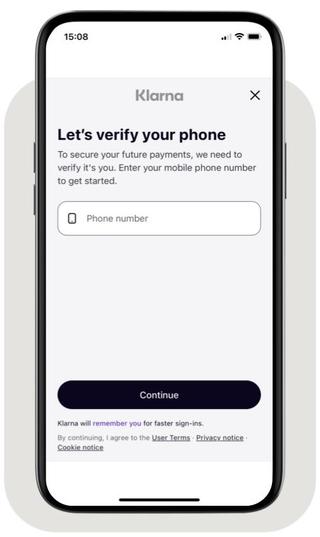
Phone collection in the Klarna Purchase Journey
Return URLs
The
return_ and app_ set inside customer_ tell Klarna where to send the customer after they complete or stop the Klarna Purchase Journey.return_
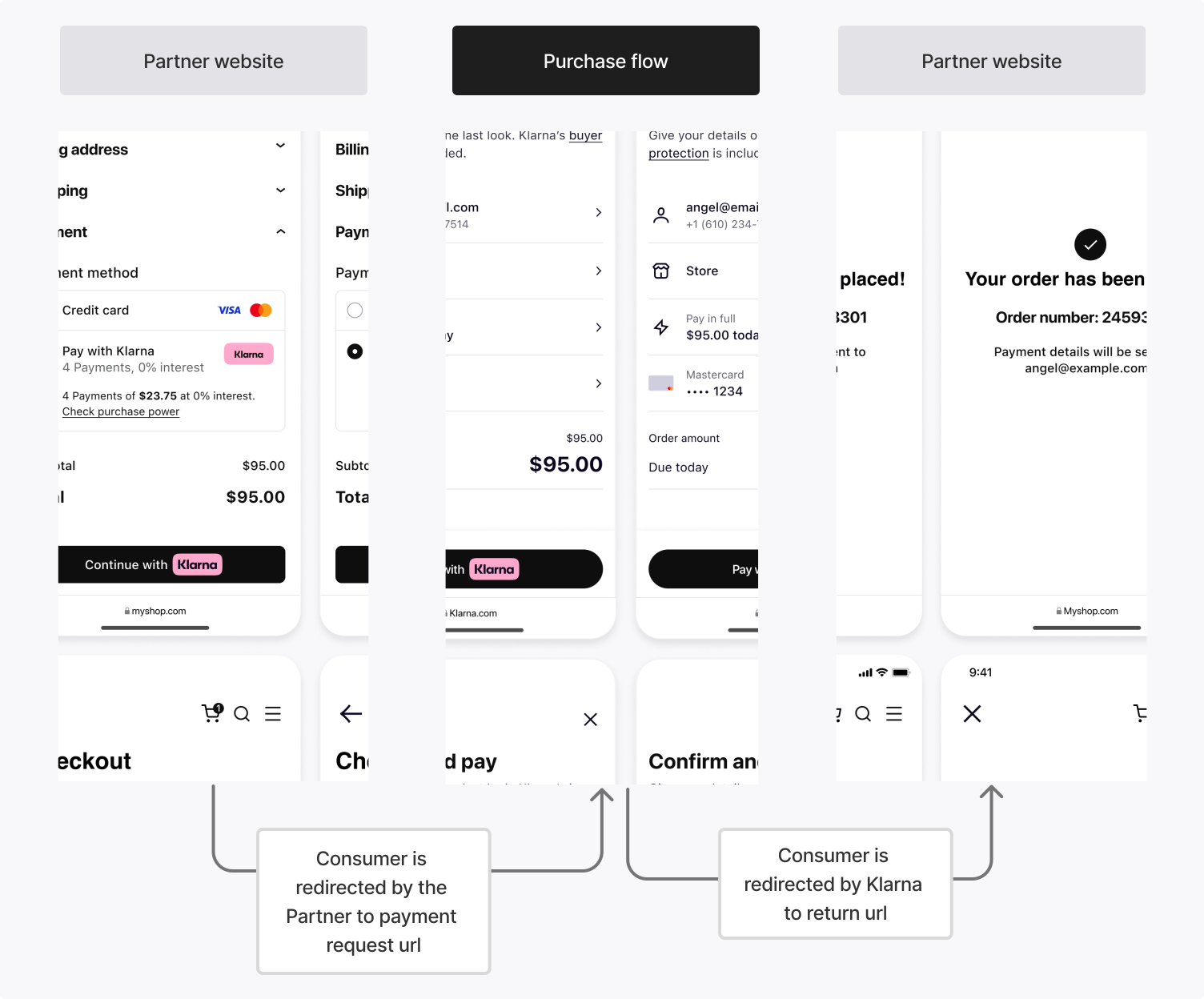
When the Klarna Purchase Journey is launched in a web environment, Klarna redirects the customer to the
return_ after they finish, whether they complete or stop the flow.app_
On mobile, the customer may be redirected to a third-party app (such as a bank app) or the Klarna app during the Klarna Purchase Journey. The
app_ brings the customer back to the Partner's mobile app when this happens.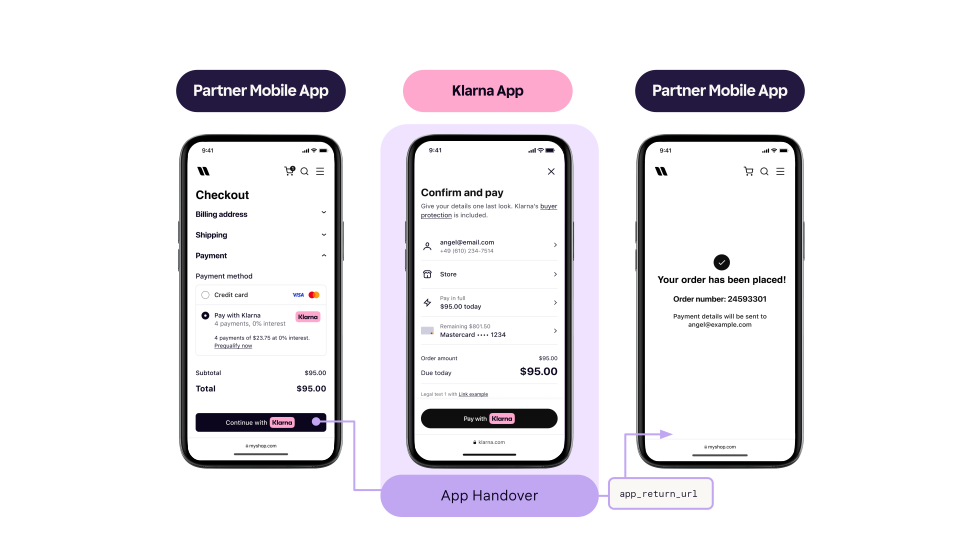
Register a URL scheme (for example,
yourapp:/) that resumes the payment flow. Klarna invokes this URL after the customer completes a native app-based step. Resume the mobile app in its last state without applying state changes or deep link navigations.Interaction scenarios
The
return_ and app_ are not mutually exclusive. Depending on the device and environment, either or both may be triggered:| Scenario | Description |
|---|---|
| Pure web flow | The customer starts the Klarna Purchase Journey in a desktop browser. After completing the flow, Klarna redirects them to return_. |
| App-to-app flow | The Partner's native app opens the Klarna Purchase Journey using a universal link. When the Klarna app is installed, the customer goes directly into it. After completion, Klarna redirects them to app_. |
| WebView flow with app handover | The Partner's native app starts the Klarna Purchase Journey in a System WebView. When the customer must continue in an external native app, app_ returns them to the Partner's app mid-flow. They then resume in the WebView and, on completion, are redirected to return_. |
Once the customer approves the purchase in the Klarna Purchase Journey, Klarna issues a
klarna_ and the Payment Request transitions to COMPLETED. This token is used in Step 4 to finalize the authorization.Klarna provides multiple methods to retrieve the token. Subscribing to the webhook event is required and may be combined with reading the Payment Request as a fallback for resilience.
Integration requirement
The
klarna_ is valid for only 1 hour and must be used within this time frame to finalize the authorization.Method: Subscribe to the payment. webhook (required)
Klarna sends this event when the Payment Request reaches the
COMPLETED state, indicating that the customer has approved the purchase and the authorization can be finalized. Subscribe via the Webhooks registration guide.Sample payload
JSON
1
2
3
4
5
6
7
8
9
10
{
  "metadata": {
    "event_type": "payment.request.state-change.completed",
    "event_id": "d9f9b1a0-5b1a-4b0e-9b0a-9e9b1a0d5b1a",
    "event_version": "v2",
    "occurred_at": "2024-01-01T12:00:00Z",
    "correlation_id": "2d1557e8-17c3-466c-924a-bbc3e91c2a02",
    "subject_account_id": "krn:partner:global:account:test:HGBY07TR",
    "recipient_account_id": "krn:partner:global:account:test:LWT2XJSE",
"product_instance_id": "krn:partner:product:payment:ad71bc48-8a07-4919-[...]",Acknowledge the event before authorizing
Handle
payment. in two stages. In the webhook handler, verify the event, persist the payload — including the klarna_ — durably against metadata., and return a 2xx response immediately. Run everything that follows asynchronously, after the acknowledgment is sent.Don't do any of the following before the acknowledgment:
- Call authorizePayment in Step 4.
- Create the Payment Transaction or any record derived from it.
- Show the customer a confirmation page or send a confirmation message.
When an event arrives with a
metadata. you have already recorded, confirm that it is recorded and return a 2xx response without repeating the work. Set up your webhooks defines the accepted acknowledgment responses and the retry schedule Klarna applies when one doesn't arrive.Method: Read the Payment Request (optional fallback)
As a fallback (for example, when the webhook is delayed or the handler missed it) retrieve the token by calling readPaymentRequest. Once the Payment Request reaches the
. Once the Payment Request reaches the COMPLETED state, the token is available in state_.Sample response
JSON
1
2
3
4
5
6
7
8
9
10
{
  "payment_request_id": "krn:payment:us1:request:552603c0-fe8b-4ab1-[...]",
  "payment_request_reference": "partner-request-reference-1234",
  "state": "COMPLETED",
  "previous_state": "IN_PROGRESS",
  "state_context": {
    "klarna_network_session_token": "krn:network:us1:test:session-token:eyJhbGciOiJIU..."
  },
  "currency": "USD",
"amount": 11800,Finalize the payment by calling authorizePayment with the
with the klarna_ in the Klarna-Network-Session-Token request header. Klarna creates the Payment Transaction and returns the result.The customer's selected payment method is carried by the Klarna Network Session Token. There is no need to send
payment_.| Parameter | Requirement | Description |
|---|---|---|
Klarna-Network-Session-Token (header) | Required | The Klarna Network Session Token received in Step 3. |
currency | Required | Same currency used in the Payment Request. |
request_ | Required | Same amount used in the Payment Request. |
request_ | Recommended | The Partner's own reference for the Payment Transaction, used for reconciliation. |
supplementary_ | Required | Same supplementary data sent on the Payment Request. The contractually required sub-fields (line_, purchase_, customer, shipping) must be present. Significant differences from the Payment Request may cause Klarna to require re-confirmation. |
acquiring_ | Required | Routes the Payment Transaction to the same Payment Account used on the Payment Request. Add settlement_ (ISO 4217) when settling in a currency that differs from the Payment Transaction currency. See Configure acquiring_config. |
step_ | Recommended | Opts the Partner in to the STEP_ outcome. When included, Klarna can request additional customer interaction (returning a new Payment Request) instead of declining cases where it needs more risk signals. Without it, those cases are returned as DECLINED. Set customer_ and provide a return_ (and an app_) so Klarna knows where to send the customer back after the step-up Klarna Purchase Journey. See Payment Authorization. |
Sample request
SHELL
1
2
3
4
5
6
7
8
9
10
curl https://api-global.test.klarna.com/v2/payment/authorize \
  -H 'Authorization: Basic <API key>' \
  -H 'Content-Type: application/json' \
  -H 'Klarna-Network-Session-Token: krn:network:us1:test:session-token:eyJhbGciOiJIU...' \
  -d '{
        "currency": "USD",
        "request_payment_transaction": {
          "amount": 11800,
          "payment_transaction_reference": "partner-transaction-reference-1234"
},Handle the authorization result
Klarna returns a
payment_ object. The result field indicates the outcome and determines the next action:| Result | Description | Next steps |
|---|---|---|
APPROVED | The authorization succeeded and a payment_ was created. | Store the payment_ and proceed with post-purchase operations (capture, refund, etc.). Show the customer a confirmation page. |
DECLINED | The authorization was not approved. No transaction is created. Common causes include an expired Klarna Network Session Token, significant discrepancies between the Payment Request and the authorize call, or risk evaluation requiring additional customer interaction when step_ was not included in the request. | Show the customer a decline or alternative payment page. |
STEP_ | Klarna requires additional customer interaction before approving. Only returned when step_ was included in the authorize request. The response includes a new Payment Request with state_. | Redirect the customer to the new payment_, wait for the new Klarna Network Session Token (via webhook or by reading the Payment Request), and call authorizePayment again with the new token. |
Step-up config behavior
Without
step_ in the authorize request, Klarna cannot return STEP_. It returns DECLINED instead in cases where additional customer interaction would have been needed. Klarna recommends including step_ by default to recover those cases.The response schema is as follows:
JSON
1
2
3
4
5
6
7
8
9
10
{
  "payment_transaction_response": {
    "result": "APPROVED",
    "payment_transaction": {
      "payment_transaction_id": "krn:payment:us1:transaction:6debe89e-98c0-[...]",
      "payment_transaction_reference": "partner-transaction-reference-1234",
      "amount": 11800,
      "currency": "USD",
      "payment_pricing": {...},
"payment_funding": {Klarna Network response data
klarna_ is only present in the response when klarna_ was sent in the request. Treat the value as opaque.Next steps
With the Payment Transaction created, the customer-initiated payment is complete. From here:
- Manage the Payment Transaction lifecycle (capture, refund, cancel). See Manage Payment Transactions.
- Tokenize the customer's payment method to authorize the same customer's payments again later. See Payment Tokenization.
- Compare integration paths and decide whether to switch to the Klarna Web SDK. See Payment Presentation Overview.
Jump to section...