

Integrate On-site messaging with Klarna mobile SDK
Boost transparency and conversions by integrating Klarna’s Mobile SDK to display payment messaging and pre-qualification, letting customers check financing eligibility before they buy.
14 min read
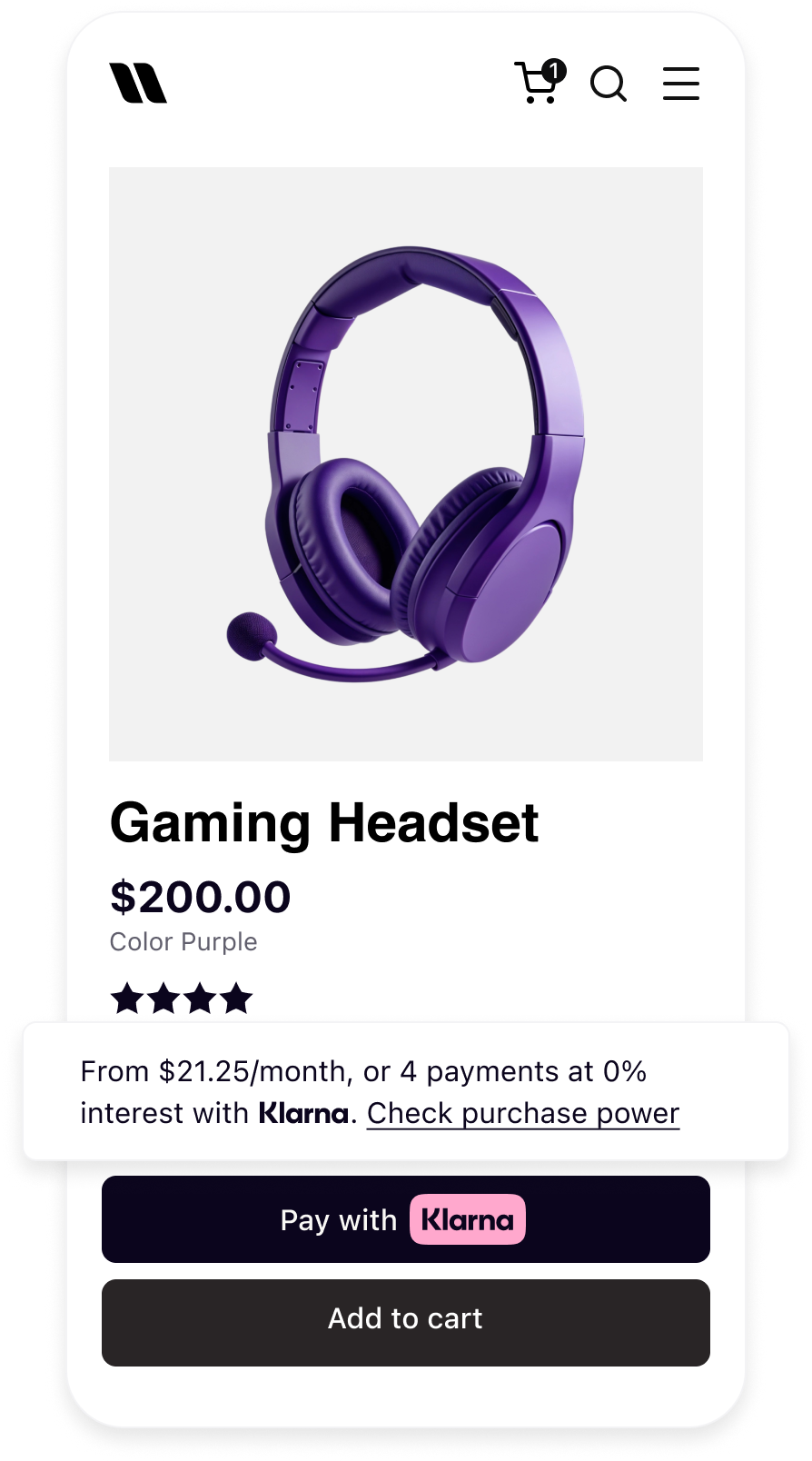 | 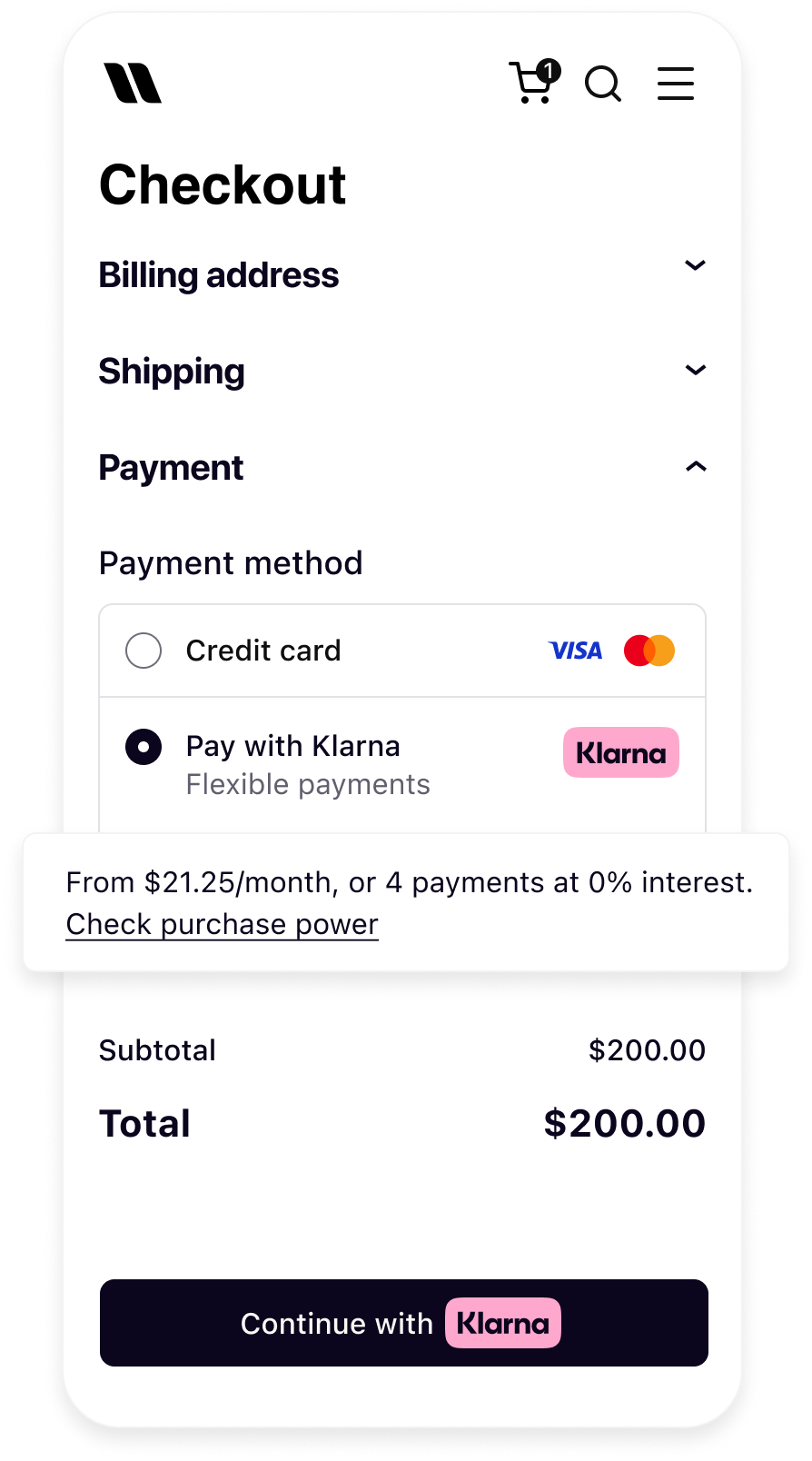 |
| Messaging on the product detail page | Messaging in the checkout |
Prerequisites
Before integrating On-site messaging, the following conditions must be met:
- 1.A Klarna payment solution is in place.
- 2.Access to the Klarna Partner Portal is available.
- 3.Inside the Klarna Partner Portal:
- 3.1.A client identifier has been generated with the domain URL allowlisted.
- 3.2.An API key has been generated.
Integration overview
This guide covers iOS (Swift and SwiftUI), Android (Kotlin and Jetpack Compose), React Native, and Flutter integrations. For React Native and Flutter, follow the general prerequisites and integration overview, then go to Integrate with React Native or Integrate with Flutter.
Adding On-site messaging to a native app is a straightforward process. At a high level, achieving this tailored experience requires the following steps:
- Request access to On-site messaging.
- Add the Mobile SDK Messaging library.
- Initialize the Klarna SDK.
- Create the native messaging view and add it to the screen.
sequenceDiagram
participant C as Customer
participant P as Partner
participant K as Klarna
P->>K: Initialize Klarna SDK
P->>K: Create OSM placement
K->>P: Render messaging/prequalification content
P->>C: Display messaging/prequalification content
alt Prequalification flow - Approved
C->>K: Clicks to check purchase power
K->>C: Start prequalification journey
C->>K: Completes prequalification
K->>C: Update placement to show approval
Note over P,K: Prequalification state preserved via Klarna Network Session Token
end
Add Mobile SDK Messaging Library
iOS
Swift Package Manager
In Xcode, navigate to File → Swift Packages → Add Package Dependency and enter the repository URL:
https:/In Version, select Up to Next Major and take the default option. Then choose the product needed in the Package Product column:
KlarnaNetworkMessaging for UIKit, or KlarnaNetworkMessagingSwiftUI for SwiftUI.Info
KlarnaNetworkMessagingSwiftUI provides the complete SwiftUI interface. Add the SwiftUI product instead of the UIKit product; it includes the underlying messaging module. In code, import KlarnaNetworkCore for the Klarna instance, KlarnaNetworkMessaging for configuration types, and KlarnaNetworkMessagingSwiftUI for the wrapper.CocoaPods
When using CocoaPods, add the dependency for the app's UI framework to the Podfile:
RUBY
1
2
3
4
5
# UIKit
pod "KlarnaMobileSDK/KlarnaNetworkMessaging"

# SwiftUI
pod "KlarnaMobileSDK/KlarnaNetworkMessagingSwiftUI"
Followed by performing:
BASH
1
2
pod install
The
KlarnaNetworkMessaging module, or KlarnaNetworkMessagingSwiftUI for SwiftUI apps, can then be imported in the workspace.Android
First, add the Klarna Mobile SDK Maven repository:
KOTLIN
1
2
3
4
repositories {
    maven("https://x.klarnacdn.net/mobile-sdk/")
}
Next, add the Klarna Mobile SDK Messaging Library as a dependency to the application:
KOTLIN
1
2
3
4
dependencies {
    implementation("com.klarna.mobile.sdk:klarna-network-messaging:2.x.x")
}
If the app is built with Jetpack Compose, add the Compose wrapper library instead, which provides a
KlarnaMessagingPlacement composable:KOTLIN
1
2
3
4
dependencies {
    implementation("com.klarna.mobile.sdk:klarna-network-messaging-compose:2.x.x")
}
Initialize the Klarna SDK
The first step to add On-site messaging to an application is to initialize the Klarna SDK and provide the required configuration:
Initialization is the same whether you use UIKit or SwiftUI on iOS, and the
View system or Jetpack Compose on Android.SWIFT
1
2
3
4
5
6
7
8
9
10
// Create an instance of KlarnaConfiguration
let configuration = KlarnaConfiguration(
    clientId: clientId,
    locale: locale,
    appReturnUrl: appReturnUrl,
    klarnaNetworkSessionToken: klarnaNetworkSessionToken
)

// Initialize Klarna
let klarnaResult = Klarna.initialize(configuration: configuration)On iOS, register the scheme in
appReturnUrl as a URL type in your app, then pass incoming app URLs to the SDK from your app or scene delegate:SWIFT
1
2
3
4
5
6
7
func application(
    _ app: UIApplication,
    open url: URL,
    options: [UIApplication.OpenURLOptionsKey: Any] = [:]
) -> Bool {
    Klarna.handleReturnUrl(url: url)
}
Parameters
| Param | Type | Presence | Description |
|---|---|---|---|
| clientId | String | Required | The client ID of the partner account that is integrating the Mobile SDK. |
| appReturnUrl | String | Required (iOS) | Registered app URL used to return customers to your iOS app after an external handover. |
| locale | String | Optional | Locale identifier for the SDK (for example, en-US). The system default locale is used if not set. |
| klarnaNetworkSessionToken | String | Optional | The Klarna Network Session Token allows the SDK to be initialized with an existing session. The token is retrievable server-side via the Network Session API. |
Create the Native View
The On-site messaging native view is called
KlarnaMessagingPlacementView. This view can be created programmatically and added to the layout with the desired layout options.SWIFT
1
2
3
4
5
6
7
8
9
10
// Create an instance of KlarnaMessagingPlacementConfiguration
// Depending on your requirements, you can create `CreditPromotionBadge` or
// `CreditPromotionAutoSize` configuration
let placementConfiguration = KlarnaMessagingPlacementConfiguration.creditPromotionBadge(
    theme: .automatic,
    amount: 10000,
    currency: "USD"
)
// Create an instance of the view
let placementView = KlarnaMessagingPlacementView(Parameters
CreditPromotionBadge| Parameter | Type | Presence | Description |
|---|---|---|---|
theme | KlarnaTheme | Optional | Enumerated theme value to specify how to stylize the view on light, dark or automatic (system) configurations. Default value is light / LIGHT. |
amount | Long | Required | Amount for the placement, in minor units / cents ($100.00 = 10000), used for amount based credit promotions. |
currency | String | Required | 3-letter ISO 4217 currency code. |
CreditPromotionAutoSize| Parameter | Type | Presence | Description |
|---|---|---|---|
theme | KlarnaTheme | Optional | Enumerated theme value to specify how to stylize the view on light, dark or automatic (system) configurations. Default value is light / LIGHT. |
amount | Long | Required | Amount for the placement, in minor units / cents ($100.00 = 10000), used for amount based credit promotions. |
currency | String | Required | 3-letter ISO 4217 currency code. |
KlarnaTheme| Swift Value | Kotlin Value | Descriptions |
|---|---|---|
light | LIGHT | Light style for placement view. |
dark | DARK | Dark style for placement view. |
automatic | AUTOMATIC | Automatic theme that will use the system’s user interface style. |
Integrate with React Native
Prerequisites
In addition to the general prerequisites above, check that:
- 1.Your app runs React Native 0.76 or later with the New Architecture enabled.
- 2.Your app targets iOS 13 or later and Android API 21 or later.
- 3.You have an
appReturnUrlvalue for the required core SDK configuration. On iOS, register its scheme as a URL type in your app.
Install
Add the core package and the messaging package:
BASH
1
2
yarn add @klarna/react-native-klarna-network-core
yarn add @klarna/react-native-klarna-network-messaging
Initialize the SDK
Call
Klarna. once at app startup, before rendering a placement. It returns the Klarna instance you pass to the placement view.TSX
1
2
3
4
5
6
7
8
9
10
import { Klarna } from '@klarna/react-native-klarna-network-core';

const klarna = await Klarna.initialize({
  clientId: 'your-client-id',
  appReturnUrl: 'your-app://return',
  // Optional:
  accountId: 'account-id',
  locale: 'en-US',
  klarnaNetworkSessionToken: 'token',
});
On iOS, if a placement launches an external flow, pass incoming app URLs to
Klarna.. On Android, don't call Klarna.; the native SDK handles returns.The Klarna Network Session Token is available on the instance and can be cleared when it is no longer needed:
TSX
1
2
const token = await klarna.network.session.token();
await klarna.network.session.clear();
Render a messaging placement
KlarnaMessagingPlacementView renders the messaging placement. Pass the Klarna instance and a configuration. The placement uses a 60px minimum height until the first native resize, then follows its content height. It collapses when no content is available or an error occurs.TSX
1
2
3
4
5
6
7
8
9
10
import {
  KlarnaMessagingPlacementView,
  KlarnaMessagingPlacementType,
  KlarnaTheme,
} from '@klarna/react-native-klarna-network-messaging';
import type { Klarna } from '@klarna/react-native-klarna-network-core';

export function CheckoutMessaging({ klarna }: { klarna: Klarna }) {
  return (
<KlarnaMessagingPlacementViewParameters
KlarnaConfiguration
| Name | Type | Presence | Description |
|---|---|---|---|
clientId | string | Required | The client ID of the partner account that is integrating the Mobile SDK. |
appReturnUrl | string | Required | Core SDK configuration value. The Android bridge ignores this value. On iOS, register its scheme and handle incoming URLs when a placement launches an external flow. |
accountId | string | Optional | Identifier of the account the action is performed on behalf of. |
locale | string | Optional | BCP 47 locale string (for example en-US). The system default is used if not set. |
klarnaNetworkSessionToken | string | Optional | The Klarna Network Session Token allows the SDK to be initialized with an existing session. The token is retrievable server-side via the Network Session API. |
Placement configuration
| Name | Type | Presence | Description |
|---|---|---|---|
type | KlarnaMessagingPlacementType | Required | The placement variant. See Placement type. |
amount | number | Required | Amount in minor currency units (for example, cents). |
currency | string | Required | 3-letter ISO 4217 currency code. |
theme | KlarnaTheme | Optional | Color theme of the placement. When omitted, the SDK chooses the default. See Theme. |
The
KlarnaMessagingPlacementView also accepts an optional onError callback, which receives a KlarnaMessagingError with name and message fields, and an optional style prop.Placement type
| Value | Description |
|---|---|
CreditPromotionAutoSize | A credit promotion placement that sizes itself based on its content. |
CreditPromotionBadge | A credit promotion placement rendered as a badge. |
Theme
| Value | Description |
|---|---|
Light | Light style. |
Dark | Dark style. |
Automatic | Follows the system's user interface style. |
Integrate with Flutter
Prerequisites
In addition to the general prerequisites above, check that:
- 1.You have an app return URL (custom URL scheme or universal link) configured for redirect callbacks.
- 2.Your project meets the minimum platform requirements: Flutter 3.22+, Dart 3.6+, iOS 13+, Android API 24+.
Install
Add both packages in a single command:
SH
1
flutter pub add klarna_network_core klarna_network_messagingBoth are required, since the messaging widget binds to a
Klarna instance that the core package creates.Initialize the SDK
Import the core package and call
Klarna. once, typically at app startup or when the screen that shows messaging is first loaded.DART
1
2
3
4
5
6
7
8
9
10
import 'package:klarna_network_core/klarna_network_core.dart';

final klarna = await Klarna.initialize(KlarnaConfiguration(
  clientId: 'your-client-id',
  appReturnUrl: 'your-app://return',
  // Optional:
  accountId: 'account-id',
  locale: 'en-US',
  klarnaNetworkSessionToken: 'session-token',
));
The returned
klarna instance is the entry point for all SDK operations. Store and reuse it for as long as Klarna features in your app share the same native session; call dispose to release it when the session is no longer needed.DART
1
await klarna.dispose();Register your return URL (iOS)
Configure
appReturnUrl as either:- A custom URL scheme registered in
Info.underplist CFBundleURLTypes. - An HTTPS universal link whose domain is added to the app's Associated Domains entitlement and serves a matching
apple-app-site-associationfile.
For a custom URL scheme, add it under
CFBundleURLTypes:XML
1
2
3
4
5
6
7
8
9
10
<key>CFBundleURLTypes</key>
<array>
  <dict>
    <key>CFBundleURLName</key>
    <string>$(PRODUCT_BUNDLE_IDENTIFIER).returnurl</string>
    <key>CFBundleURLSchemes</key>
    <array>
      <string>your-app</string>
    </array>
</dict>Then use a matching return URL, for example
appReturnUrl: 'your-app:/, and pass each incoming iOS app URL to Klarna from your app's URL handler:DART
1
2
3
Future<bool> handleIncomingUrl(String url) {
  return Klarna.handleReturnUrl(url);
}
Warning
Return URL handling is iOS-only. The Dart constructor requires
appReturnUrl on both platforms, but Android initialization ignores it. On Android, Klarna. resolves to false.Render the placement view
Import the messaging package and embed
KlarnaMessagingPlacementView in your widget tree. Pass the Klarna instance from Klarna. and a KlarnaMessagingPlacementConfiguration.DART
1
2
3
4
5
6
7
8
9
10
import 'package:klarna_network_core/klarna_network_core.dart';
import 'package:klarna_network_messaging/klarna_network_messaging.dart';

KlarnaMessagingPlacementView(
  instance: klarna,
  configuration:
      const KlarnaMessagingPlacementConfiguration.creditPromotionAutoSize(
    amount: 19900,
    currency: 'EUR',
theme: KlarnaTheme.automatic,KlarnaMessagingPlacementView starts at a fallback height of 60 logical pixels and then adopts the height reported for the loaded content. It collapses to zero height when no content is available, so you don't need to set a height yourself.Parameters
KlarnaConfiguration
| Name | Type | Presence | Description |
|---|---|---|---|
clientId | String | Required | The client ID of the partner account that is integrating the Mobile SDK. |
appReturnUrl | String | Required | Required by the Dart constructor on both platforms. Register and handle it on iOS; Android initialization ignores it. |
accountId | String? | Optional | Identifier of the account the action is performed on behalf of. |
locale | String? | Optional | Default locale (BCP 47, e.g. en-US) for the SDK. The device locale is used if not set. |
klarnaNetworkSessionToken | String? | Optional | The Klarna Network Session Token allows the SDK to be initialized with an existing session. The token is retrievable server-side via the Network Session API. |
KlarnaMessagingPlacementConfiguration
| Name | Type | Presence | Description |
|---|---|---|---|
amount | int | Required | Amount for the placement, in minor currency units following ISO 4217 exponents (e.g. 19900 = 199.00 EUR). Used for amount-based credit promotions. |
currency | String | Required | Three-letter ISO 4217 currency code (e.g. EUR, USD, SEK). |
theme | KlarnaTheme? | Optional | Uses the shared color theme from klarna_. When omitted, the SDK chooses the theme. |
KlarnaMessagingPlacementView props
| Name | Type | Presence | Description |
|---|---|---|---|
instance | Klarna | Required | The Klarna instance from Klarna.. |
configuration | KlarnaMessagingPlacementConfiguration | Required | Placement type, amount, currency, and optional theme. |
Placement configuration constructors
| Constructor | Description |
|---|---|
KlarnaMessagingPlacementConfiguration. | A placement that automatically adjusts its size to fit its content. |
KlarnaMessagingPlacementConfiguration. | A compact badge-style placement. |
KlarnaTheme
| Value | Description |
|---|---|
light | Light style for the placement view. |
dark | Dark style for the placement view. |
automatic | Automatic theme that follows the system's user interface style. |
Jump to section...