
Token charge Customer Present - Final authorization
When integrating Klarna, the final authorization is a critical step when the step-up scenario occurs. This guide walks you through the creation of a transaction using the klarna_network_session_token provided by Klarna.
Token usage Klarna now uses klarna_network_session_token as the required token to finalize a payment.
- Existing integrations: Klarna previously relied on payment_token, which will continue to be returned in the current version for backward compatibility. Please note that payment_token will be removed in future versions, so if your integration currently uses it, plan to migrate to klarna_network_session_token.
- New integrations: Acquiring Partners should ignore payment_token and use klarna_network_session_token exclusively.
Integration overview
After the customer completes their purchase via Klarna, the Payment Request transitions to the COMPLETED state. At this point:
- Klarna returns a klarna_network_session_token which must be secured through Klarna Webhooks
- You must use this klarna_network_session_token to authorize the payment within 60 minutes to finalize the transaction.
- Successful authorization will generate a payment_transaction_id required for future transaction management.
Important: If you do not authorize within 60 minutes, the transaction will be invalidated.
The below diagram shows the customer journey and Acquiring Partner workflow, illustrating:
- The handoff from Klarna to the Partner after purchase.
- The sequence from receiving the Klarna Network session token to finalizing the payment.
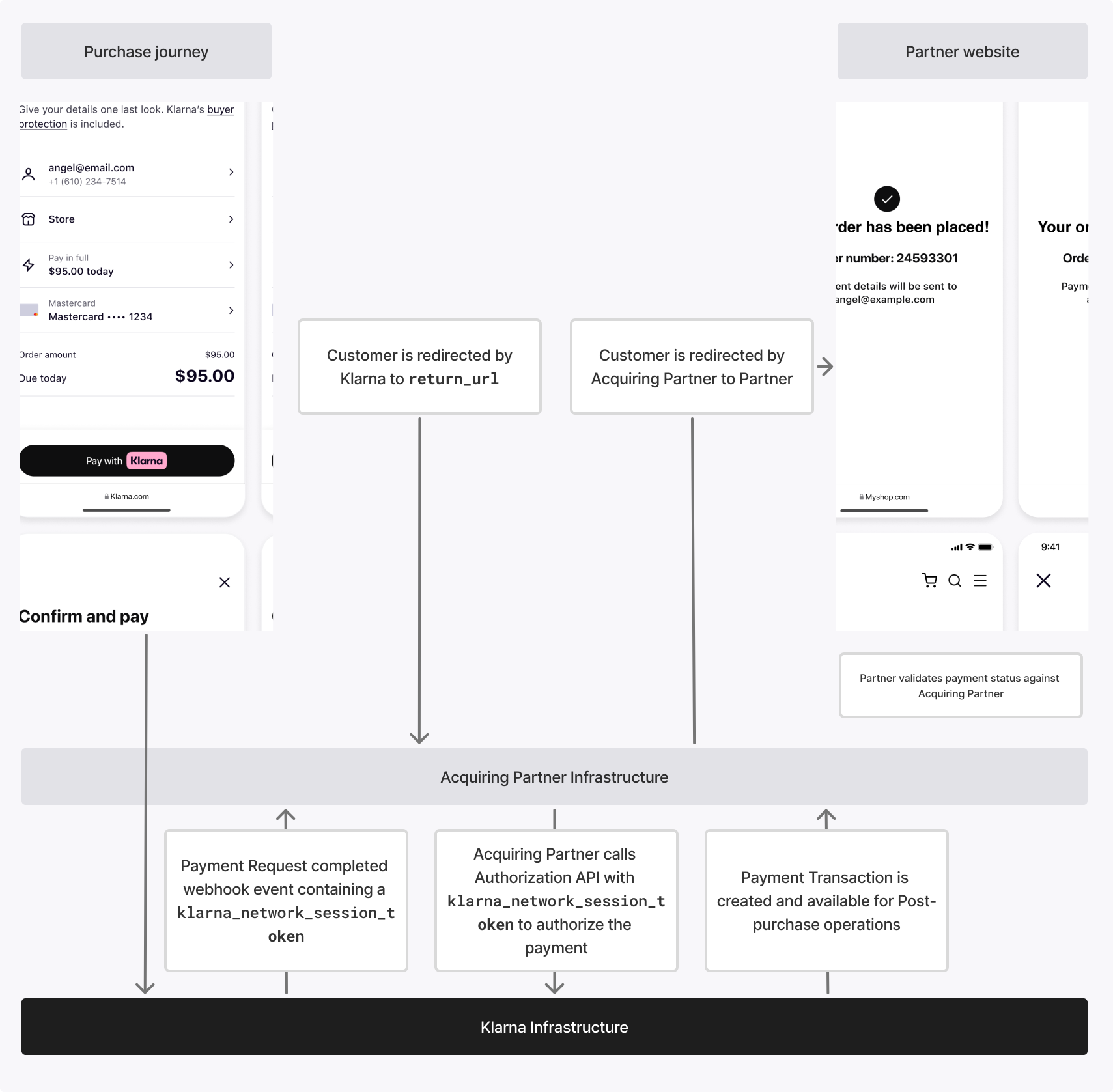
Final authorization functions the same across all integration methods. If it has already been implemented—for example, with a server-only integration for one-time payments—it can be reused without modification.
Integration details
Request
After receiving the klarna_network_session_token from Klarna, call the Payment Authorize API to finalize the authorization. Pass the token in the
 Klarna-Network-Session-Token request header.
This request is performed entirely on the backend and does not involve customer interaction. As a result, the step_up_config object can be omitted.
Submit the same request payload that was used in the initial authorization request.
The klarna_network_session_token acts as an idempotency key. Repeating the request with the same token returns the same result, which allows safe retries.
In the request to the Payment Authorize API, specify the following parameters:
curl https://api-global.test.klarna.com/v2/accounts/{partner_account_id}/payment/authorize \
  -H 'Authorization: Basic <API key>' \
  -H 'Klarna-Network-Session-Token: ***' \
  -H 'Content-Type: application/json' \
  -d '{
        "payment_request_id": "krn:payment:eu1:request:552603c0-fe8b-4ab1-aacb-41d55fafbdb4",
        "currency": "USD",
        "request_payment_transaction": {
          "amount": 11800,
          "payment_option_id": "***",
          "payment_transaction_reference": "finalize-ref-1234"
},Response
When the integration is implemented correctly, Klarna approves the authorization and returns a payment_transaction. Klarna validates that the authorized payment amount matches the amount approved by the customer during the step-up flow.
If the supplementary_purchase_data differs materially from the data previously provided, Klarna may decline the authorization based on its risk assessment.
The result field can have the following values:
| Result | Description | Next step |
|---|---|---|
APPROVED | The authorization succeeded and a payment_transaction was created. | Store the payment_transaction_id and proceed with post-purchase operations. |
DECLINED | The authorization failed and no transaction was created. This typically indicates an issue with the authorization request, such as an amount mismatch. | Review the request data, correct the integration if needed. Raise an incident if the issue persists. |
Result: APPROVED
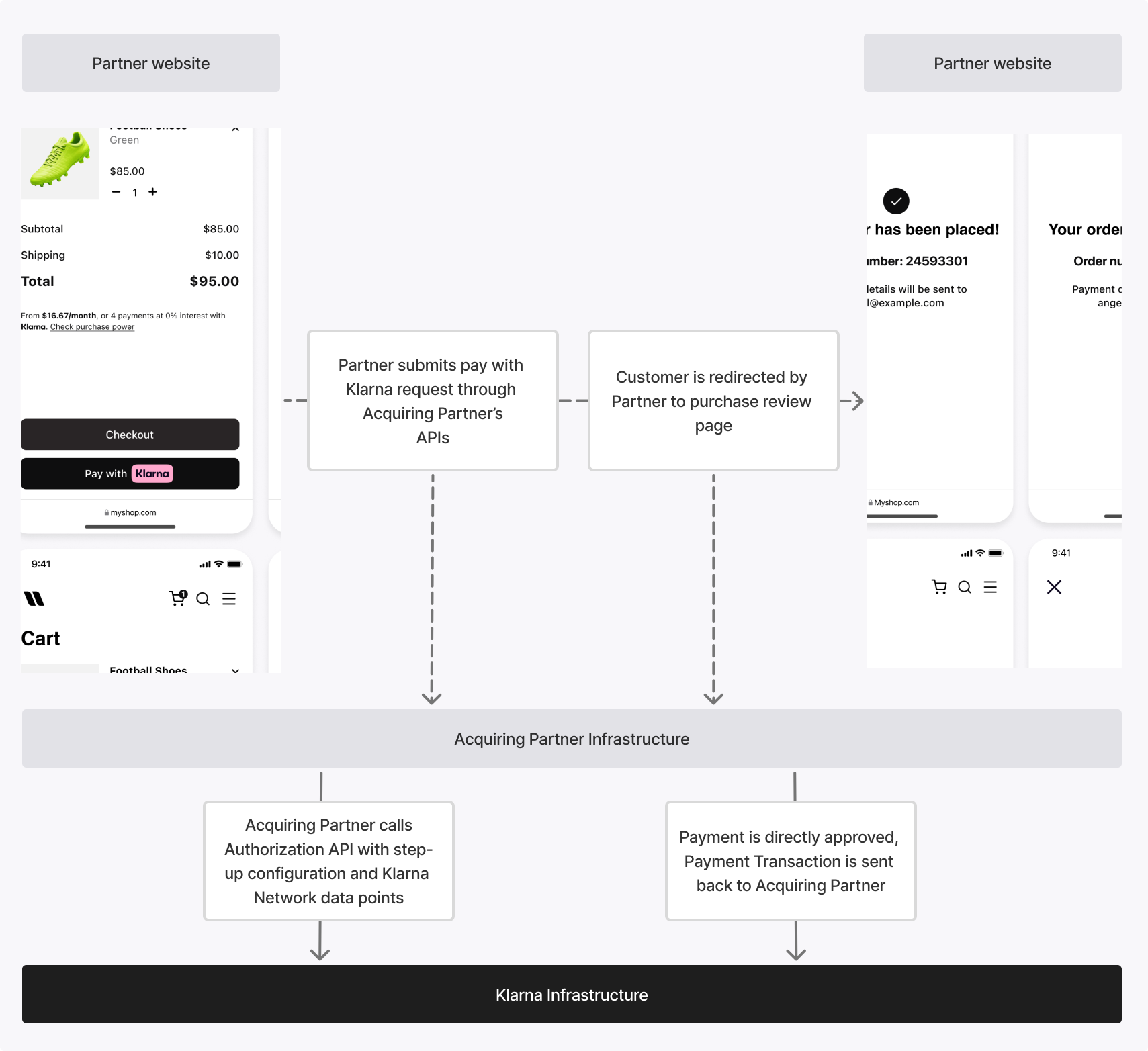
Handle this result when Klarna authorizes the payment without requiring customer interaction.
- Read the
payment_transactionfrom the response. - Store the
payment_transaction_id. - Return a success response to the Partner.
- Continue with post-purchase operations (for example, capture or refund) using the Payment Transactions API.
Sample payload
{
  "payment_transaction_response": {
    "result": "APPROVED",
    "payment_transaction": {
      "payment_transaction_id": "krn:payment:eu1:transaction:6debe89e-98c0-[...]",
      "payment_transaction_reference": "transaction-reference-1234",
      "amount": 11800,
      "currency": "USD",
      "payment_funding": {
        "type": "INVOICE",
        "details": { }
},Result: DECLINED
Handle this result when Klarna rejects the authorization.
- Do not retry the authorization unless explicitly instructed by Klarna.
- Return a failure response to the Partner.
- End the payment flow.
Sample payload
{
  "payment_transaction_response": {
    "result": "DECLINED",
    "result_reason": "PAYMENT_DECLINED"
  }
}
Related articles
API & SDK references