
Token charge Customer Present - Final authorization
When integrating Klarna, the final authorization is a critical step when the step-up scenario occurs. This guide walks you through the creation of a transaction using the klarna_network_session_token provided by Klarna.
Token usage Klarna now uses klarna_network_session_token as the required token to finalize a payment.
- Existing integrations: Klarna previously relied on payment_token, which will continue to be returned in the current version for backward compatibility. Please note that payment_token will be removed in future versions, so if your integration currently uses it, plan to migrate to klarna_network_session_token.
- New integrations: Acquiring Partners should ignore payment_token and use klarna_network_session_token exclusively.
Integration overview
After the customer completes their purchase via Klarna, the Payment Request transitions to the COMPLETED state. At this point:
- Klarna returns a klarna_network_session_token which must be secured through Klarna Webhooks
- You must use this klarna_network_session_token to authorize the payment within 60 minutes to finalize the transaction.
- Successful authorization will generate a payment_transaction_id required for future transaction management.
Important: If you do not authorize within 60 minutes, the transaction will be invalidated.
The below diagram shows the customer journey and Acquiring Partner workflow, illustrating:
- The handoff from Klarna to the Partner after purchase.
- The sequence from receiving the Klarna Network session token to finalizing the payment.
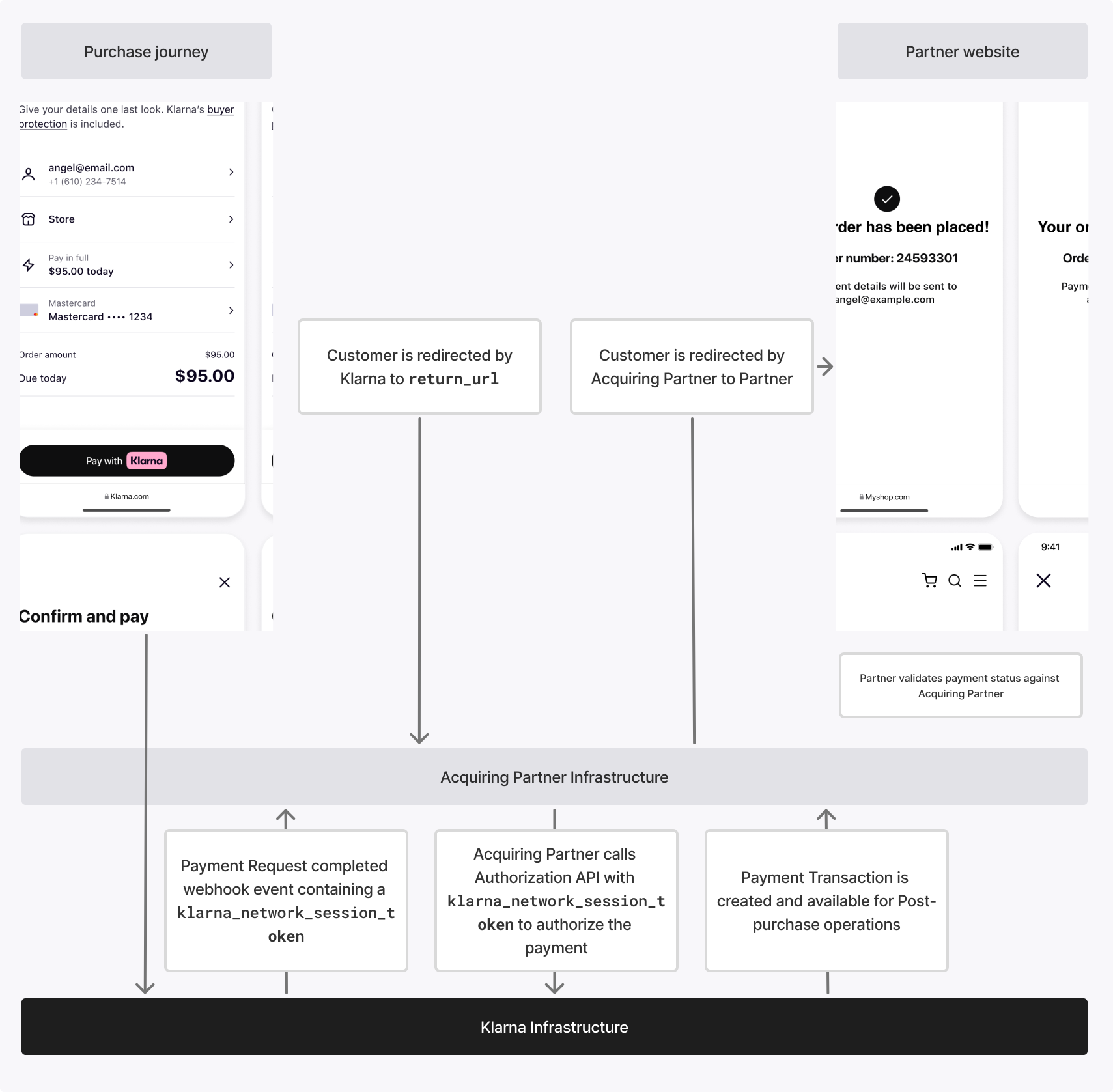
Final authorization functions the same across all integration methods. If it has already been implemented—for example, with a server-only integration for one-time payments—it can be reused without modification.
Integration details
Call Payment Authorize API with klarna_network_session_token
The acquiring partner must use the klarna_network_session_token to perform a second call to Klarna's Payment Authorize API .
.
Request parameters
Sample Request
The klarna_network_session_token must be passed in the Klarna-Network-Session-Token HTTP header.
curl https://api-global.test.klarna.com/v2/accounts/{partner_account_id}/payment/authorize \
-H 'Authorization: Basic <API key>' \
-H 'Content-Type: application/json' \
-H 'Klarna-Network-Session-Token: krn:payment:eu1:klarna-network-session-token:...' \
-d '{
      "currency": "USD",
      "request_payment_transaction": {
        "amount": 11800,
        "payment_transaction_reference": "acquiring-partner-transaction-reference-1234"
      }
    }'
Handling Klarna's response
Upon successful authorization, the response body includes the payment_transaction_id, which you'll use for payment transaction management actions.
- The endpoint is idempotent, so repeated requests with the same token return the same result, ensuring safe retries.
Response parameters
Sample response
{
  "payment_transaction_response": {
    "result": "APPROVED",
    "payment_transaction": {
      "payment_transaction_id": "krn:payment:eu1:transaction:6debe89e-98c0-[...]",
      "payment_transaction_reference": "acquiring-partner-transaction-reference-1234",
      "amount": 11800,
      "currency": "USD",
      "payment_funding": {...},
      "payment_pricing": {...},
      "expires_at": "2025-10-30T19:26:02.772Z"
}API & SDK references