
Token creation - Final authorization
This guide details the crucial final authorization step in Klarna payment integration, focusing on transaction creation with a payment_token. Essential for completing purchases and handling transactions effectively.
Token usage Klarna now uses klarna_network_session_token as the required token to finalize a payment.
- Existing integrations: Klarna previously relied on payment_token, which will continue to be returned in the current version for backward compatibility. Please note that payment_token will be removed in future versions, so if your integration currently uses it, plan to migrate to klarna_network_session_token.
- New integrations: Acquiring Partners should ignore payment_token and use klarna_network_session_token exclusively.
Integration overview
After the customer completes their purchase via Klarna, the Payment Request transitions to the COMPLETED state. At this point:
- Klarna returns a klarna_network_session_token which must be secured through Klarna Webhooks
- You must use this klarna_network_session_token to authorize the payment within 60 minutes to finalize the transaction.
- Successful authorization will generate a payment_transaction_id required for future transaction management.
Important: If you do not authorize within 60 minutes, the transaction will be invalidated.
The below diagram shows the customer journey and Acquiring Partner workflow, illustrating:
- The handoff from Klarna to the Partner after purchase.
- The sequence from receiving the Klarna Network session token to finalizing the payment.
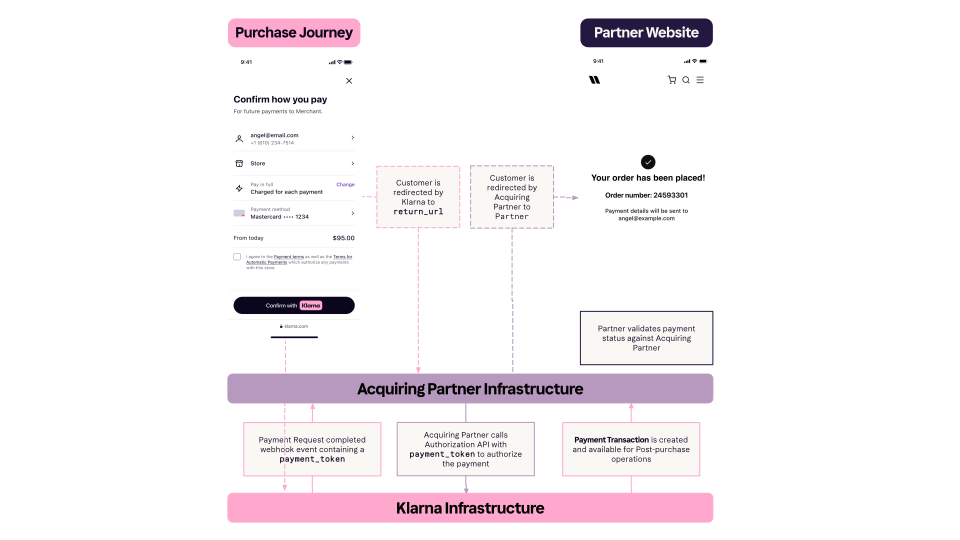
This step is required only if the purchase was part of the payment authorization process. You can ignore this step for pure tokenization flows.
Final authorization functions the same across all integration methods. If it has already been implemented—for example, with a server-only integration for one-time payments—it can be reused without modification.
Integration details
Call Payment Authorize API with klarna_network_session_token
The acquiring partner must use the klarna_network_session_token to perform a second call to Klarna's Payment Authorize API .
.
Request parameters
Sample Request
The klarna_network_session_token must be passed in the Klarna-Network-Session-Token HTTP header.
curl https://api-global.test.klarna.com/v2/accounts/{partner_account_id}/payment/authorize \
-H 'Authorization: Basic <API key>' \
-H 'Content-Type: application/json' \
-H 'Klarna-Network-Session-Token: krn:payment:eu1:klarna-network-session-token:...' \
-d '{
      "currency": "USD",
      "request_payment_transaction": {
        "amount": 11800,
        "payment_transaction_reference": "acquiring-partner-transaction-reference-1234"
      }
    }'
Handling Klarna's response
Upon successful authorization, the response body includes the payment_transaction_id, which you'll use for payment transaction management actions.
- The endpoint is idempotent, so repeated requests with the same token return the same result, ensuring safe retries.
Response parameters
Sample response
{
  "payment_transaction_response": {
    "result": "APPROVED",
    "payment_transaction": {
      "payment_transaction_id": "krn:payment:eu1:transaction:6debe89e-98c0-[...]",
      "payment_transaction_reference": "acquiring-partner-transaction-reference-1234",
      "amount": 11800,
      "currency": "USD",
      "payment_funding": {...},
      "payment_pricing": {...},
      "expires_at": "2025-10-30T19:26:02.772Z"
}API & SDK references