
Token creation - Build the payment form
Learn how to seamlessly integrate Klarna into your payment process using our SDK for a seamless, high-conversion checkout. This guide covers everything from SDK setup to custom payment form creation.
Integration Overview
This guide explains how to provide dynamic Klarna assets to Partners using Klarna’s Presentation API, enabling them to create their own payment selector in line with Klarna’s best practices.
Below is a step-by-step overview for supporting dynamic payment method listing:
- 1.Accept
interoperability_tokenandinteroperability_datain requests. - 2.Call Klarna’s Payment Presentation API
 to fetch the most up-to-date Klarna content.
 - 3.Include Klarna-specific display instructions and assets (labels, icons, etc.) in the API response sent to Partners.
Example of the payment selector built by a Partner when the Acquiring Partner enables this support:
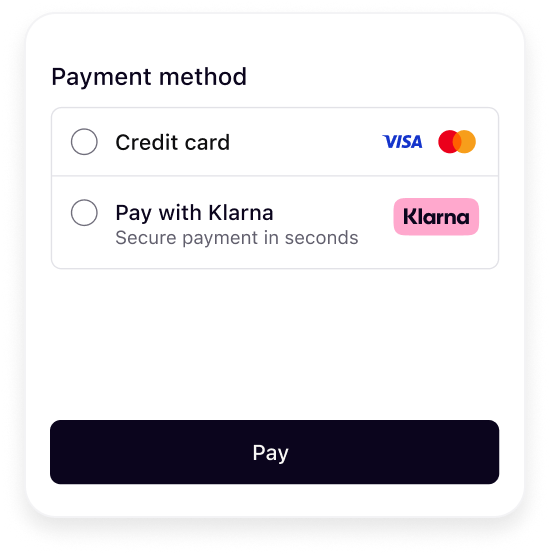 | 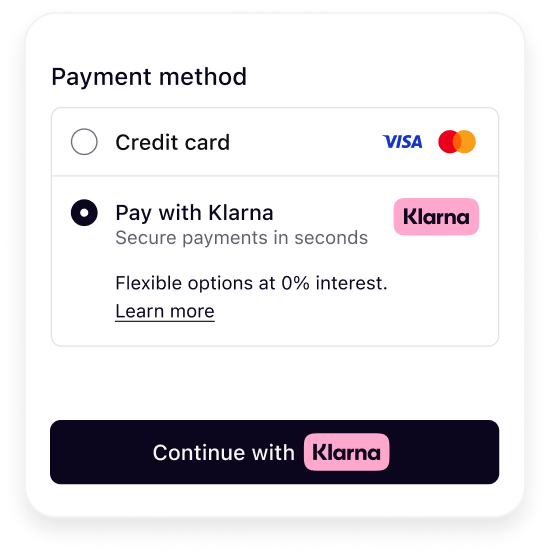 |
| Initial presentation | When Klarna is selected |
This step only applies to Acquiring Partners that have APIs that allow Partners to retrieve available payment methods. It is identical to the server-side only integration for one-time payments.
Integration details
Accept Klarna Network data points
klarna_network_session_token- Encodes Klarna session context, such as payment option preselection, prequalification results, or payment approval
- May be present on the initial authorization request
- Required when finalizing authorization after a step-up flow
klarna_network_data- Encodes additional Klarna Network context supplied by the Partner, including supplementary purchase data
- Must not be parsed, enriched, or transformed
Below is an example of how Acquiring Partners can accept the Klarna Network parameters in their Partner-facing APIs.
{
  "currency": "USD",
  "amount": 17800,
  "payment_method_options": {
    "klarna": {
      "klarna_network_session_token": "eyJhbGciOiJ...",
      "klarna_network_data": "{\"content_type\":\"application/vnd.klarna.interoperability-data.v2+json\",\"content\":{\"payment_request\":{...}}}"
    }
  }
}
Requirements
- Accept the Klarna Network parameters in the Partner-facing APIs.
- Use the field names
klarna_network_session_token/klarna_network_data, ensuring that it’s easy for any Partner to identify and use. - Validation should be implemented, but it must not be more restrictive than what is specified in Klarna’s Payment Authorize API.
- All printable UTF-8 characters must be supported
- Forward the Klarna Network parameters unmodified to Klarna.
Call the Payment Presentation API
curl -G https://api-global.test.klarna.com/v2/accounts/{partner_account_id}/payment/presentation \
  -H 'Authorization: Basic <API key>' \
  -H 'Content-Type: application/json' \
  -H 'Klarna-Network-Session-Token: eyJhbGciOiJIU...' \
  --data-urlencode 'locale=en-US' \
  --data-urlencode 'currency=USD' \
  --data-urlencode 'intents[]=SUBSCRIBE'
Return Klarna presentation data to the Partner
Your API response (e.g., for Get Payment Methods) should include the Klarna assets returned in the response from the Payment Presentation API, so your Partner can render the payment method correctly.
You have two options:
- 1.Map individual fields: Extract and structure the response from Klarna’s Payment Presentation API and map relevant keys (e.g.,
descriptor,payment_button) into your API response format. - 2.Serialize the entire response: Alternatively, you may populate a single field—
klarna_payment_presentation_data—with a serialized version (e.g., JSON string) of the full response obtained from Klarna’s Payment Presentation API. This avoids the need to map each field individually.
{
  "payment_methods": [{
    "name": "VISA",
    "type": "scheme"
  }, {
    "name": "Pay with Klarna",
    "type": "klarna",
    "klarna_payment_presentation_data": "{\"instruction\":\"SHOW_KLARNA\",...}"
  }]
}
You may structure the response to fit your API format, but ensure that the Klarna presentation data is clearly identifiable. Use a field name like:
klarna_payment_presentation_data- or
payment_presentation_data(when used specifically for Klarna) This makes it easy for Partner integrations to parse and use Klarna presentation data dynamically.
Related articles