
Token creation - Authorize the payment
Integration overview
Steps for token creation only or for token creation with purchase:
- 1.The Partner sends a request to the Acquiring Partner containing
interoperability_tokenandinteroperability_datafor:- 1.1.Token creation only (Use cases: On-demand without a purchase, Subscription with free trial)
- 1.2.Token creation with purchase (Use cases: On-demand with initial purchase, Subscription without free trial, Mixed payments)
- 2.The Acquiring Partner forwards the required payment context data to Klarna’s Payment Authorization API including:
- 2.1.
supplementary_purchase_data- 2.1.1.
ondemand_serviceor - 2.1.2.
subscriptionand/or - 2.1.3.
line_items[]if a purchase is involved
- 2.2.
step_up_config - 2.3.
request_customer_token - 2.4.if purchase is involved:
request_payment_transaction
- 3.Klarna returns one of the following responses:
- 3.1.STEP_UP_REQUIRED – The customer has to authenticate for the token creation and, if applicable, for the payment. Either return the Klarna
payment_request_idorpayment_request_urlto the Partner. - 3.2.APPROVED – Successful creation of the customer token and, if applicable, the payment transaction.
- 3.3.DECLINED – Token creation and payment authorization is declined.
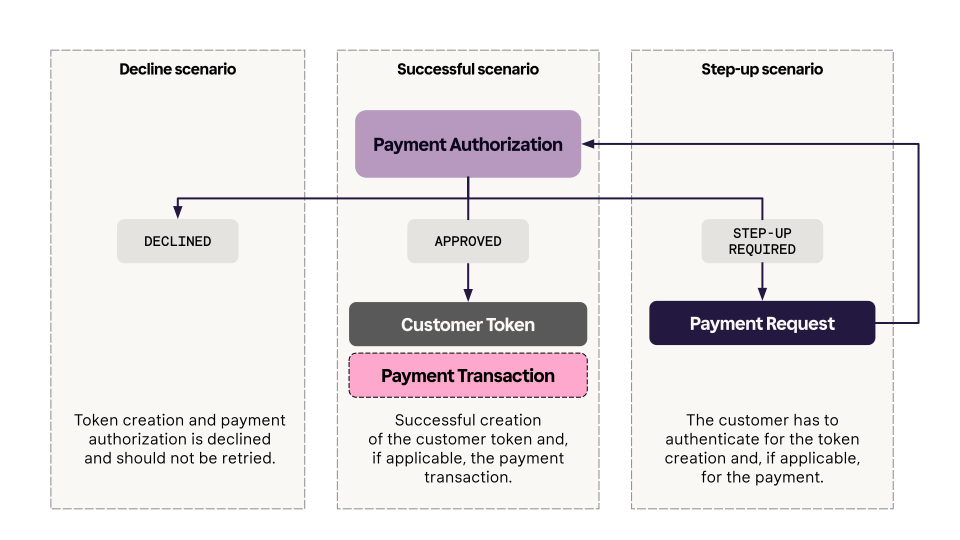
Integration details
Step 1: Gather and forward payment context data
Before calling Klarna’s Payment Authorization API, the Acquiring Partner must ensure their backend accept and forward Klarna specific parameters. These include interoperability parameters that preserve session context as well as supplementary purchase data which improves Klarna’s ability to assess risk, optimize approval rates, and deliver a more personalized checkout experience.
Interoperability parameters
When Partners optimize their integration with Klarna, they are likely to have interoperability parameters to share with the Acquiring Partner.
| Parameter | Purpose |
|---|---|
interoperability_token | Encodes Klarna-specific session context (e.g., preselected payment option, pre-qualification results). |
interoperability_data | Submit supplementary purchase data directly to Klarna |
These ensure consistent customer and transaction context throughout the payment flow and must be forwarded unaltered to Klarna.

Implementation requirements
- Accept the interoperability parameters in the Partner-facing payment request API.
- Forward the interoperability parameters unmodified to Klarna’s Payment Authorization API.
- Validation can and should be implemented, but it must not be more restrictive than what is specified in Klarna’s Payment Authorize API
 . Make sure that all special characters permitted by the API specification are accepted.
The Partner-facing field should be named either klarna_interoperability_token/klarna_interoperability_data or interoperability_token/interoperability_data in a Klarna-specific context, ensuring that it’s easy for any Partner to identify and use.
The Acquiring Partner can validate the input based on the provided guidelines but must not modify it. The input must always be forwarded as received, without any interference.
Sample request
Below an example of how Acquiring Partners can accept the interoperability parameters in their Payment request API endpoint.
{
  "currency": "USD",
  "amount": 17800,
  "payment_method_options": {
    "klarna": {
      "interoperability_token": "eyJhbGciOiJ...",
      "interoperability_data": "{\"content_type\":\"application/vnd.klarna.interoperability-data.v2+json\",\"content\":{\"payment_request\":{...}}}"
    }
  }
}
Tokenization Specific Supplementary Purchase Data
Step 2: Call Klarna’s Payment Authorization API
Customer token scopes
To support tokenized payments, Acquiring Partners must include additional parameters when calling the Authorization API. Klarna then generates a customer token, which authorizes future payments on behalf of the customer. Each customer token is issued with specific scopes that define the permitted actions and level of access for subsequent transactions.
| Scope | Definition | Use cases |
|---|---|---|
payment:customer_present | Enables tokenization of the customer for subsequent on-demand charges. Depending on risk assessment and the initially selected payment method, charges might go through immediately as a one-click experience or, in certain cases, require a step-up. | *On-demand with initial purchase *On-demand without purchase |
payment:customer_not_present | Enables tokenization of the customer for subsequent subscription charges. It allows the Partners to initiate tokens charges without requiring a step-up flow since the customer is not present during the transaction. | *Subscription with free trial *Subscription without free trial |
Creating a token with multiple token scopes will be supported in the future.
Choosing the correct token scope is crucial for ensuring successful payments and maximizing conversion:
payment:customer_present: choose this token scope for payments where the customer is actively present in the payment flow and can authenticate if required, so it's not suitable for subscription charges.payment:customer_not_present: choose this token scope for payments where the customer is not present in the payment flow. While this scope could also work for a customer present payment, there may be limitations in the payment options Klarna can offer under this scope.
Note that the request_payment_transaction is only required in case of token creation with purchase.
Token creation only
{
  "currency": "USD",
  "supplementary_purchase_data": {
      "subscriptions": [{
        "subscription_reference": "MONTHLY PLAN",
        "name": "9.99 for spotify",
        "free_trial": "ACTIVE",
        "billing_plans": [{
            "billing_amount": 999,
            "currency": "USD",
            "from": "2025-08-01",
"interval": "MONTH",Token creation with purchase
{
  "currency": "USD",
  "supplementary_purchase_data": {
      "subscriptions": [{
        "subscription_reference": "PREMIUM_INDIVIDUAL",
        "name": "9.99 for spotify",
        "free_trial": "INACTIVE",
        "billing_plans": [{
            "billing_amount": 999,
            "currency": "USD",
            "from": "2025-08-01",
"interval": "MONTH",Step 3: Handle Payment Authorize API response
The Payment Authorize API response for the payment_transaction_response and for the customer_transaction response can yield 3 different results:
| Result | Description |
|---|---|
STEP_UP_REQUIRED | The customer has to authenticate for the token creation and, if applicable, for the payment. Read more about how to handle the Step-up Scenario. |
APPROVED | Successful creation of the customer token and, if applicable, the payment transaction. |
DECLINED | Token creation and if applicable, the payment authorization are declined. |
Step-up scenario
When the customer has to authenticate for the token creation, and optionally also for the purchase completion, the Step-up scenario will be triggered and the Acquiring Partner will receive a STEP_UP_REQUIRED result.
In such scenario, the Payment Authorization API returns a Payment Request in the response. The expectation is that the customer will go through Klarna’s Purchase Journey to authenticate for the token creation and, if required, to complete the purchase. The required steps to properly make the step-up scenario work is outlined in the next section.
The following parameters are present in the response to the request.
Token creation with purchase -Sample response - STEP_UP_REQUIRED
{
  "payment_transaction_response": {
    "result": "STEP_UP_REQUIRED"
  },
  "customer_token_response": {
    "result": "STEP_UP_REQUIRED"
  },
  "payment_request": {
    "payment_request_id": "krn:payment:eu1:request:552603c0-fe8b-4ab1-aacb-41d55fafbdb4",
    "payment_request_reference": "acquiring-partner-request-reference-1234",
    "amount": 11800,
"currency": "USD",Token creation without purchase -Sample response - STEP_UP_REQUIRED
{
  "customer_token_response": {
    "result": "STEP_UP_REQUIRED"
  },
  "payment_request": {
    "payment_request_id": "krn:payment:eu1:request:552603c0-fe8b-4ab1-aacb-41d55fafbdb4",
    "payment_request_reference": "acquiring-partner-request-reference-1234",
    "amount": 11800,
    "currency": "USD",
    "state": "SUBMITTED",
    "expires_at": "2025-01-02T13:00:00Z",
"created_at": "2025-01-01T12:00:00Z",In case your systems cannot support a pattern where there is no consumer interaction at the initialization of the session, it is possible to force the Step-up flow. This can be achieved by adding the mode = REQUIRED to the step_up_config object.
The mode = REQUIRED will be available in a future release.
Approved Payment Transaction
When the token creation is successful, a customer_token is created on the Klarna Network. Optionally, if a purchase is completed, a payment_transaction_id is created too. No further customer interactions are needed and the Acquiring Partner can directly inform their partners that the payment session is completed and that the customer can be redirected to the confirmation page.
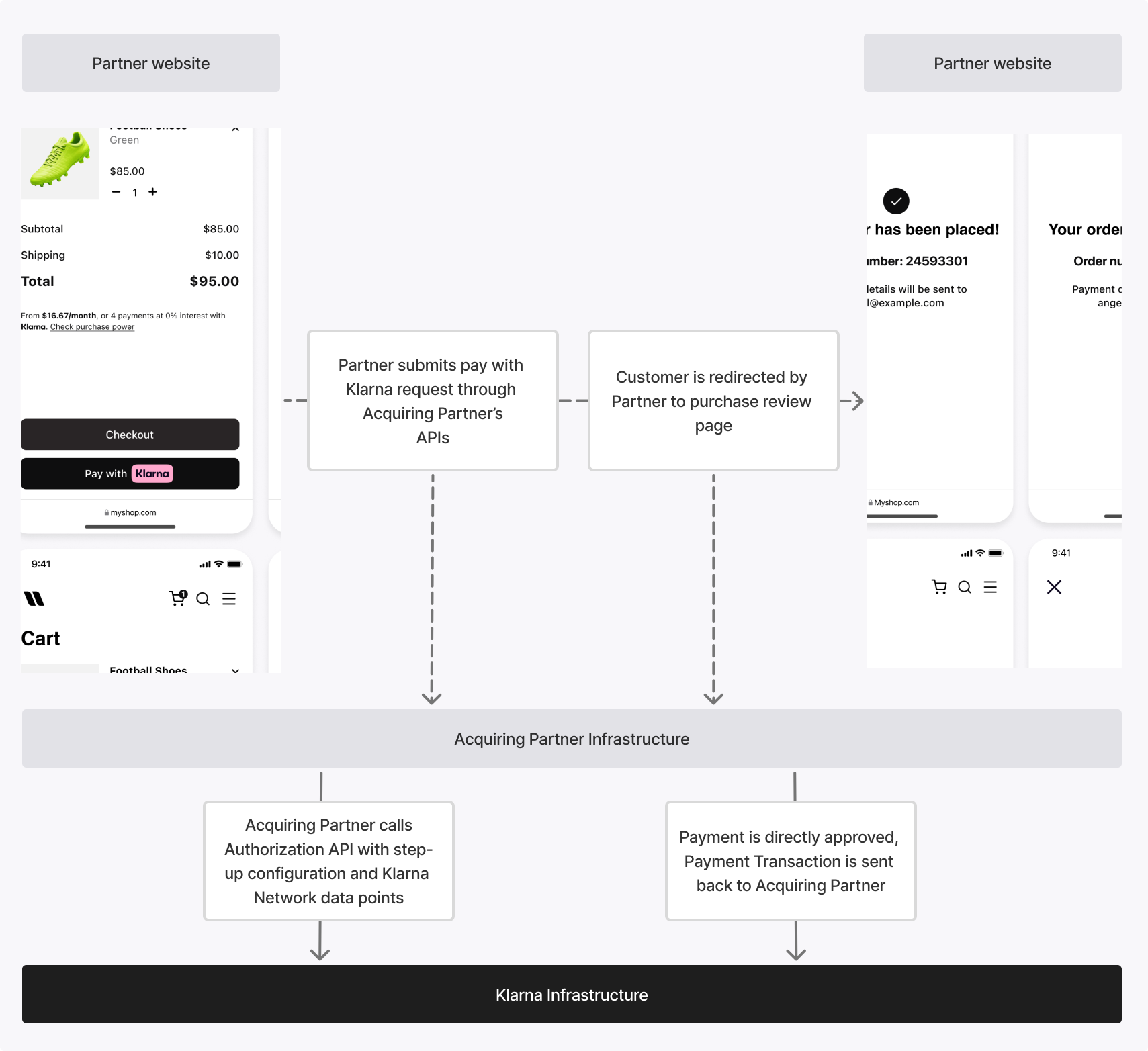
Acquiring Partners must share the Klarna customer_token or issue their own token equivalent and share it with their Partners to enable them to perform future token charges. Acquiring Partners must also store the Klarna payment_transaction_id for future operations on the transaction through the Payment Transactions API, such as capture and refund. The Acquiring Partner will receive the following parameters in the response.
Sample response - APPROVED
{
  "customer_token_response": {
    "result": "APPROVED",
    "customer_token": "krn:customer-token:123"
  }
}
Sample response - APPROVED
{
  "payment_transaction_response": {
    "result": "APPROVED",
    "payment_transaction": {
      "payment_transaction_id": "krn:payment:eu1:transaction:6debe89e-98c0-[...]",
      "payment_transaction_reference": "acquiring-partner-transaction-reference-1234",
      "amount": 11800,
      "currency": "USD",
      "payment_funding": {...},
      "payment_pricing": {...}
    }
},Declined authorization
If a token creation request, optionally with a purchase, could not be approved by Klarna and the step-up scenario cannot be triggered (due to missing configuration or a permanent decline), the Acquiring Partner will receive a DECLINED result. Declines should not be replayed without a change of context. The Acquiring Partner should inform the Partner that the token creation, and the transaction if applicable, could not be completed.
Sample response - DECLINED
{
  "customer_token_response": {
    "result": "DECLINED"
  }
}
Sample response - DECLINED
{
  "payment_transaction_response": {
    "result": "DECLINED"
  },
  "customer_token_response": {
    "result": "DECLINED"
  }
}
Mixed responses
When creating a token with a purchase, it’s possible—though rare—for the payment transaction and customer token results to differ. The list below summarizes each scenario and the appropriate next steps:
APPROVED(transaction),STEP_UP_REQUIRED(token): Registerpayment_transaction_id, then direct the customer to the step-up flow to complete token authentication.STEP_UP_REQUIRED(transaction),APPROVED(token): Registercustomer_token, then direct the customer to the step-up flow to complete the purchase.APPROVED(transaction),DECLINED(token): Retrievepayment_transaction_id; token creation failed—notify the partner to inform the transaction.DECLINED(transaction),APPROVED(token): Retrieve and savecustomer_tokenfor future use; purchase failed—notify the partner to inform the customer. May use thecustomer_tokento reattempt the charge on the background if customer_not_present scope was requested.
Related articles
API & SDK references