

Data storage
Overview of Salesforce for Klarna payment setup, including data on session IDs, client tokens, subscription details, order parameters, and fraud status for secure transactions.
10 min read
System Object Extensions
Basket
| Parameter name | Attribute ID | Description |
|---|---|---|
| Klarna Session ID | kpSessionId | The Klarna session ID returned after "Create Session" API endpoint is called (Applicable from version 21.2.0) |
| Klarna Client Token | kpClientToken | Client token returned by "Create Session" API endpoint and used to initialize the JS SDK (Applicable from version 21.2.0) |
| Klarna Client Token Frequency | kpSubscriptionFrequency | Subscription frequency values (day, month, etc.) |
| Klarna Subscription Period | kpSubscriptionPeriod | Predefined subscription period in numbers |
| Klarna Is Express Checkout | kpIsExpressCheckout | Determines if the basket is an express checkout |
| Klarna Session ID | kpSessionId | The Klarna session ID returned after "Create Session" API endpoint is called (Applicable from version 21.2.0) |
Order
| Parameter name | Attribtute ID | Description |
|---|---|---|
| Klarna Payments Order ID | kpOrderID | The Klarna Payments Order ID for Klarna payment method selected by customer |
| VCN Brand | kpVCNBrand | Klarna Payments virtual card scheme name |
| VCN Holder | kpVCNHolder | Klarna Payments virtual card holder name |
| VCN Card ID | kpVCNCardID | Klarna Payments Virtual Card - Card ID |
| VCN PCI Data | kpVCNPCIData | Klarna Payments Virtual Card PCI Data in encrypted format |
| VCN Initialization Vector | kpVCNIV | Klarna Payments Virtual Card Initialization Vector |
| VCN AES Key | kpVCNAESKey | Klarna Payments Virtual Card AES Key |
| Is VCN Used | kpIsVCN | True if virtual card is enabled and used for payment of the order, otherwise false |
| Klarna Session ID | kpSessionId | The Klarna session ID returned after "Create Session" API endpoint is called (Applicable from version 21.2.0) |
| Klarna Client Token | kpClientToken | Client token returned by "Create Session" API endpoint and used to initialize the JS SDK (Applicable from version 21.2.0) |
| Klarna Subscription Frequency | kpSubscriptionFrequency | Subscription frequency values (day, month, etc.) |
| Klarna Subscription Period | kpSubscriptionPeriod | Predefined subscription period in numbers |
Order Payment Instrument
| Parameter name | Attribute ID | Description |
|---|---|---|
| Klarna Payment Category ID | klarnaPaymentCategoryID | ID of Klarna payment category |
| Klarna Payment Category Name | klarnaPaymentCategoryName | Name of Klarna payment category |
Payment Transaction
| Parameter name | Attribute ID | Description |
|---|---|---|
| Fraud Status | kpFraudStatus | Klarna Payments order fraud status |
| Klarna Authorization Token | kpAuthorizationToken | This attribute stores the Klarna authorization token, which is a string value used to authenticate and finalize the order creation process with Klarna's payment system. (Applicable from version 23.2.0) |
| Klarna Redirect URL | kpRedirectURL | This attribute holds the URL to which the customer is redirected after the payment authorization is successfully completed by Klarna's system. (Applicable from version 23.2.0) |
Site preferences
| Parameter name | Attribute ID | Description |
|---|---|---|
| Enable Klarna Payments | kp_ | Enable/Disable Klarna Payments.Boolean attribute with Default value as true |
| Color Customization | kpColorCustomization | JSON attribute to customize color |
| Enable Extra Merchant Data | kpEMD | Enable this option to include customer_ and other_ as attachments when creating an order. Boolean with default value false. |
| VCN - Enable settlement retry | kpVCNRetry | When set to "Yes", SFCC will automatically retry the VCN settlement in the event of a service error. Boolean with default value false |
| Log Extra debug data | kpLogExtraData | Attribute to log debug data.Boolean with default value true |
| Merchant Reference 2 | merchant_ | Enter the attribute from the SCC order (basket) object that you would like to forward as an additional merchant reference to Klarna. This attribute must be a class attribute of the SCC LineItemCtnr. String attribute |
| Agent username for subscriptions | kpSubsUsername | |
| Agent password for subscriptions | kpSubsPassword | Agent password to login on behalf of customers to create subscription orders. Password Attribute |
| Enable retry for subscriptions | kpSubsRetryEnable | Boolean with default value false |
| Number of Retries | kpSubsRetryNumber | Number attribute |
| Recurring retry frequency | kpSubsRetryFrequency | Number attribute |
| Parameter name | Attribute ID | Description |
|---|---|---|
| Enable Express Checkout | kec_ | Boolean flag to enable/disable Express Checkout |
| Theme | kec_ | The theme of the button. Options include default, light and dark |
| Button Shape | kec_ | The shape of the button. Options include default, rect and pill |
| Placement | kec_ | Multi-select attribute to choose where to display express checkout buttons. Values: cart, PDP, mini cart |
| Parameter name | Attribute ID | Description |
|---|---|---|
| Enable On-Site Messaging | osm_ | Enable/Disable On-Site Messaging functionality |
| Theme | osm_ | Theme for on site messaging .Options include default,dark and custom |
| Placement | osm_ | Multi-select dropdown which includes cart, pdp, header, footer and info. Placement Tag IDs are hardcoded in code. |
| Custom styling | osm_ | JSON to store custom styling |
| Parameter name | Attribute ID | Description |
|---|---|---|
| Enable Sign-in with Klarna | siwk_ | Boolean flag to enable/disable Klarna SIWK |
| Scope | siwk_ | Multi Selection list of available scopes that can be requested |
| Redirect URL | siwk_ | Login redirect url |
| Button theme | siwk_ | The theme of the button. Options include default, light and dark |
| Button Shape | siwk_ | The shape of the button. Options include default, rect and pill |
| Logo alignment | siwk_ | Klarna logo alignment. Options include badge, left and center |
| Placement | siwk_ | Multiselect attribute to choose where to display SIWK buttons. Values: login and checkout |
Product parameters for Klarna subscriptions
| Parameter name | Attribute ID | Description |
|---|---|---|
| Is Klarna Standard Product | kpIsStandardProduct | Boolean attribute to define if the product is standard. |
| Is Klarna Subscription Product | kpIsSubscriptionProduct | Boolean attribute to define if the product is eligible for subscription. |
| Klarna Trial Days Usage | kpTrialDaysUsage | Numeric value used for free trial definition. |
ProductLineItem
| Parameter name | Attribute ID | Description |
|---|---|---|
| Is Selected for Subscription product | kpSubscription | Boolean attribute to define if the product is selected for subscription in the basket. |
| Enriched data for product line item. | klarna_ | String data for product line item. |
Profile
| Parameter name | Attribute ID | Description |
|---|---|---|
| Klarna Subscriptions | kpSubscriptions | Text attribute to store customer subscriptions to Klarna |
Klarna activation
KlarnaActivation custom object gives an opportunity to configure multiple MIDs per site. Merchants could have different credentials, clientIDs and VCN keys per country or group of countries. It has a similar structure to the Klarna Activation Site preferences group. Klarna Activation Key is the unique key for each Klarna Activation CO entry. It should be defined by the merchant and could have any unique string value.
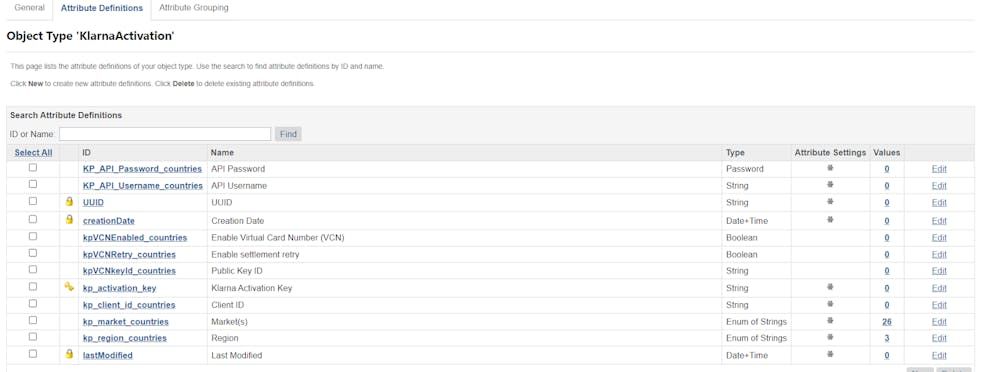
Klarna activation attributes
| Parameter name | Attribute ID | Description |
|---|---|---|
| Klarna Activation Key | kp_ | Unique identifier for a single KlarnaActivation entry. It is a free text entered by the merchant. |
| Region | kp_ | Klarna regions (Europe, North America, Oceania) |
| Market(s) | kp_ | Klarna available countries |
| Client ID | kp_ | Client ID generated in Klarna Partner Portal |
| API Username | KP_ | API username generated in Klarna Partner Portal |
| API Password | KP_ | API password generated in Klarna Partner Portal |
| Enable Virtual Card Number (VCN) | kpVCNEnabled_ | Flag to enable virtual card number for selected countries. This will override the globally selected in Klarna Payments. |
| Public Key ID | kpVCNkeyId_ | Countries specific public key for VCN |
| Enable settlement retry | kpVCNRetry_ | Flag to enable settlement retry for selected countries. This will override the globally selected in Klarna Payments. |
Session attributes and cookies
The following session custom attributes are saved in session.privacy storage and accessible in checkout. The attributes are retained for the session lifetime and cleared when the customer logs out of their profile.
| Attribute | Description |
|---|---|
KlarnaLocale | The Klarna locale in use |
KlarnaPaymentsSessionID (Not included as session attributes from version 21.2.0) | The Klarna session ID returned after "Create Session" API endpoint is called |
KlarnaPaymentsClientToken (Not included as session attribute from version 21.2.0) | Client token returned by "Create Session" API endpoint and used to initialize the JS SDK |
KlarnaPaymentMethods | The available payment method categories for the respective Klarna session; saved in JSON format |
KlarnaPaymentsAuthorizationToken | The authorization token returned by JS SDK "Authorize" call |
KPAuthInfo | Whether finalization is required for the payment method; returned by JS SDK "Authorize" call; saved in JSON format |
KlarnaExpressCategory | The KEB payment category; currently applicable for US and defaults to "pay_over_time" |
KlarnaPaymentsRedirectURL | The URL to redirect the customer to after placing the order; returned by the "Create Order" API call |
'kpActive_ | Flag to indicate if Klarna is enabled for current site country |
'kpActivationSource_ | Klarna activation source per country: Custom Object or Site Preferences; empty for old Klarna countries config |
'kpActivationKey_ | Klarna activation key in case of Custom Object usage |
The following cookies are being set by the Klarna cartridge integration:
| Cookie name | Description |
|---|---|
selectedKlarnaPaymentCategory | The selected payment method on checkout (for example, "pay_later") |
Library
In addition to the configurations, the following two library assets will be added:
- footer-about: An updated Out-of-the-Box (OOTB) asset that includes a link to the Klarna On-Site Messaging dedicated page in the footer.
- klarna-email-info: An asset containing links to review Klarna Payment information, which is used in the confirmation email sent to customers.
Services
An HTTP service,
klarna., has been added with the klarna. profile.Service credentials deprecation notices
- **Deprecation Notice for Version 24.4.0: **Service credentials and the
KlarnaCountriescustom object have been deprecated as of version 24.4.0. Please use the Klarna Activation Site Preferences or the Klarna Activation custom object to enter API credentials. - **Replication Guidance for Version 21.2.0: **Prior to version 21.2.0, the
KlarnaCountriescustom object was replicable. To avoid issues with service credentials during replication, merchants should use the same service credential name across staging, development, and production environments.
For more details on updating the KlarnaCountries definition in your instances, please review Section Update KlarnaCountries Definition.
Klarna Sign In Service
klarna.http.signIn with klarna.http.signIn profile and klarna.signin.credentials credentials. URL is populated dynamically for Activation configuration. For deprecated Klarna Countries setup service credentials URL should be updated on production.
Logs
The integration includes the following types of logs:
- Service Communication Logs: These logs start with
service-klarna-***and contain every request and response to the Klarna endpoints. Personal information, such as emails and names required for the Klarna API calls, is masked in these logs. - Custom Errors and Debug Info: Depending on the case, custom errors and debug information are logged under
customerror-***,custodebug-***, andcustominfo-***files.
Availability
Cartridge functionality is dependent on the availability of the Klarna API service. The current operational status of Klarna can be viewed at Klarna Status.
Merchant support
For reporting core SFCC functionality issues in the Klarna cartridge technical integration, please contact: commercecloud@klarna.com.
For production issues related to Klarna API availability, merchant representatives should reach out to their Klarna Account Manager after reviewing the current operational status at Klarna Status.
Pre-requisite information to provide when reporting an incident:
- Merchant's affected MID or market
- Impact and examples of customer orders (order_id or Klarna session_id if available)
- Screenshots, timeframe, and any additional information as required
This information helps speed up the investigation and resolution process.
Jump to section...