This page contains sample data you can use for testing your integration in the Klarna playground environment.
25 min read
Use the sample customer data in this page to test the standard approved and denied payment flows in Klarna payments.
If you want to test non-standard flows, such as pending payments or presenting only pre-paid payment methods, see the Other test scenarios section in this page.
If you want to test different payment methods, direct debit, credit card, and bank transfer, use the data in our sample data.
About user account
To make a purchase new customers in most countries go through an account creation wizard, provide their personal data, and enter a verification code to create their Klarna user account.
To test a new Klarna user account, select a combination of a random phone number and an email matching the required pattern. If the combination was used during sign-up before, you'll be logged into an existing account after providing a one-time password (one-time password). In the playground environment, you can use any valid 6-digit number other than 999999 as the one-time password.
One user account is only valid in a single market. For example, you can't use the same email address or phone number to test purchases in a playground store in Germany and Sweden.
User account is available in all countries included in the sample customer data list.
Synthetic PII substitution
If you choose to create a new account rather than using one of the provided sample customer accounts on this page, any Personally Identifiable Information (PII) will be substituted with synthetically generated data. Consequently, you may notice different account values from those you provided. This helps us prevent data leaks in our playground environment.
Sample customer data
Use the sample data for private persons to test B2C transactions. The company test data can be used for testing B2B transactions.
If you're testing a B2B transaction with Billie, please refer to Billie's sample data for guidance.
The B2C sample data in this article is split into two sub-categories:
Standard flows shows the data for testing standard responses approved and denied transactions.
Custom flows shows the data for testing flows other than the standard approved and denied transactions, for example launching a dispute.
Below is a list of email addresses associated with standard and custom test flows.
Standard flows
Email address pattern
Description
customer+**@klarna.com
Accept purchase. Message: "None, auth_token (valid 60 minutes) is returned for use in create_order"
customer+**+denied@klarna.com
Hard decline. Message: "Your purchase can not be accepted Unfortunately your purchase can not be accepted at this moment. Please choose a different payment method to complete your purchase."
Custom flows
Email address pattern
Description
customer+**+new_user@klarna.com
New customer sign up flow. Payment method specific details (for example, cards) are stored to the customer. New user flow can also be tested with any new email address and phone number.
As we're constantly improving the testing experience, you may not able to test the denied payment flow in some markets, for example, Sweden and Norway. Please contact Klarna merchant support for more information.
All Countries
Select a country to view the sample data you can use to test Klarna.
One-time password (Random 6 digits different from 999999)
123456
123456
123456
Mexico
Private person
Flow Mexico
Email address
Phone number
Approved
customer+mx@klarna.com
+525593747739
Denied
customer+mx+denied@klarna.com
+525593747740
New customer sign up
customer+mx+new_user@klarna.com
+525593747767
Field Mexico
Approved
Denied
Other flows
First name
Test
Person-mx
John
Last name
Person-mx
Test
Test
Address
Test Street 13
Test Street 13
Test Street 13
Zip code
03000
03000
06000
City
Benito Juárez
Benito Juárez
Ciudad de México
State
CDMX
CDMX
CMX
Country
MX
MX
MX
Date of birth (DD-MM-YYYY)
10-07-1970
10-07-1970
01-01-2000
One-time password (Random 6 digits different from 999999)
123456
123456
123456
United States of America
Private person
Flow
Email address
Phone number
Approved
customer+us@klarna.com
+13106683312
Denied
customer+us+denied@klarna.com
+13106354386
New customer sign up
customer+us+new_user@klarna.com
+13105550134
ID Scan
customer+us+denied+auth_id_scan@klarna.com
+13105550124
Bank Authentication Bank authentication flow starts after clicking Pay With Klarna. Select Demo Bank, and Test Transportweg USA as login method. User ID and Password: test
One-time password (Random 6 digits different from 999999)
123456
123456
123456
Asia and Oceania
Australia
Private person
Flow
Email address
Phone number
Approved
customer+au@klarna.com
+61473752244
Denied
customer+au+denied@klarna.com
+61473763254
New customer sign up
customer+au+new_user@klarna.com
+61491574119
ID Scan
customer+au+denied+auth_id_scan@klarna.com
+61491574127
Field
Approved
Denied
Other flows
First name
Test
John
John
Last name
Person-au
snow
Test
Address
Test Street 13
Test Street 13
Test Street 13
Zip code
4877
2128
2000
City
Port Douglas
Silverwater
Sydney
State
QLD
NSW
NSW
Country
AU
AU
AU
Date of birth (DD-MM-YYYY)
10-07-1970
03-05-1994
01-01-2000
One-time password (Random 6 digits different from 999999)
123456
123456
123456
New Zealand
Private person
Flow
Email address
Phone number
Approved
customer+nz@klarna.com
+6427555290
Denied
customer+nz+denied@klarna.com
+642993007712
New customer sign up
customer+nz+new_user@klarna.com
+642862276121
ID Scan
customer+nz+denied+auth_id_scan@klarna.com
+642862276142
Field
Approved
Denied
Other flows
First name
Test
Test
John
Last name
Person-nz
Person-nz
Test
Address
Test Street 13
Test Street 13
Test Street 13
Zip code
6011
6011
6011
City
Auckland
Wellington
Wellington
Country
NZ
NZ
NZ
Date of birth (DD-MM-YYYY)
10-07-1970
10-07-1970
01-01-2000
One-time password (Random 6 digits different from 999999)
123456
123456
123456
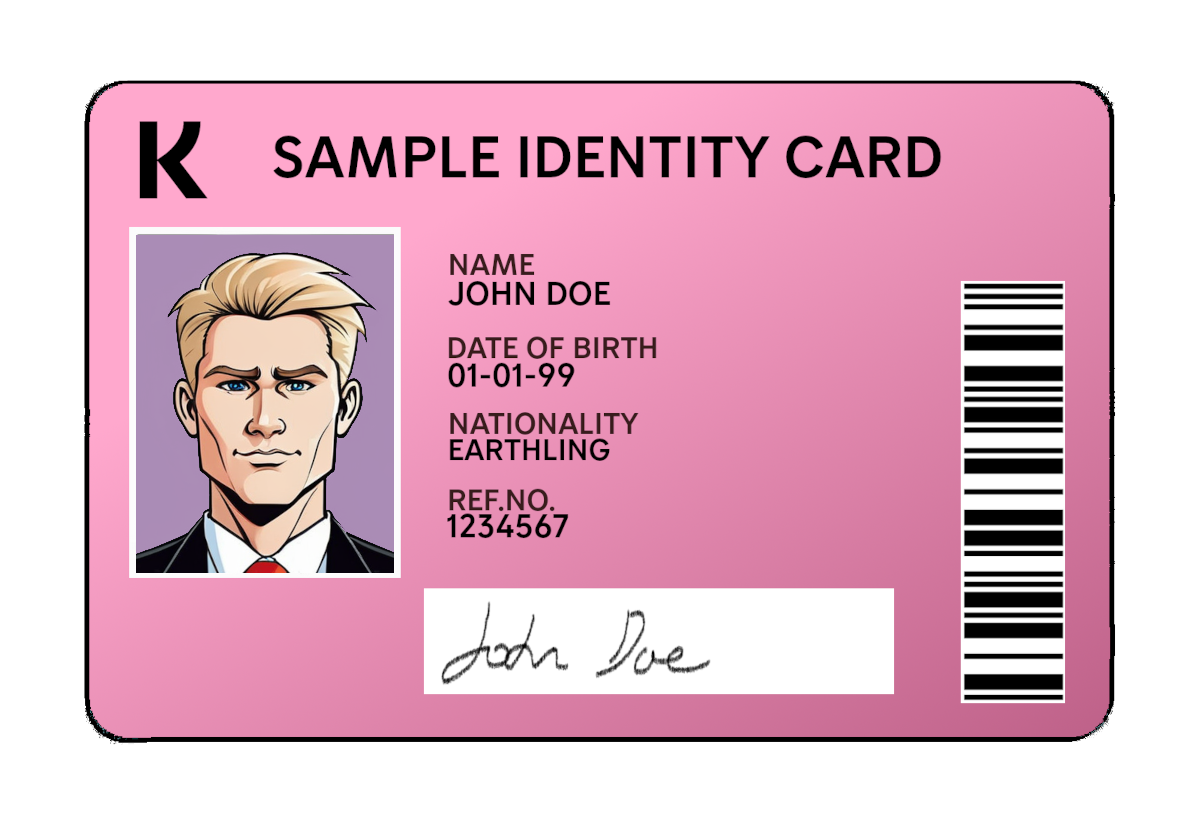
Test ID Card
You can test the ID scan flow with this mock national ID card. Use the same image as both front and back of the card for all markets.
Mock national ID card
Other test scenarios
The sample customer data lets you test the basic approve and deny transaction flows. However, you can also test some other Payments scenarios by adding suffixes to sample usernames.
In the examples below, the email address reflects sample customer data for the United States. Make sure to adjust the address to match the country in which your store operates.
To launch a Payments widget, include a sample email address in your API call. You can modify the address to display the sign-up widget or delay the payment.
To launch a Checkout widget, include a sample email address in your API call.
Scenario
Customer email address pattern
Example
Applies to
New customer signup
username+require_signup@domain\.com
customer+require_signup@example.us
Payments
Returning customer
username@domain\.com
customer+us@klarna\.com
Payments
Don't show form (only when pre-screen is enabled)
username+red@domain\.com
customer+us+red@klarna\.com
Payments
Pending payment
status is the expected status after the time delay, either accept to accept a payment or reject to reject a payment
time delay is the time delay, in minutes, before the decision is made and the status is confirmed. The value must be a two-digit number in the range of 00-99. Note: Only works for US and UK.
username+pend-[status]-[time delay]@domain\.com status = accept/reject time delay = 00-99 minutes Only works for US/UK